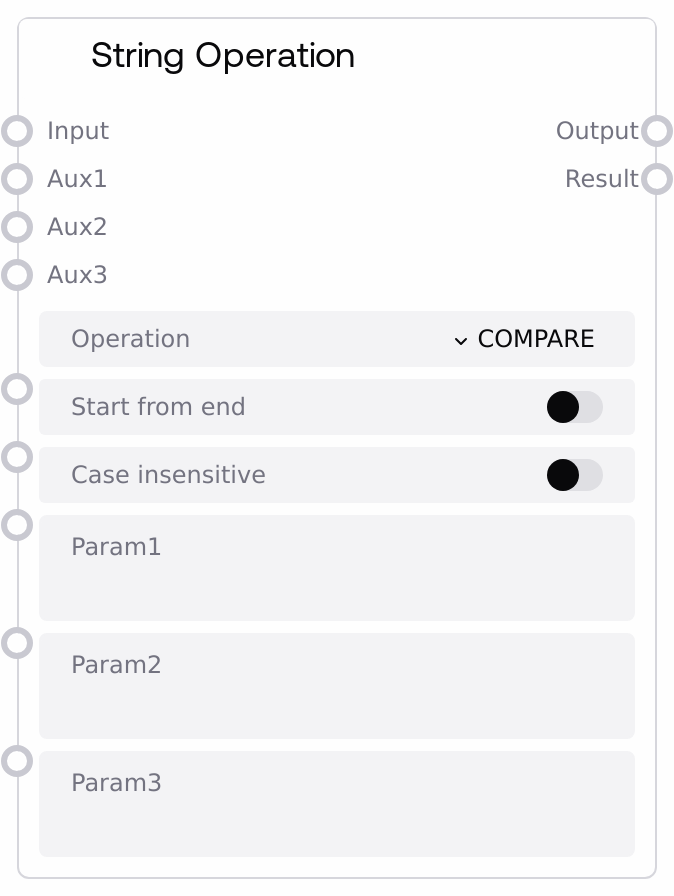
String Operation
This node applies a selected operation to a string or list of strings, enabling searching, slicing, splitting, joining, replacing, case transformations, counting, and random or repeated generation. It accepts one primary input plus up to three auxiliary inputs or parameters whose meaning depends on the chosen operation. The node returns the transformed value as `output` and a secondary `result` that typically indicates success, counts, indexes, or lengths.
Usage
Use this node whenever you need to transform or analyze text or lists of text within a Salt workflow. Typical scenarios include cleaning or normalizing text (UPPERCASE, LOWERCASE, PROPERCASE, STRIP, TRIM_SPACES, REPLACE), parsing and segmenting content (SPLIT, SPLIT_LINES, SLICE, GET_LINE, TO_LIST), searching or checking conditions (FIND, STARTS_WITH, ENDS_WITH, COUNT, IS_ALPHA, IS_NUMERIC), and constructing or randomizing sequences (CONCATENATE, JOIN, GENERATE, RANDOM_INPUT, RANDOM_ELEMENT, REVERSE, LENGTH, TO_STRING). Upstream nodes often provide raw text from prompt builders, HTTP responses, or file readers, or lists of strings from previous SPLIT/TO_LIST steps or batch loaders. Downstream, you typically feed output into language model nodes, condition/routing nodes such as SaltStringConditions, or other utility nodes, while using result for control-flow checks (for example, whether FIND returned a valid index) or for metrics (lengths, counts). Configure operation first, then set aux1, aux2, aux3 or the literal string parameters param1, param2, param3. When a param is non-empty it overrides its corresponding aux, which is helpful for constants. Use start_from_end when you need operations to work from the end (for example last occurrence in FIND, reversed concatenation) and case_insensitive when you want case-insensitive matching for supported operations.
| Field | Required | Type | Description | Example |
|---|
| input | True | WILDCARD | Primary value to process. Usually a string, but some operations expect or support lists (for example RANDOM_ELEMENT, JOIN, TO_LIST, PROPERCASE on lists). SPLIT and SPLIT_LINES require a string and will raise an error if given a list. For most string-type operations the node converts this to a string internally; for list-specific logic it iterates over list elements. | String: "Hello John,\nYour order #12345 has shipped." or List: ["alpha", "beta", "gamma"] |
| operation | True | ENUM | The operation to apply to the input value. Supported values: "COMPARE", "CONCATENATE", "COUNT", "ENDS_WITH", "EXTRACT_BETWEEN", "FIND", "GENERATE", "GET_LINE", "IS_ALPHA", "IS_NUMERIC", "JOIN", "LENGTH", "LOWERCASE", "PROPERCASE", "REPLACE", "RANDOM_INPUT", "RANDOM_ELEMENT", "REVERSE", "SLICE", "SPLIT", "SPLIT_LINES", "STARTS_WITH", "STRIP", "TO_LIST", "TO_STRING", "TRIM_SPACES", "UPPERCASE". Some names listed (such as "COMPARE" and "EXTRACT_BETWEEN") are not implemented in the current processing logic and effectively do nothing meaningful. | operation: "FIND" to search a substring, or operation: "SPLIT_LINES" to split a multiline string into a list of lines. |
| start_from_end | True | BOOLEAN | When true, many operations conceptually work from the end instead of the beginning. Examples: FIND uses a reverse search on strings when start_from_end is true, CONCATENATE can prepend auxiliary values instead of appending, TO_LIST may invert input before converting, GET_LINE can pick elements counting from the end of a list, SPLIT adjusts the separator for reversed processing, and after processing the final expression may be reversed back. Some operations explicitly reset this flag to false once they have applied their own adjustments. | start_from_end: true to find the last occurrence of "ERROR" in a long log string. |
| case_insensitive | True | BOOLEAN | If true, operations that involve comparisons or searching ignore letter case. This affects STARTS_WITH, ENDS_WITH, FIND, REPLACE, and STRIP/TRIM_SPACES (which then strip both lowercase and uppercase variants of the specified characters). For operations that do not rely on character content comparisons, this flag has no effect. | case_insensitive: true so that searching for "error" will also match "ERROR" and "Error". |
| aux1 | False | WILDCARD | First auxiliary input. Its role depends on the selected operation. Examples: for FIND, STARTS_WITH, ENDS_WITH, and COUNT it is the substring or element to look for; for SPLIT and JOIN it acts as the separator; for GENERATE it is the repetition count (must be a positive integer); for GET_LINE it is the line index (1-based for strings, numeric index for lists); for SLICE it is the slice start index; for RANDOM_ELEMENT a truthy aux1 means pop the chosen element from the list instead of just returning it. If `param1` is a non-empty string, it overrides aux1. | For operation "FIND" on "Customer: John Doe", aux1: "John"; for operation "GENERATE" to duplicate the string three times, aux1: 3. |
| aux2 | False | WILDCARD | Second auxiliary input. Its purpose varies by operation. For REPLACE it is the replacement string; for JOIN or GENERATE it can be used as a separator inserted between repetitions or list items; for FIND it may serve as the starting index of the search; for SLICE it is used as the end index in the slice. If `param2` is a non-empty string, it overrides aux2. | For operation "REPLACE" to change "error" to "warning", aux1: "error", aux2: "warning". |
| aux3 | False | WILDCARD | Third auxiliary input. For REPLACE it is interpreted as a maximum replacement count (0 or None implies no limit); for SLICE it can be cast to an integer step value; for FIND it may act as the end index for the search. If `param3` is a non-empty string, it overrides aux3. | For operation "REPLACE" to change only the first occurrence, aux1: "error", aux2: "warning", aux3: 1. |
| param1 | False | STRING | String parameter that, when non-empty, overrides aux1. Useful when you want to hardcode a constant string or numeric value without connecting another node. The node converts it to the correct type (for example integer for GENERATE, GET_LINE, or SLICE) where needed. | param1: "," to indicate a comma separator for SPLIT, or param1: "3" to repeat input three times for GENERATE. |
| param2 | False | STRING | String parameter that, when non-empty, overrides aux2. Typical uses include a replacement string for REPLACE, a join separator for JOIN, or numeric string values that will be cast to integers in operations that require them. | param2: " \| " for JOIN to merge a list like ["A", "B", "C"] into "A \| B \| C". |
| param3 | False | STRING | String parameter that, when non-empty, overrides aux3. Often used where aux3 is expected to be numeric (for example as the max number of replacements in REPLACE or as the slice step in SLICE). The node will cast this value to an integer if the operation requires it. | param3: "2" for SLICE to take every second character or list item. |
Outputs
| Field | Type | Description | Example |
|---|
| output | WILDCARD | Primary processed value after applying the chosen operation. The type depends on both the original input and the operation: often a string, but it can be a list for operations like SPLIT, SPLIT_LINES, TO_LIST, GENERATE with list inputs, or RANDOM_ELEMENT when returning or popping from a list. For transformations such as REPLACE, UPPERCASE, LOWERCASE, PROPERCASE, STRIP, TRIM_SPACES, REVERSE, SLICE, and JOIN, it returns the modified string or list. | If input is "Error: disk full" and operation is "REPLACE" with aux1: "Error" and aux2: "Warning", output becomes "Warning: disk full". For input "a\nb\nc" with operation "SPLIT_LINES", output is ["a", "b", "c"]. |
| result | WILDCARD | Secondary result summary of the operation. It can be a boolean (success or failure for JOIN, GENERATE, GET_LINE, IS_NUMERIC, IS_ALPHA, UPPERCASE, LOWERCASE, PROPERCASE), an integer (for example length for LENGTH or SLICE, count for COUNT, index from FIND, random index for RANDOM_INPUT and RANDOM_ELEMENT), a list of integers (indexes per list element when FIND runs over a list), or False when an error occurs. The exact semantics vary by operation. | For operation "FIND" searching for "error" in a log string, result might be 152 (the character index). For operation "SPLIT" on a comma, result might be 5 (number of segments). For operation "IS_NUMERIC" on "123.45", result is true. |
Important Notes
- Performance: REPLACE with case_insensitive set to true and FIND on very large strings or lists rely on regex or repeated scans and can be relatively expensive; prefer using them once on a batch of data rather than inside many small iterations.
- Limitations: SPLIT and SPLIT_LINES will raise an exception if
input is a list; RANDOM_ELEMENT will raise an exception if input is not a list. Ensure you provide the correct type for the chosen operation.
- Behavior: When param1, param2, or param3 are non-empty, they override aux1, aux2, and aux3 respectively. If both are provided, the param values take precedence, which can cause unexpected behavior if you forget that a default param string is set.
- Behavior: Some operations modify list inputs in place. In particular, RANDOM_ELEMENT can pop (remove) the selected element from the original list when aux1 is truthy. Be careful if the same list is reused elsewhere in your workflow.
- Behavior: The start_from_end flag can trigger internal reversals before and or after processing. Some operations reset it to false after use, so you should not assume that the output is still reversed unless that is explicitly part of the operation (such as REVERSE).
- Limitations: Certain operations listed in the operation dropdown, such as COMPARE and EXTRACT_BETWEEN, are not implemented in the current code path; selecting them will not carry out the described behavior and may simply leave output similar to the input.
Troubleshooting
- Common Error 1: Message similar to "The RANDOM_ELEMENT operation expects a List for Input!". This happens when operation is RANDOM_ELEMENT but input is a string or other non-list. Provide a list (possibly from SPLIT or TO_LIST) or use RANDOM_INPUT if you only have separate scalar values.
- Common Error 2: Message similar to "Input cannot be successfully converted to a string!". The node attempted to cast input to string and failed. Ensure that input is a string or a list of simple values (numbers, strings) and avoid complex or custom objects.
- Common Error 3: Messages like "Aux1 must be a positive number for the GENERATE operation!" or errors on GET_LINE. These appear when aux1 (or param1 overriding it) cannot be parsed as a positive integer. Check that you provide a numeric value greater than zero and that the param is not an empty or non-numeric string.
- Common Error 4: Messages like "The input cannot be a List for the SPLIT operation!" or "The input cannot be a List for the SPLIT_LINES operation!". These indicate that input is a list where a string is required. Convert or adjust upstream nodes to provide a single string to this operation.
- Common Issue: result is False, 0, or -1 unexpectedly. Many internal exceptions are caught and logged, with result set to a fallback value. Check the node logs (using unique_id) and verify that aux1, aux2, aux3 or param1, param2, param3 are of the expected type (for example integers where required) and that case_insensitive and start_from_end are set appropriately.