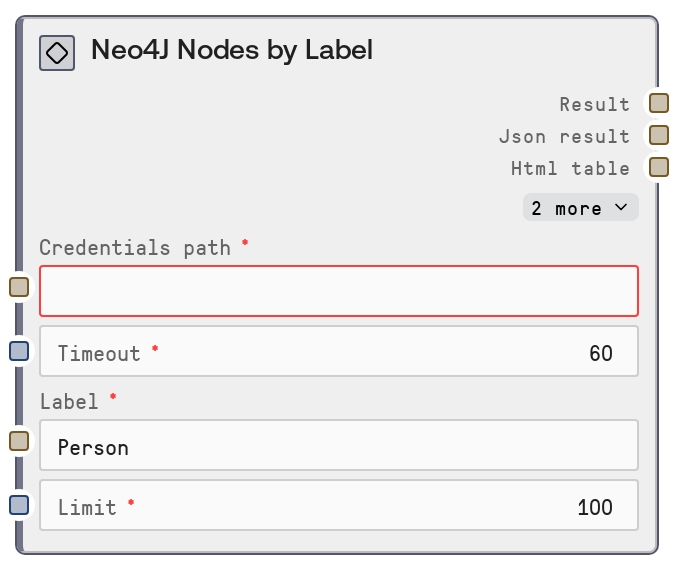
Neo4J Nodes by Label
This node queries a Neo4J database for nodes that have a specified label (for example Person or Product) and returns a bounded set of matching nodes. It uses stored Neo4J credentials and a backend service endpoint to perform the request, then formats both a human-readable summary and a JSON string. It is useful for quickly exploring or sampling subsets of graph data based on a single label.
Usage
Use this node when you want to retrieve entities of a particular type from a Neo4J graph, such as all Person nodes or a sample of Order nodes. In a typical workflow, you first configure and validate your connection with a credentials file and the Neo4J Test Connection node, optionally discover available labels via the Neo4J Node Labels node, and then pass a chosen label into this node to fetch actual node instances. Place it upstream of nodes that parse or transform JSON, build prompt context, or visualize graph data, such as a JSON processing node, a summarization node, or Neo4J Graph Explorer. It is especially helpful for building dashboards filtered by entity type, providing context to language models about a specific class of nodes, or inspecting the contents of a label during development and debugging. For large databases, tune the limit input to balance completeness with performance, and combine this node with Neo4J Query or Neo4J Relationships by Type for more complex graph exploration.
| Field | Required | Type | Description | Example |
|---|
| credentials_path | True | STRING | Path to the Neo4J credentials file that follows the neo4j credential template. The file must contain the necessary connection details, such as URI and authentication information, and must be readable by the Salt environment. If the path is wrong or the file is malformed, the node will not be able to connect to the database. | /project/secrets/neo4j_prod_credentials.json |
| timeout | True | INT | Maximum time in seconds to wait for the backend Neo4J service call before it is treated as failed. Use larger values for slow or remote databases and smaller ones for highly responsive pipelines. The value should be a positive integer; too small a value can cause otherwise valid queries to fail due to network latency. | 30 |
| label | True | STRING | The Neo4J node label to filter by. Only nodes that have this label will be returned. Labels are case-sensitive, so the input must exactly match how the label is defined in the database schema. This field expects a single label name, not a list of labels or a Cypher expression. | Person |
| limit | True | INT | Maximum number of nodes to return. Must be an integer between 1 and 10000 inclusive. Higher values may increase query time and memory usage because more records and a larger JSON payload must be processed. Use a lower limit for quick inspection or sampling, and only raise it when you genuinely need more results. | 100 |
Outputs
| Field | Type | Description | Example |
|---|
| text | STRING | Human-readable summary of the operation and result, suitable for logs or UI display. Typically indicates which label was queried and how many nodes were returned, possibly with a small preview of example properties. | Neo4J Nodes by Label: Person Returned 100 nodes with label 'Person'. Example node: {"name": "Alice", "age": 34, "city": "Berlin"}. |
| json | STRING | JSON-formatted string containing the raw results from the nodes-by-label request. Usually this includes a list of nodes, each with an internal id, labels, and properties. Downstream nodes can parse this string into structured data for analysis, transformation, or further graph operations. | {"nodes": [{"id": 123, "labels": ["Person"], "properties": {"name": "Alice", "age": 34}}, {"id": 124, "labels": ["Person"], "properties": {"name": "Bob", "age": 29}}], "label": "Person", "limit": 100} |
| aux_1 | STRING | Auxiliary output channel kept for compatibility with other database nodes. In most standard workflows this is an empty string and can be ignored unless a custom integration explicitly uses it. | |
| aux_2 | STRING | Second auxiliary output string, generally unused. Present to maintain a consistent output signature across related nodes, allowing flexible extension without breaking existing flows. | |
| aux_3 | STRING | Third auxiliary output string, also typically unused. Can be reserved for future metadata or alternative encodings of the result if needed by advanced integrations. | |
Important Notes
- Performance: The limit value directly affects performance and memory usage. Querying large labels with a high limit near 10000 can generate large responses and slow down the pipeline, so start with modest limits and increase only as needed.
- Limitations: This node only filters by a single label and does not support arbitrary Cypher conditions, property filters, or multi-label queries. For complex filtering or joins, use the Neo4J Query node instead.
- Behavior: Labels are case-sensitive and must match the database schema exactly. If the label is misspelled or has different capitalization, the node will typically return an empty result set without an obvious error.
- Behavior: Credentials are loaded from credentials_path at runtime. Updating the credentials file will affect subsequent executions, but invalid paths, incorrect formats, or revoked credentials will cause the underlying request to fail.
- Performance: Network latency and database server load can cause long response times. If you frequently encounter slow responses, consider raising the timeout slightly and reducing limit, and ensure the Neo4J instance is adequately provisioned.
Troubleshooting
- No nodes returned but label exists: When the result set is empty even though you know nodes exist, first verify the exact spelling and capitalization of the label. Use the Neo4J Node Labels node to list labels and copy the one you need.
- Connection or authentication failures: Errors indicating that the service cannot connect or authenticate usually stem from an incorrect credentials_path or outdated credentials content. Confirm the file path, ensure it uses the neo4j template, and validate connectivity with the Neo4J Test Connection node.
- Timeout errors: If the node reports a timeout, either the limit is too high for the current database load, or the timeout value is too low. Try lowering limit, increasing timeout, and checking for network issues or high load on the Neo4J instance.
- Downstream JSON parse errors: If a following node fails to parse the JSON output, confirm that you are wiring the json output field, not the text summary. Also check that the downstream node expects a JSON string and, if necessary, insert a JSON parsing or transformation node before further processing.