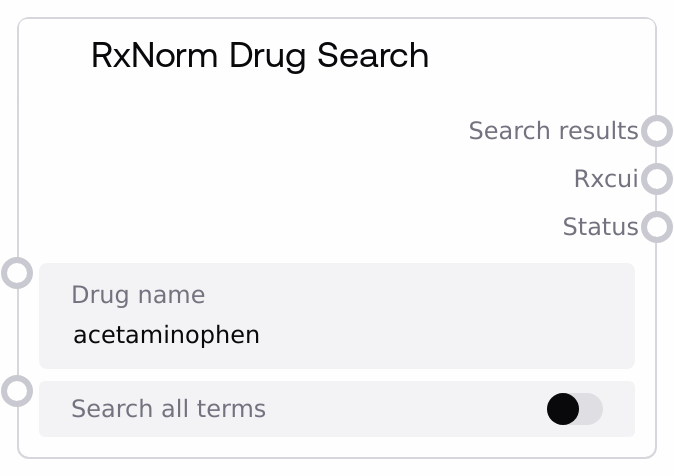
RxNorm Drug Search
This node queries the RxNorm service for drug concepts matching a given drug name. It returns a formatted JSON string of the full search response, a JSON-encoded list of RxCUI identifiers, and a human-readable status message. You can control whether the search considers all term types or only active terms, making it suitable for both broad lookups and clinically focused searches.
Usage
Use this node whenever you need to translate a free-text drug name into RxNorm identifiers (RxCUIs) as the entry point to RxNorm-based workflows. Typical usage is: (1) provide a drug name such as a generic or brand name, (2) optionally enable searching across all term types, and (3) feed the returned RxCUIs into downstream nodes for detailed concept info, related concepts, or interaction/relationship exploration. It commonly appears early in a pipeline, upstream from nodes like SaltAIRxNormConceptInfo (for detailed concept metadata), SaltAIRxNormRelatedConcepts (to expand to related drugs or formulations), SaltAIRxNormApproximateMatch (if you need fuzzy matching for misspelled names), or SaltAIRxNormDrugInteractions (for relationship/interaction-style queries). For best results, use clear, canonical drug names (for example, "metformin", "warfarin", "lisinopril 10 mg") and handle the case where no RxCUI is returned (empty list) in your workflow logic. The node is well-suited for EHR data normalization, medication list cleanup, and building drug selection interfaces that rely on a standard vocabulary.
| Field | Required | Type | Description | Example |
|---|
| drug_name | True | STRING | The human-readable drug name to search in RxNorm. This may be a generic name, brand name, or a simple description containing strength or form. Leading and trailing whitespace is ignored, but the string cannot be empty after trimming. Very ambiguous or non-standard text may return no results. | acetaminophen 500 mg tablet |
| search_all_terms | True | BOOLEAN | Whether to search across all RxNorm term types instead of just active or primary terms. When true, results may include retired concepts or non-standard variants; when false, results are typically more clinically focused and concise. | False |
Outputs
| Field | Type | Description | Example |
|---|
| search_results | STRING | A pretty-printed JSON string containing the full RxNorm search response, wrapped with the original query parameters. Structure: an object with keys like search_term, search_all_terms, and results (the raw RxNorm idGroup and related fields). This is useful for inspection, debugging, or feeding into custom downstream parsing logic. | {"search_term":"acetaminophen","search_all_terms":false,"results":{"idGroup":{"name":"acetaminophen","rxnormId":["161"]}}} |
| rxcui | STRING | A JSON-encoded list of RxNorm concept identifiers (RxCUIs) extracted from the search results (idGroup.rxnormId). This is the primary machine-consumable output for chaining into other RxNorm nodes. If no identifiers are found or an error occurs, this may be an empty JSON array string ("[]"). | ["161","198440"] |
| status | STRING | A short status message describing the outcome of the search, such as success, API errors, or input validation issues. Use this to drive user messaging or conditional logic in your workflow. | Successfully searched for 'acetaminophen' in RxNorm |
Important Notes
- Performance: Each execution makes a live request through the RxNorm API wrapper; in high-volume pipelines, limit repeated identical lookups or cache results upstream to reduce latency and external calls.
- Limitations: The node depends on RxNorm string search behavior; ambiguous, very generic, or misspelled drug names may return no RxCUIs or unexpected matches. It does not perform fuzzy matching beyond what the underlying API supports.
- Behavior: If drug_name is empty or only whitespace, the node immediately returns "{}" for search_results, "[]" for rxcui, and an error status without calling the API.
- Behavior: When the RxNorm service reports an error (for example, connectivity or API issues), the node embeds the error details in search_results and returns "[]" as rxcui with a status prefixed by "API Error:"; downstream nodes must handle the absence of RxCUIs.
- Integration: The rxcui output is a JSON string, not a parsed list; many downstream Salt nodes expect a string input of this form, but if you write custom logic you may need to parse it into an array first.
Troubleshooting
- Empty drug name error: If status is "Error: Drug name cannot be empty" and rxcui is "[]", ensure you are passing a non-empty, trimmed string from upstream nodes or user input and that any text preprocessing does not remove the entire value.
- No RxCUI returned: When rxcui is "[]" but status indicates success, the search completed but RxNorm found no matching identifiers. Try simplifying the drug_name (for example, remove extraneous free-text notes) or enable search_all_terms to broaden the search.
- API Error status: If status begins with "API Error:" and search_results contains an "error" field, there was a problem calling the RxNorm service (network, rate limit, or service outage). Retry later, check your network configuration, or implement fallback logic.
- Downstream parsing issues: If a custom node or script fails when consuming rxcui, verify you are treating it as a JSON-encoded list of strings, not as a single scalar; parse it first if you need to iterate over identifiers.