Storage Delete
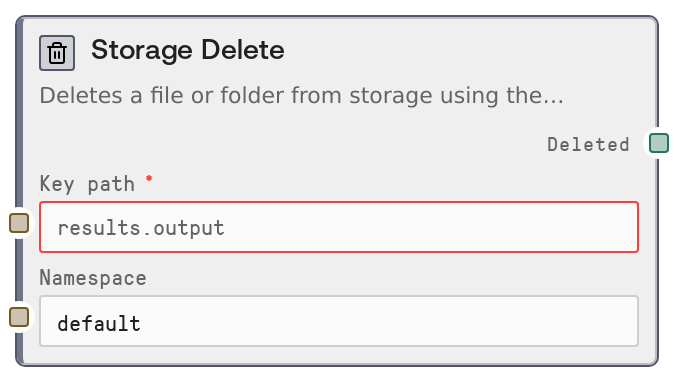
Usage
Use Storage Delete when you need to clean up or manage data that was previously written to persistent storage across runs. Common scenarios include removing temporary checkpoints or intermediate artifacts after a workflow completes, invalidating outdated cached results before recomputing them, or enforcing retention policies by deleting old data.
Typical position in a workflow: an upstream node such as SaltStorageWrite or another task node has stored data under a known key path and namespace. You then pass those same values into Storage Delete once the data is no longer needed. Downstream, you can use the deleted boolean with control-flow or logging nodes to record what was cleaned up or to branch when a key was missing.
Storage Delete works best as part of a family of storage nodes (SaltStorageWrite, SaltStorageRead, SaltStorageListUrl). Together they support full lifecycle patterns: write data, read and use it, optionally list or inspect keys, then delete when finished. Always ensure that key_path and namespace exactly match the original write and that the workflow runs in an authenticated Salt context so the salt_user_id is available.
Inputs
| Field | Required | Type | Description | Example |
|---|---|---|---|---|
| key_path | True | STRING | The exact storage key path to delete within a namespace. This must match the key that was originally written, including any dot separators and character casing. The value is validated as a storage key before execution; malformed keys will cause a validation error. If the key is valid but does not exist, the node will succeed but the output deleted will be false. | experiments/run_2024_09_01/checkpoints/final_model |
| namespace | False | STRING | The logical namespace from which to delete the key. Namespaces separate a user’s storage into areas such as default, staging, or prod. The value is trimmed of whitespace; if blank after trimming, it falls back to default. It must match the namespace that was used when the key was stored or the key will not be found. | default |
Outputs
| Field | Type | Description | Example |
|---|---|---|---|
| deleted | BOOLEAN | True if a key matching the given key_path and namespace existed for the current user and was successfully deleted; false if no such key was found and therefore nothing was removed. Downstream nodes can rely on this flag for conditional branching, reporting, or to implement safe, repeatable cleanup steps. | True |
Important Notes
- Performance: The node performs a single-key delete operation via the storage backend, which is typically fast. However, backend latency and network conditions still apply, so avoid very large loops that delete thousands of keys one by one without considering overall workflow time.
- Limitations: The node only operates in the context of the current authenticated user. If salt_user_id is not present, it will raise an error and no deletion occurs. It cannot delete data belonging to other users.
- Behavior: If the key does not exist, the node does not fail. Instead, it returns deleted = false. This makes it safe to use for idempotent cleanup where you may call it multiple times with the same key.
- Behavior: The namespace value is stripped of whitespace; if it becomes empty, the node uses default as the namespace. Inconsistent use of namespaces between write and delete operations is a common cause of deleted = false.
- Limitations: Deletion is permanent at the storage layer from this node’s perspective; there is no built-in recovery. If you need the ability to roll back, implement your own archival or versioning strategy instead of directly deleting critical data.
Troubleshooting
- Common Error 1: "ValueError: User ID is not available in this context." — The node is running without a valid salt_user_id. Ensure that the workflow is invoked in a regular Salt environment with user authentication, and avoid stripping user context in custom integrations or test harnesses.
- Common Error 2: Validation failure on key_path (for example, reported as an invalid storage key) — The key path does not meet storage key format rules, often due to disallowed characters or leading/trailing whitespace. Normalize the key to a clean, dot- or slash-separated string such as results.output or experiments/run_1/output.json.
- Common Issue 3: The deleted output is always false even though you expect the key to be removed — This usually indicates a mismatch in key_path or namespace compared to the original write. Double-check spelling, casing, and namespace, and if needed, inspect existing keys using a listing node like SaltStorageListUrl.
- Common Issue 4: Other parts of the system still appear to see the deleted data — Frequently this is due to caching in external systems or earlier steps in the workflow holding references. Make sure consumers read fresh data from storage after deletion and clear or bypass any caches that might still serve old content.