Table Read JSON
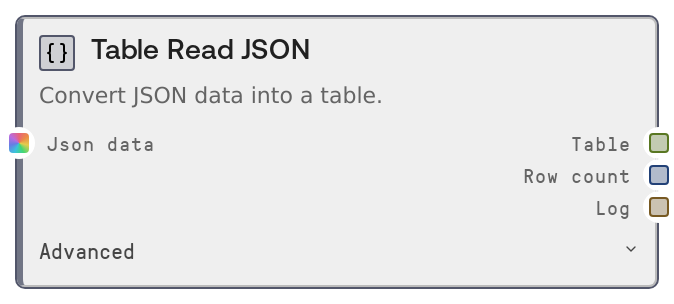
This node parses JSON data and converts it into a TABLE, handling both row-oriented lists of objects and column-oriented dicts. It can also navigate into nested JSON structures using a dot-separated records_path before tabularizing the data. It returns the resulting table, the row count, and a human-readable parse summary.
Usage
Use this node when you need to turn JSON data into a structured table for analysis, filtering, joining, or charting in Salt. Common scenarios include converting API responses like [{"id":1,"name":"Alice"},{"id":2,"name":"Bob"}] into a table, reading nested JSON payloads where the records live under keys like data.results, or reshaping columnar JSON such as {"date":["2024-01-01","2024-01-02"],"value":[10.5,12.3]} into tabular form. Place this node early in your workflow, right after nodes that fetch or produce JSON (for example HTTP/API request nodes, file importers, or custom script outputs). Downstream, connect it to table-processing nodes like SaltTableFilter, SaltTableSort, SaltTableSelectColumns, SaltTableJoin, SaltTableGroupBy, SaltTableInfo, or to visualization/export nodes such as SaltChart, SaltDisplayTable, SaltTableToJSON, SaltTableToCSV, and SaltTableOutput. When dealing with nested JSON, use records_path to point directly to the array or object of interest (for example data.items or payload.results) instead of manually preprocessing the JSON.
| Field | Required | Type | Description | Example |
|---|
| json_data | True | WILDCARD | The JSON content to parse. Can be a JSON string, a list of objects, or a dict. If a string is provided, it must be valid JSON. Supported shapes include: (1) list of objects (row format) such as [{"id":1,"name":"Alice"}], (2) dict of arrays (columnar format) such as {"id":[1,2],"name":["Alice","Bob"]}, (3) a single object such as {"id":1,"name":"Alice"}, or (4) nested structures that contain one of these under a key path. Other types at the target location, such as plain strings or lists of scalars, will cause an error. | [{"id":1,"name":"Alice","score":92.5},{"id":2,"name":"Bob","score":87.0}] |
| records_path | False | STRING | Optional dot-separated path to the array, object, or columnar dict that should be turned into a table when working with nested JSON. Each segment must be a key in a nested dict; the node will step through these keys before parsing. For example, if the JSON looks like {"data":{"results":[{"id":1},{"id":2}]}}, set records_path to data.results. Leave empty to parse the root value directly. | data.results |
Outputs
| Field | Type | Description | Example |
|---|
| table | TABLE | The resulting table built from the JSON data. Columns correspond to JSON object keys; rows correspond to items in the selected array or records. A single object produces a one-row table; a columnar dict produces columns from its keys and rows from list positions. | A TABLE with columns ["id","name","score"], 2 rows: (1,"Alice",92.5) and (2,"Bob",87.0), and metadata such as {"source":"JSON Read","created_at":"2024-06-01T10:23:45.123456"}. |
| row_count | INT | The number of rows in the parsed table, useful for quick validation, conditional branching, or logging in downstream steps. | 250 |
| log | STRING | A human-readable summary of the parse operation, including how many rows and columns were produced, or noting when the input array was empty. | Parsed JSON: 2 rows, 3 columns |
Important Notes
- Performance: The entire JSON structure at the target location is loaded into memory and converted via a DataFrame. Very large arrays can be slow or memory-intensive; prefer paging or filtering data upstream when working with large APIs or files.
- Limitations: After applying records_path, the value must be a list or dict suitable for tabular conversion (list of dicts, columnar dict, or single dict). Lists of scalars, heterogeneous nested lists, or unsupported shapes will cause a ValueError.
- Behavior: If the JSON at the target location is an empty list, the node returns an empty table with 0 rows and a log message like "Parsed JSON: 0 rows (empty array)" instead of failing.
- Behavior: When given a dict where all values are lists, it is interpreted as columnar data and converted with keys as columns and list positions as rows; otherwise a dict is treated as a single record, producing a one-row table.
- Error Handling: If any key in records_path does not exist at a given level, the node raises a ValueError that identifies the missing key and lists the available keys at that level, making it easier to correct the path.
Troubleshooting
- Invalid JSON string: If json_data is a malformed JSON string, parsing will fail with a JSON error. Validate the string upstream, remove trailing characters, or ensure the source returns well-formed JSON before passing it to this node.
- records_path key not found: An error like "records_path 'data.results': key 'results' not found" indicates the path does not match the JSON structure. Inspect a sample of the JSON, verify the nesting, and adjust records_path (for example change data.results to data.items).
- Unexpected type error: If you see an error similar to "Expected JSON array or object, got str" (or another type name), the value at the root or at records_path is not a list or dict. Confirm that you are pointing to the actual records container and not to a scalar field like a status string or message.
- Empty output table: If the node returns a table with 0 rows and the log says "Parsed JSON: 0 rows (empty array)", the selected JSON array is empty. Check upstream filters, API query parameters, and the correctness of records_path to ensure data is actually being returned.