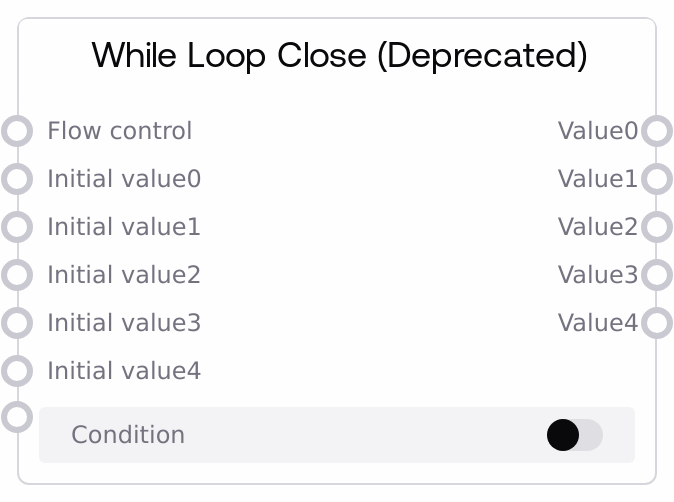
While Loop Close (Deprecated)
This node works with While Loop Open (Deprecated) to implement a while-style loop region in your workflow. It receives a flow_control token, a boolean condition, and up to five loop-carried values, then either schedules another iteration or returns the final values when the condition is false. While functional, this node is deprecated in favor of the newer Loop Open / Loop Close pair and should mainly be used to maintain or extend existing flows.
Usage
Use While Loop Close (Deprecated) when you are maintaining or extending a legacy workflow that already uses While Loop Open (Deprecated). Place While Loop Open at the start of your looped region to emit the FLOW_CONTROL token and initial values, then route that FLOW_CONTROL output into the flow_control input of While Loop Close at the end of the loop body. Inside the loop body, wire the values coming from While Loop Open (or from a previous While Loop Close) into your processing nodes, then feed the updated values back into this node’s initial_value0–initial_value4 inputs. Drive the condition input from a boolean node that determines whether another iteration is needed (for example, a counter comparison or convergence check). When condition becomes false, the loop ends and this node outputs the final value0–value4 states for downstream consumers. In typical workflows, upstream you will use While Loop Open (Deprecated) or SaltForLoopClose, and downstream you will route value0–value4 into result collection, reporting, or further processing nodes. For new flows, prefer Loop Open / Loop Close instead of this deprecated pair.
| Field | Required | Type | Description | Example |
|---|
| flow_control | True | FLOW_CONTROL | Flow-control token that identifies the loop context. Must come from the FLOW_CONTROL output of SaltWhileLoopOpen (Deprecated) or from a compatible loop-constructing node. It is used internally to manage iterations and should always be connected directly, not synthesized manually. | FLOW_CONTROL output from a While Loop Open (Deprecated) node that begins the loop region. |
| condition | True | BOOLEAN | Boolean flag that decides if the loop continues. When true, the loop is scheduled to run another iteration with the provided initial_value inputs as the new state. When false, the loop terminates and the current values are returned as final outputs. This is force-input only, so it must be wired from another node. | Output of a SaltIntConditions node evaluating current_step > 0 for a countdown loop. |
| initial_value0 | False | WILDCARD | First loop-carried value. On the first iteration, typically connected from While Loop Open’s value0; on later iterations, usually connected from this node’s own value0 output. Accepts any supported data type (numbers, text, images, lists, dicts, etc.). | An integer loop counter such as 10 that is decremented each iteration until it reaches 0. |
| initial_value1 | False | WILDCARD | Second loop-carried state value. Used to carry additional information that evolves over iterations. Usually seeded from While Loop Open’s value1 and then fed from this node’s value1 output on subsequent passes. | A floating-point running sum of error values accumulated over multiple refinement steps. |
| initial_value2 | False | WILDCARD | Third loop-carried value slot for arbitrary per-iteration state, such as auxiliary data or logs. | A text string that concatenates per-iteration status messages into a single log transcript. |
| initial_value3 | False | WILDCARD | Fourth loop-carried value slot. Use this for additional state that must persist and be updated across loop iterations. | A list of processed item IDs that is extended with new IDs each iteration. |
| initial_value4 | False | WILDCARD | Fifth loop-carried value slot, allowing you to track up to five separate pieces of state through the loop body. | A dictionary of metrics such as {"loss": 0.23, "accuracy": 0.91} updated on each training iteration. |
Outputs
| Field | Type | Description | Example |
|---|
| value0 | * | Loop-carried or final value corresponding to initial_value0. During looping, it is commonly fed back into initial_value0 for the next iteration. Once condition becomes false, this output holds the final state for downstream use. | 0, representing a completed countdown that started from 10 and decremented to 0. |
| value1 | * | Loop-carried or final value corresponding to initial_value1. Intended for state that must be preserved after the loop finishes. | 125.4, the total accumulated score after all refinement iterations are complete. |
| value2 | * | Loop-carried or final value corresponding to initial_value2, often used for secondary results or logs. | A long text report that merges summaries generated on each iteration into a single narrative. |
| value3 | * | Loop-carried or final value corresponding to initial_value3, often holding tertiary or diagnostic data. | A list of 20 processed image URLs gathered over the lifetime of the loop. |
| value4 | * | Loop-carried or final value corresponding to initial_value4. This is the last of the five available loop-carried outputs. | {"loss_history":[0.8,0.6,0.4],"accuracy_history":[0.5,0.7,0.85]} summarizing metric trajectories over iterations. |
Important Notes
- Performance: Loops can generate large execution graphs if the condition remains true for many iterations; design conservative stop conditions or add an explicit iteration cap to avoid excessive resource use.
- Limitations: This node is deprecated; for all new workflows you should use Loop Open and Loop Close, which offer a more modern and better-supported control-flow pattern.
- Behavior: The condition input has forceInput enabled and no default value, so leaving it unconnected will prevent the loop from behaving as intended and may cause errors or unexpected termination.
- Behavior: All initial_value inputs are wildcard-typed and passed through without validation; mismatched or changing data shapes across iterations can cause downstream nodes in the loop body to fail. Ensure the data type and structure are consistent each iteration.
Troubleshooting
- Loop never terminates or graph explodes in size: Check that the condition input is actually updated within the loop and will eventually evaluate to false (for example, verify that your counter is being changed and that the comparison operation is correct).
- Outputs are None or incorrect: If value0–value4 are None or not what you expect, confirm that you are wiring the outputs from While Loop Open (or from a previous While Loop Close) into the loop body and then feeding the updated results back into the matching initial_value inputs on this node.
- Cannot connect flow_control: If there is no compatible FLOW_CONTROL output available, ensure your loop region begins with a While Loop Open (Deprecated) or a compatible loop node, and that you have not broken the flow-control chain by inserting incompatible nodes between the open and close.
- Issues migrating legacy loops: When modernizing a graph, mixing While Loop Open/Close with the newer Loop Open/Close in the same loop can cause wiring confusion. Migrate entire loop regions at once or keep legacy loops isolated to avoid incorrect connections.