Trigonometric Operation
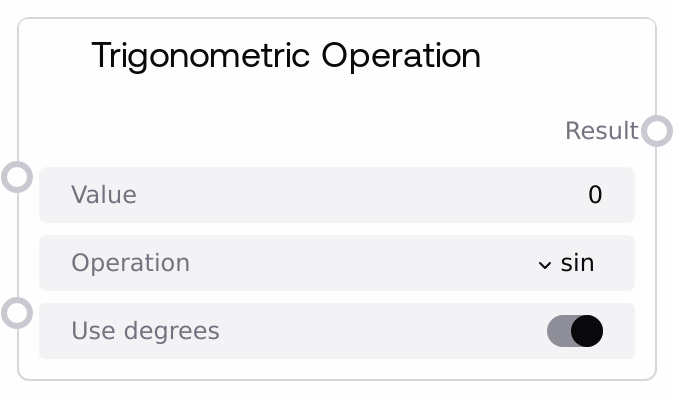
Usage
Use this node when you need trigonometric calculations inside a Salt workflow, for example to convert rotation angles into sine or cosine values, generate smooth oscillations over time, perform simple geometric computations, or recover angles from numeric ratios using inverse functions. It typically follows nodes that produce or transform numeric values (such as SaltFloatMathOperation, SaltAdvancedMathOperation, or parameter/slider nodes) and precedes comparison, rounding, or further math nodes that interpret or apply the resulting value.
Configure the use_degrees flag to match your angle convention: set it to true if the rest of your pipeline uses degrees (for example 0 to 360), or false if you are working in radians. For sin, cos, and tan, the node converts from degrees to radians internally when use_degrees is true. For asin, acos, and atan, it computes the angle and then converts the result from radians back to degrees when use_degrees is true. Hyperbolic functions (sinh, cosh, tanh) accept a real-valued parameter and share the same range settings and interface, even though they are not typically interpreted as geometric angles.
Typical workflow patterns include: (1) Generate a time-based or parameter-based angle with SaltFloatMathOperation, pass it to SaltTrigonometricOperation with operation set to "sin" or "cos" to create an oscillating control signal, then feed that into nodes that modulate strength, opacity, or weights. (2) Normalize a dot product between direction vectors to stay in [-1, 1], feed it into acos with use_degrees set to true to obtain a human-readable angle, then use SaltComparisonOperation to check thresholds (for example, “is this angle less than 30 degrees?”). (3) Combine this node with SaltLogarithmicOperation or SaltRoundingOperation to build more complex numeric mappings for simulations or parameter shaping.
Inputs
| Field | Required | Type | Description | Example |
|---|---|---|---|---|
| value | True | FLOAT | The numeric input to the chosen trigonometric function. For sin, cos, and tan, this is interpreted as an angle in degrees when use_degrees is true, or radians when use_degrees is false. For inverse functions (asin, acos, atan), value is the ratio or numeric argument; asin and acos require value to be within the closed interval [-1, 1] to return a valid angle. For hyperbolic functions (sinh, cosh, tanh), value is an unrestricted real parameter, though large magnitudes may produce very large outputs. The configurable range is from -360.0 to 360.0 with a step of 0.001. | 45.0 |
| operation | True | CHOICE | Specifies which trigonometric function is applied to value. Supported options are: "sin" (sine), "cos" (cosine), "tan" (tangent), "asin" (arc sine), "acos" (arc cosine), "atan" (arc tangent), "sinh" (hyperbolic sine), "cosh" (hyperbolic cosine), and "tanh" (hyperbolic tangent). Each option produces a single floating-point output. | cos |
| use_degrees | True | BOOLEAN | Controls whether angles are interpreted and returned in degrees or radians. When true, sin, cos, and tan convert value from degrees to radians before performing the computation, and asin, acos, and atan convert their radian results back to degrees. When false, all computations and outputs use radians or raw numeric units with no unit conversion. | true |
Outputs
| Field | Type | Description | Example |
|---|---|---|---|
| result | FLOAT | The computed result of the selected trigonometric operation as a single floating-point number. For sin, cos, tan, sinh, cosh, and tanh, this is the function value at the given input. For asin, acos, and atan, this is an angle, returned in degrees when use_degrees is true and in radians otherwise. If the input is outside the valid domain for inverse functions or an unknown operation is specified, the node returns 0.0. | 0.70710678 |
Important Notes
- Performance: The node executes one standard library trigonometric call per run, so it is highly efficient and suitable for frequent use, including inside loops or large numeric pipelines.
- Limitations: asin and acos only accept inputs in the range [-1, 1]. When value is outside this domain, the node logs a warning and returns 0.0 instead of raising an error, so you should validate or clamp inputs upstream if correctness is important.
- Behavior: The use_degrees flag affects both input interpretation for sin, cos, and tan and output formatting for asin, acos, and atan. Keeping this flag consistent across your workflow is critical to avoid subtle degree/radian mismatches.
- Behavior: Hyperbolic functions (sinh, cosh, tanh) can grow very quickly in magnitude for moderately large absolute inputs, especially cosh and sinh, which may require additional normalization, clamping, or scaling before passing their results to downstream nodes.
Troubleshooting
- asin or acos always return 0.0: value is likely outside the [-1, 1] range required for these inverse functions. Normalize or clamp inputs (for example, clamp a dot product to [-1, 1]) before feeding them into this node.
- Angles appear off by a constant factor: A mismatch between degrees and radians is likely. Confirm that use_degrees is set correctly for how value was generated, and that any downstream consumers of the output expect the same unit.
- Very large outputs for tan, sinh, or cosh: Inputs near odd multiples of 90 degrees (or pi/2 radians) can cause tan to spike, and large absolute inputs to sinh or cosh cause exponential growth. Add upstream clamping, scaling, or conditional logic to keep value within a safe numeric range.
- Output stuck at 0.0 even when inputs change: The node returns 0.0 on invalid domains or unknown operations. Double-check that operation is set to one of the supported values and that value respects the documented ranges, especially for inverse functions, then re-run the workflow.