RF Diffusion Scaffold Guided Config
Usage
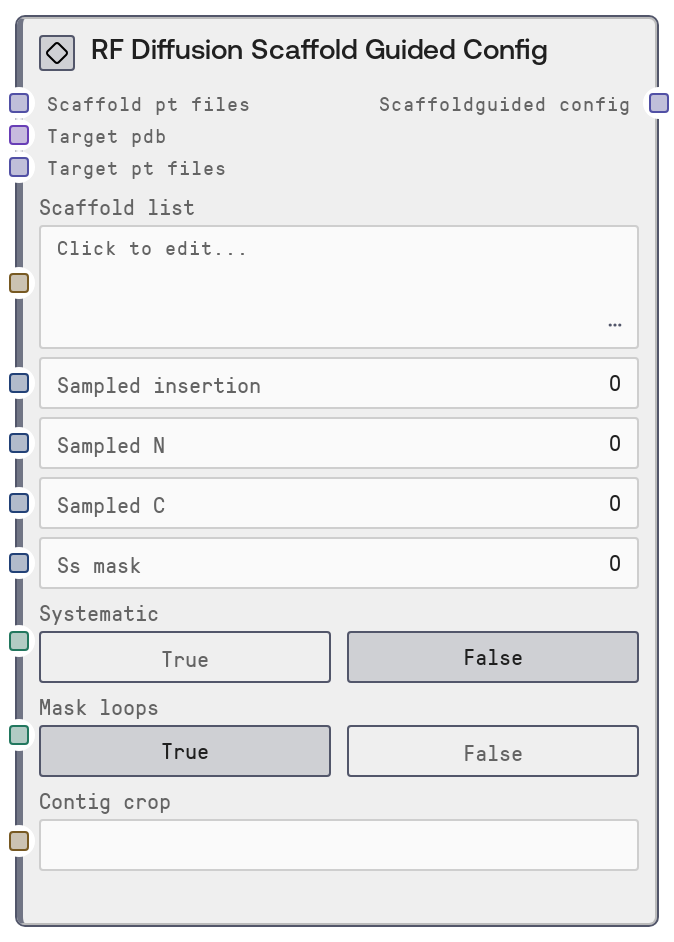
Use this node when you want RF Diffusion to follow a specific fold or scaffold instead of generating backbones from scratch. Common use cases include fold-conditioned monomer design using a scaffold library, scaffolded binder design against a target PDB, and loop or terminus redesign while preserving an overall topology.
Typical workflow: (1) Generate scaffold .pt files externally (for example, using RF Diffusion’s secstruc/adjacency tooling). (2) Load them via a node that outputs SCAFFOLD_PT_FILES (such as a GCS scaffold-folder loader) and connect that output to scaffold_pt_files here. (3) For binder/PPI tasks, also connect a target PDB to target_pdb and, if available, target-specific .pt files to target_pt_files. (4) Optionally define scaffold_list to restrict which scaffolds to use, and tune flexibility with sampled_insertion, sampled_N, sampled_C, ss_mask, mask_loops, and contig_crop.
Place this node upstream of the RF Diffusion node (class name SaaSRFDiffusionNode) and wire its scaffoldguided_config output into that node’s scaffoldguided_config input. It frequently appears alongside RF Diffusion Contigmap Config, Symmetry Config, Denoiser Config, and Potentials Config nodes. For large libraries, prefer cloud-based SCAFFOLD_PT_FILES for performance, and use scaffold_list together with systematic mode when you want predictable coverage of a defined scaffold set across runs.
Inputs
| Field | Required | Type | Description | Example |
|---|---|---|---|---|
| scaffold_pt_files | True | SCAFFOLD_PT_FILES | Reference to the scaffold .pt files used for fold conditioning. Supported formats: (1) cloud-folder mode, where type is gcs_path or cloud_path and fields such as cloud_folder_path or gcs_folder_path plus an optional provider identify the storage location; or (2) inline mode, where type is inline and pt_files is a dict mapping file names to base64-encoded *_ss.pt and *_adj.pt contents. A legacy mode where the value is directly a dict of pt files (without a type discriminator) is also accepted. The mapping must be non-empty. | { "type": "cloud_path", "provider": "gcs", "cloud_folder_path": "gs://protein-design/scaffolds/folds" } |
| target_pdb | False | PDB | Optional target protein structure for scaffold-guided binder or PPI design. The node extracts the first PDB file from this input, records its text content in the configuration, and flags that a target PDB is present. This allows RF Diffusion to design binders or interfaces against the specified target. | { "name": "target_enzyme.pdb", "content": "ATOM 1 N MET A 1 ..." } |
| target_pt_files | False | SCAFFOLD_PT_FILES | Optional pre-computed secondary-structure and adjacency .pt files for the target protein, complementing target_pdb. Accepts the same formats as scaffold_pt_files (cloud folder, inline, or legacy dict). When provided and non-empty, these tensors enable additional fold conditioning on the target itself. | { "type": "inline", "pt_files": { "target_ss.pt": " |
| scaffold_list | False | STRING | Optional multi-line list of scaffold names to use, one per line. Empty lines and lines beginning with '#' are ignored. If left empty, all scaffolds present in scaffold_pt_files are eligible. Use this to focus runs on a curated subset of scaffolds or to have a stable set of names for systematic runs. | helix_bundle_01 beta_barrel_03 # disabled candidate mixed_topology_07 |
| sampled_insertion | False | INT | Maximum number of residues that can be inserted into loop regions per run. A value of 0 disables loop-length changes; values from 1 to 50 allow flexible loop insertion while retaining the global fold. Only added to the configuration when greater than 0. | 5 |
| sampled_N | False | INT | Maximum number of additional residues to sample at the N terminus beyond the scaffold. Zero disables N-terminal extension; values up to 50 allow flexible N-terminal tails while keeping the scaffold core fixed. | 10 |
| sampled_C | False | INT | Maximum number of additional residues to sample at the C terminus beyond the scaffold. Zero disables C-terminal extension; values up to 50 enable variable C-terminal tails. | 8 |
| ss_mask | False | INT | Number of residues to mask at the end of each secondary-structure block (for example helices or strands) to permit flexibility at these boundaries. Range is 0 to 20. When set to 0 it is omitted from the config and no explicit masking is requested. | 2 |
| systematic | False | BOOLEAN | If true, indicates that scaffold selection should be systematic (for example iterating through scaffold_list in order) instead of random. Useful when you want to exhaustively test a panel of scaffolds over multiple runs. When false, the service is free to choose scaffolds stochastically. | True |
| mask_loops | False | BOOLEAN | Controls whether loop regions from the scaffold should be masked for redesign. The default is true (loops flexible). Set to false to preserve loop geometry, which can be important in some PPI or functional contexts. The node only writes mask_loops into the config when it is false; the default flexible behavior is implicit. | False |
| contig_crop | False | STRING | Optional region specifier to crop part of the scaffold before conditioning, expressed in contig-style syntax. For example, A10-50 selects residues 10 through 50 of chain A. If left blank, the full scaffold is used. The value is validated and converted to a parsed contig structure before being stored. | A35-120 |
Outputs
| Field | Type | Description | Example |
|---|---|---|---|
| scaffoldguided_config | RFDIFFUSION_SCAFFOLDGUIDED_CONFIG | Configuration object enabling scaffold-guided and fold-conditioned RF Diffusion. It always includes scaffoldguided set to true and a scaffold_secstruc_adj block describing how to access scaffold .pt files (cloud path or inline, including provider and folder or pt_files). If a target_pdb is provided, target_pdb and target_pdb_content are included; if target_pt_files are supplied, a target_secstruc_adj block is added. Depending on inputs, it may also contain scaffold_list, sampled_insertion, sampled_N, sampled_C, ss_mask, systematic, mask_loops (when false), and contig_crop. Connect this directly to the scaffoldguided_config input of the RF Diffusion node. | { "scaffoldguided": true, "scaffold_secstruc_adj": { "type": "cloud_path", "provider": "gcs", "cloud_folder_path": "gs://protein-design/scaffolds/folds", "gcs_folder_path": "gs://protein-design/scaffolds/folds" }, "target_pdb": true, "target_pdb_content": "ATOM 1 N MET A 1 ...", "scaffold_list": ["helix_bundle_01", "beta_barrel_03"], "sampled_insertion": 5, "sampled_N": 10, "mask_loops": false, "contig_crop": [["A", 35, 120]] } |
Important Notes
- Performance: Passing many inline .pt files as base64 significantly increases payload size and can slow down communication with the RF Diffusion service. For large scaffold sets, prefer gcs_path or cloud_path modes that reference a bucket.
- Limitations: scaffold_pt_files must be a non-empty dict in one of the supported formats; otherwise the node raises a ValueError and stops execution. The node does not inspect the numerical contents of .pt tensors and assumes they were produced by a compatible preprocessing pipeline.
- Behavior: Optional integer parameters such as sampled_insertion, sampled_N, sampled_C, and ss_mask are only added to the configuration when greater than zero. Leaving them at zero defers to service-side defaults and should not be interpreted as an explicit constraint.
- Behavior: scaffold_list is parsed by trimming whitespace, discarding blank lines, and ignoring lines beginning with '#'. The node does not verify that listed names actually exist in the scaffold library; invalid names may simply be ignored downstream.
- Behavior: When target_pdb is provided, the node embeds its content and sets a flag signaling that a target is present. This interacts with hotspot and PPI-related validation in the RF Diffusion node; using hotspot-related settings there without a target may cause that node to error.
Troubleshooting
- Common Error 1: Error indicating scaffold_pt_files is required and should be connected from a loader or preprocessing node. This happens when scaffold_pt_files is missing or an empty dict. Fix it by wiring a valid SCAFFOLD_PT_FILES output from an upstream loader node and ensure it produces a non-empty mapping.
- Common Error 2: Downstream RF Diffusion failures mentioning missing or unreadable scaffold files. In cloud-folder mode, verify that cloud_folder_path or gcs_folder_path points to a bucket that is accessible to the service, that permissions are correct, and that it contains the expected _ss.pt and _adj.pt files.
- Common Error 3: Designs appear to ignore the specified scaffold_list and sample unexpected scaffolds. Check for typos or stray whitespace in scaffold names, ensure lines are not commented out with '#', and confirm that each name matches a file or key in your scaffold_pt_files.
- Common Error 4: Validation or region-mismatch errors when using contig_crop. Ensure the contig string follows the correct syntax (for example A10-50 with valid chain IDs) and that residue indices correspond to the numbering present in your scaffold structures.