Storage Write
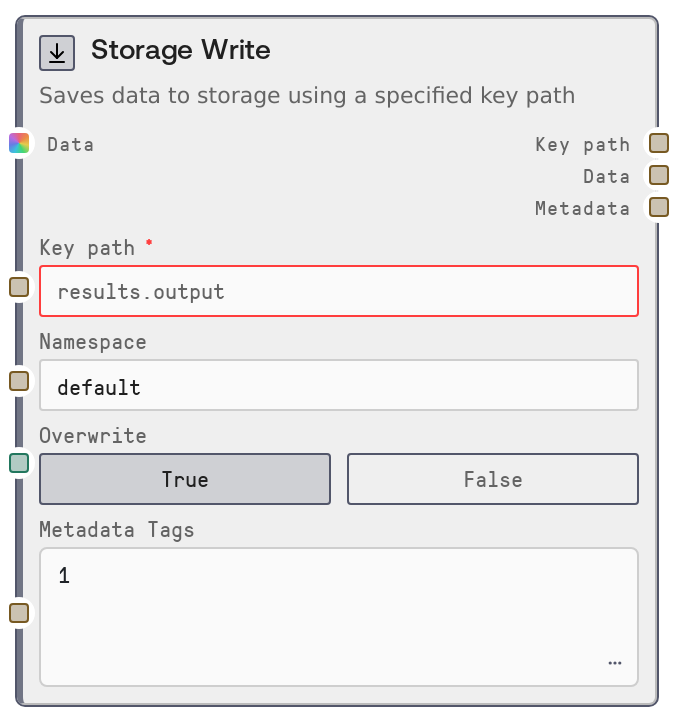
Usage
Use Storage Write whenever you need workflow outputs or intermediate results to survive beyond a single run. Common scenarios include saving an LLM-generated report for later download, caching an expensive computation result, checkpointing progress in a multi-stage workflow, or persisting configuration and preferences per user.
Typically, an upstream node such as a model invocation, data processing node, or aggregation node feeds its result into the data input. A SaltString node or similar is often used to construct the key_path (for example, reports.weekly.summary) and optionally the namespace (for example, marketing-dashboard). Downstream, a SaltStorageRead node or storage listing/query nodes can retrieve or enumerate stored entries using the same namespace and key path.
Keys are logical paths: use dots or hyphens to organize (for example, user_state.session-123.step-2). The overwrite flag controls whether existing values at that key are replaced (default) or treated as immutable checkpoints (write fails if present). metadata_tags lets you attach a JSON object of string key-value pairs (such as { "model": "gpt-4", "stage": "final" }) which downstream tooling can use to filter or categorize stored items. For robust pipelines, choose stable namespaces per project, validate key conventions, and enable or disable overwrite according to whether you want idempotent updates or one-time checkpoints.
Inputs
| Field | Required | Type | Description | Example |
|---|---|---|---|---|
| key_path | True | STRING | Logical key path for this object within the user's storage namespace. Must pass storage-key validation (dot- or hyphen-separated segments, without invalid characters). Used together with namespace and user ID to uniquely identify the stored entry. | reports.weekly.summary_2026_04_27 |
| data | True | * | The value to store. Supports strings (saved as plain text), dictionaries, lists, numbers, and booleans (saved as JSON), or other types which will be converted to string. Raw binary bytes are not supported and will cause an error. Data should be reasonably sized to fit storage limits. | {"title": "Weekly Marketing Report", "summary": "Traffic increased 14% week-over-week.", "generated_by": "gpt-4"} |
| namespace | False | STRING | Logical grouping for keys, used to avoid collisions between different apps or workflows. If blank or whitespace, it is normalized to default. Combine namespace and key_path to structure storage (for example, namespace=marketing-dashboard, key_path=reports.weekly.summary). | marketing-dashboard |
| overwrite | False | BOOLEAN | If true (default), any existing value at this namespace and key is replaced. If false, the write will fail with a conflict error when the key already exists, which is useful for one-time checkpoint creation or append-only logs. | true |
| metadata_tags | False | STRING | Optional JSON object of string key-value pairs to attach as metadata for this stored item. Must be valid JSON; non-string values may be rejected by parsing utilities. Used for later filtering or introspection by storage listing and query nodes. | {"model": "gpt-4", "stage": "final", "workflow": "weekly-report"} |
Outputs
| Field | Type | Description | Example |
|---|---|---|---|
| key_path | STRING | The validated, normalized key path that was actually used for storage. Typically identical to the input key_path and intended to be passed directly to downstream Storage Read or listing nodes. | reports.weekly.summary_2026_04_27 |
| data | STRING | The stored value as a string. If the original input was a string, it is returned unchanged; otherwise it is the UTF-8 decoded serialized representation (JSON or stringified value). This makes it safe to feed into text-processing or logging nodes. | {"title": "Weekly Marketing Report", "summary": "Traffic increased 14% week-over-week.", "generated_by": "gpt-4"} |
| metadata | STRING | A JSON string containing metadata returned by the storage backend for the stored item. Typically includes fields like content_type, serialization_format, size, timestamps, and any custom tags. Useful for debugging, auditing, or driving conditional logic downstream. | {"key_path": "reports.weekly.summary_2026_04_27", "namespace": "marketing-dashboard", "content_type": "application/json", "serialization_format": "json", "size_bytes": 3142, "metadata": {"model": "gpt-4", "stage": "final", "workflow": "weekly-report"}} |
Important Notes
- Performance: Large JSON payloads are serialized in memory before being sent to storage; very large objects may impact memory usage and hit storage size limits, so prefer storing summaries or references instead of entire raw datasets.
- Limitations: Raw binary bytes are not supported; attempting to pass a bytes object will raise an error. Convert binary data to a text-safe format, for example base64 inside JSON, if you must store it.
- Behavior: When overwrite is false and the key already exists, the node fails with a conflict error instead of silently overwriting. This is useful for safe checkpointing but can break loops if not handled intentionally.
- Behavior: If namespace is empty or whitespace, it is automatically normalized to default. salt_user_id must be available from the runtime context; otherwise the node raises a User ID is not available in this context. error and does not perform any write.
- Behavior: All outputs are string-based, including metadata, even when storing structured JSON, to keep downstream text processing straightforward. Downstream consumers should parse the metadata JSON string if they need structured access.
Troubleshooting
- Write conflict: key already exists and overwrite is disabled.: This occurs when overwrite is set to false and the same namespace and key already has a value. Either enable overwrite, change the key_path (for example, include a timestamp or unique identifier), or design the workflow to check existence before writing.
- Payload too large for storage limits.: This indicates the serialized content exceeds backend limits. Reduce the size of data (shorter text, remove large fields, or store references or IDs instead of full objects) and try again.
- User ID is not available in this context.: The node could not obtain salt_user_id from the runtime, often because it is being used in a context that does not provide authenticated user information. Ensure the workflow runs in a user-scoped environment that supplies user context; this field is not meant to be set manually.
- Invalid metadata_tags JSON or tag types.: If metadata_tags is not valid JSON, or contains unsupported value types, parsing will fail and may prevent the write. Ensure you pass a valid JSON object with string keys and string values only, such as {"model": "gpt-4", "stage": "draft"}.
- Storage Write failed:
. : For other runtime exceptions, such as network or storage outages or internal errors, the node raises a generic error message starting with Storage Write failed. Check platform logs or status, retry the workflow, and verify that storage services are healthy.