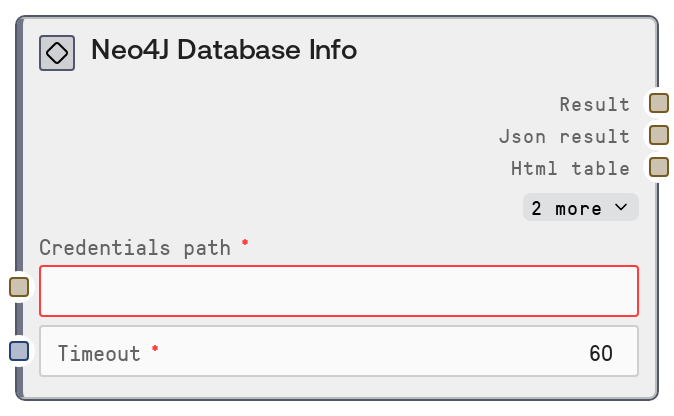
Neo4J Database Info
This node calls the Salt Neo4J data service to fetch general database and server metadata, such as version, edition, available databases, and basic server or cluster details. It uses stored Neo4J credentials along with a timeout to invoke a dedicated database-info endpoint. The result is returned as a human-readable text summary and a raw JSON payload for downstream parsing or monitoring.
Usage
Use this node early in any Neo4J-focused workflow to confirm connectivity and understand the target environment before running queries or schema operations. A common pattern is: (1) load or reference stored Neo4J credentials, (2) run Neo4J Database Info to retrieve metadata (version, edition, default database, cluster role), then (3) branch into query, schema, or monitoring flows depending on what is returned. Upstream, you will usually have credential or connection helpers such as a generic Salt credential loader or the "SaltNeo4JConnectionString" node. Downstream, the JSON output can be consumed by nodes like "SaltNeo4JQuery" for conditional logic (e.g., only run certain Cypher on Enterprise edition), "SaltNeo4JSchemaInfo" for deeper schema inspection, or logging/export nodes that archive environment snapshots. In monitoring or diagnostics flows, schedule this node regularly and feed the results into dashboards or alerting logic to track changes in version, role, or cluster membership over time.
| Field | Required | Type | Description | Example |
|---|
| credentials_path | True | STRING | Identifier or path to the saved Neo4J credentials in Salt. These credentials must correspond to the Neo4J service and include all necessary connection and authentication details. If the path is incorrect, references another service, or points to invalid credentials, the node will fail to fetch database information. | connections/prod/neo4j_cluster_primary |
| timeout | True | INT | Maximum time in seconds to wait for the Neo4J database-info request to complete. If the database or network is slow and this limit is exceeded, the node returns a timeout error instead of database info. Set this high enough to accommodate your network and server load while avoiding excessively long waits. | 30 |
Outputs
| Field | Type | Description | Example |
|---|
| text | STRING | Human-readable summary of the Neo4J database information. Typically contains key fields such as Neo4J version, edition, default database, list of databases, cluster role and addresses, formatted for quick inspection or display. | Neo4J Database Info Version: 5.12.0 Edition: Enterprise Default database: neo4j Databases: neo4j, system Cluster role: LEADER Bolt address: neo4j-prod.internal:7687 HTTP address: neo4j-prod.internal:7474 |
| json | STRING | Raw JSON string with the full database information object returned by the Neo4J data service. This is intended for programmatic use: downstream nodes can parse it to access specific fields such as edition, databases, cluster role, and member addresses. | {"version":"5.12.0","edition":"enterprise","default_database":"neo4j","databases":["neo4j","system"],"cluster":{"role":"LEADER","members":[{"id":"node-1","address":"neo4j-prod-1.internal:7687"},{"id":"node-2","address":"neo4j-prod-2.internal:7687"}]},"addresses":{"bolt":"neo4j-prod.internal:7687","http":"neo4j-prod.internal:7474"}} |
| html | STRING | HTML-formatted representation of the database info, when provided by the base formatter. Useful for dashboards or rich UI components that can render HTML directly. | Neo4J Database Info| Version | 5.12.0 |
|---|
| Edition | Enterprise |
|---|
| Default database | neo4j |
|---|
|
| file | STRING | Identifier or path to an exported artifact (for example, a JSON file) if the base node writes the database info to disk or an artifact store. Downstream export, audit, or reporting nodes can use this to retrieve the snapshot. | artifacts/neo4j/db_info_2024-03-01T10-15-00Z.json |
Important Notes
- Performance: Although the database-info call is lightweight, slow networks or overloaded clusters can still cause noticeable latency; configure the timeout to match your environment, especially for cross-region or VPN connections.
- Limitations: The exact JSON structure depends on the Neo4J data service and Neo4J version; some fields (such as cluster details or multiple databases) may be absent on single-instance or older deployments, so downstream parsing should check key existence.
- Behavior: On authentication, connectivity, or service errors, the node returns an error message instead of normal database info; this is typically visible in both the text summary and JSON payload, so workflows should detect and handle error states explicitly.
- Behavior: The node is strictly read-only and does not modify data or schema; it is safe to include in production workflows for discovery, verification, and monitoring of Neo4J environments.
- Security: Returned metadata may expose internal addresses, ports, and cluster membership; treat outputs as sensitive environment information and avoid exposing them in public dashboards or logs.
Troubleshooting
- Authentication or authorization failure: If the text output mentions authentication errors or insufficient privileges, verify that
credentials_path refers to valid Neo4J credentials and that the user has permission to access database metadata. Update stored credentials or database roles as needed.
- Connection or DNS issues: Errors indicating host not found, connection refused, or TLS handshake failures usually mean the Neo4J endpoint is unreachable or misconfigured. Confirm host, port, and protocol in the stored credentials, and ensure the Salt environment can reach the Neo4J server.
- Timeout exceeded: If the node reports a timeout, increase the
timeout value and test the Neo4J instance using another client to confirm responsiveness. Persistent timeouts may indicate network problems or a heavily loaded server that needs tuning.
- Unexpected JSON structure: When downstream nodes or scripts break because keys are missing or changed, log and inspect the raw
json output, then update your parsing logic to be more defensive (check for keys before use) or adapt expectations to the observed Neo4J version and deployment type.
- Incorrect credentials_path: If you get generic service errors or messages that suggest the wrong backend, confirm that
credentials_path points to a Neo4J credential entry rather than another database type (for example, PostgreSQL or MySQL).