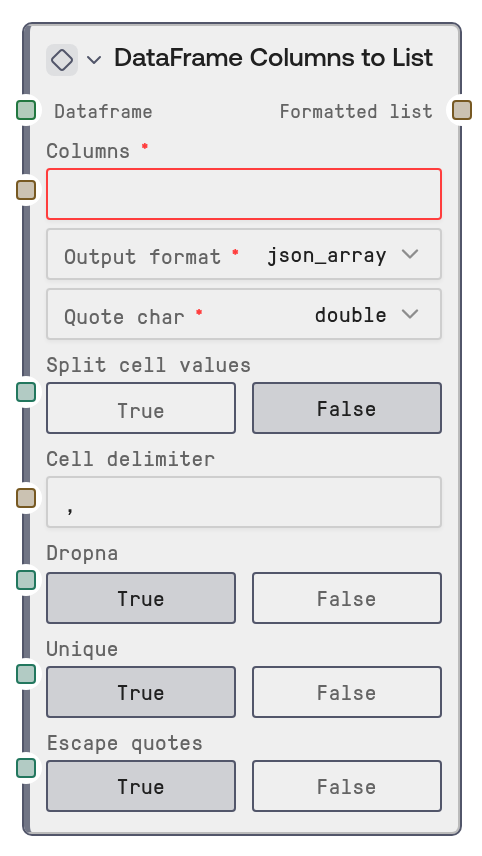
DataFrame Columns to List
This node pulls values from selected columns in a DATAFRAME and formats them as a single string list. It can combine multiple columns, optionally split delimited cell contents, remove missing values, deduplicate entries, quote values, and output either JSON-array-style or tuple-style formatting.
Usage
Use this node when you need to turn table column values into a compact string list for prompts, filters, API parameters, SQL-like clauses, or downstream text-processing workflows. It is commonly placed after data-loading nodes such as CSV to DataFrame, Excel to DataFrame, JSON to DataFrame, or Parquet to DataFrame, and can also follow transformation nodes like Join DataFrames or Concatenate DataFrames. Typical use cases include extracting gene symbols, customer IDs, product SKUs, tags, or category labels from a table and passing the resulting string to downstream text, query, or export nodes. For best results, confirm column names first with a table preview or conversion node, use dropna to avoid unwanted missing-value strings, and enable split_cell_values only when cells contain multiple values separated by a known delimiter.
| Field | Required | Type | Description | Example |
|---|
| dataframe | True | DATAFRAME | The input table to extract values from. It must contain the columns named in the `columns` field. | A DATAFRAME loaded from a clinical CSV with columns `DRUG1_GENE`, `DRUG2_GENE`, `PATIENT_ID`, and `RESPONSE_STATUS`. |
| columns | True | STRING | Comma-separated column names to extract. Column names are trimmed for surrounding whitespace and must exactly match columns in the DataFrame after trimming. | DRUG1_GENE,DRUG2_GENE |
| output_format | True | COMBO: json_array \| tuple | Controls the wrapper used around the formatted values. `json_array` returns values inside square brackets, while `tuple` returns values inside parentheses. | json_array |
| quote_char | True | COMBO: double \| single \| none | Controls how individual values are quoted. `double` wraps values in double quotes, `single` wraps values in single quotes, and `none` leaves values unquoted. JSON array output always uses double quotes to remain JSON-compatible. | double |
| split_cell_values | False | BOOLEAN | When enabled, each extracted cell value is converted to text and split using `cell_delimiter`. Useful for cells containing multiple values such as comma-separated tags or gene lists. | True |
| cell_delimiter | False | STRING | Delimiter used when `split_cell_values` is enabled. Empty split results are discarded after trimming whitespace. | , |
| dropna | False | BOOLEAN | Drops missing values from each selected column before formatting. Disable this only if missing values should appear in the output as text. | True |
| unique | False | BOOLEAN | When enabled, duplicate values are removed while keeping the first occurrence order. When disabled, repeated values are preserved. | True |
| escape_quotes | False | BOOLEAN | Escapes backslashes and matching quote characters inside values so the resulting string is safer to pass into JSON-like or tuple-like text contexts. | True |
Outputs
| Field | Type | Description | Example |
|---|
| formatted_list | STRING | A single formatted string containing the extracted values. Depending on settings, this may look like a JSON array or a tuple-style list and can be passed to downstream prompt, query, or text nodes. | ["BRCA1","EGFR","TP53","ALK"] |
Important Notes
- Column matching: Every requested column must exist in the DataFrame. If any column is missing, the node stops with an error listing available columns.
- JSON behavior: When
output_format is json_array, the node forces double quotes even if quote_char is set to single or none, because JSON arrays require double-quoted strings.
- Value conversion: Extracted values are formatted as strings. Numeric IDs, dates, booleans, and other cell types will be represented as text in the output.
- Deduplication: With
unique enabled, duplicates across all selected columns are removed while preserving the first time each value appears.
Troubleshooting
columns parameter must be provided: The columns input is empty or only whitespace. Enter one or more exact DataFrame column names, separated by commas.Column 'X' not found in DataFrame: The column name does not exactly match the table. Check capitalization, spaces, and spelling, or inspect the DataFrame with a preview/export node before extraction.- Unexpected quoted output: If
output_format is json_array, values will always use double quotes. Choose tuple if you need single quotes or unquoted values.
- Output contains combined values instead of separate entries: Enable
split_cell_values and set cell_delimiter to the delimiter used inside cells, such as ,, ;, or |.