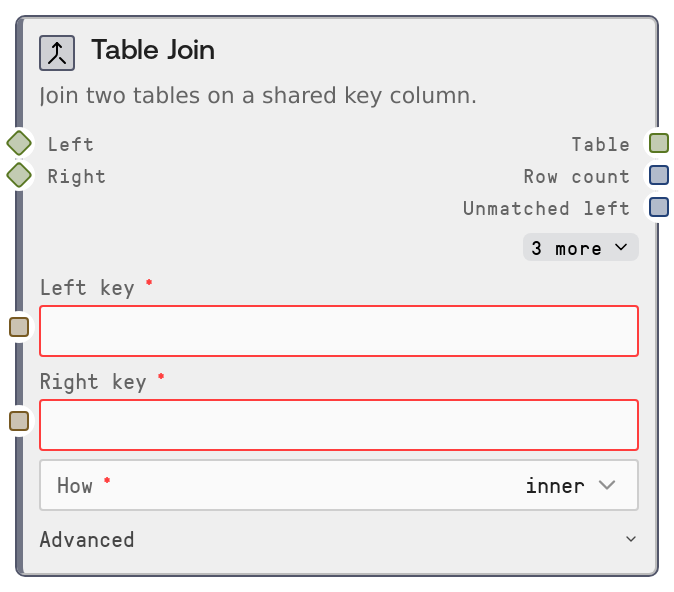
Table Join
Table Join combines two related tables on specified key columns, similar to SQL joins. It supports inner, left, right, and outer join types, optional custom suffixes for duplicate column names, and reports how many rows from each side did not find a match. It also outputs a structured log for auditing and diagnostics.
Usage
Use this node when you need to combine two tabular datasets that share a logical key, such as user_id, order_id, or product_sku. It typically follows loader and cleanup nodes (for example, Table From CSV/JSON, Table Filter, Table Sort, Table Select Columns) and precedes aggregation, inspection, or export nodes (for example, Table Group, Table Info, Table Output, Chart). Connect a TABLE to left and right, specify left_key and right_key columns, and choose how: inner (only matched rows), left (all rows from left plus matches from right), right (all rows from right plus matches from left), or outer (all rows from both with nulls where no match). Use suffixes to label overlapping non-key columns from each side to avoid confusion in downstream steps. Inspect row_count, unmatched_left, unmatched_right, and the log/log_json outputs to validate join quality, detect many-to-many joins, and monitor data coverage. In workflows, it is common to first standardize and inspect key columns with Table Info and possibly Table Cast Type or Table Fill Null before joining.
| Field | Required | Type | Description | Example |
|---|
| left | True | TABLE | Primary input table on the left side of the join. Must be a TABLE (or compatible dataframe-like) and must contain the column given in left_key. Often used for the main fact table you want to preserve in a left join. | Orders table with columns ["order_id", "customer_id", "order_date", "total_amount"]. |
| right | True | TABLE | Secondary input table on the right side of the join. Must be a TABLE (or compatible dataframe-like) and must contain the column given in right_key. Commonly a lookup or dimension table providing attributes to enrich the left table. | Customers table with columns ["customer_id", "country", "segment", "lifetime_value"]. |
| left_key | True | STRING | Column name in the left table to join on. Must exactly match one of the left table's column names. This column is used as the join key on the left side. | customer_id |
| right_key | True | STRING | Column name in the right table to join on. Must exactly match one of the right table's column names. Can be the same text as left_key if both tables use the same name, or different if they use distinct names for the same logical key. | customer_id |
| how | True | STRING (enum: inner \| left \| right \| outer) | Join type controlling which rows are kept. inner: only rows where both keys match. left: all rows from left plus any matching right rows. right: all rows from right plus any matching left rows. outer: all rows from both tables with nulls where no match exists. | left |
| suffixes | False | STRING | Comma-separated pair of suffixes applied to overlapping non-key column names from left and right. If both tables have a column with the same name, it will be renamed using these suffixes. If not provided as exactly two comma-separated values, defaults to "_left,_right". | _orders,_customers |
Outputs
| Field | Type | Description | Example |
|---|
| table | TABLE | Joined table produced from the selected join type on left and right using the provided key columns. Contains all columns from both inputs, with duplicate names disambiguated using the suffixes setting. | TABLE with columns ["order_id", "customer_id", "order_date", "total_amount", "country", "segment"] and 12350 rows after a left join of orders (12350 rows) with customers (4200 rows). |
| row_count | INT | Number of rows in the joined result table. Useful for quickly verifying the effect of the join and detecting unexpected row expansion or reduction. | 12350 |
| unmatched_left | INT | Count of rows from the left table that did not match any row in the right table, measured before filtering to the requested join type. Helps identify orphaned or unmapped records on the left side. | 275 |
| unmatched_right | INT | Count of rows from the right table that did not match any row in the left table, measured before filtering to the requested join type. Useful for checking coverage and unused records in the right-side reference data. | 42 |
| log | STRING | Human-readable summary of the join, including join type, key columns, input row counts, output row count, and a warning if a many-to-many join caused significant row expansion. | Left join on left[customer_id] = right[customer_id]: 12350 left + 4200 right -> 12350 rows. Warning: many-to-many join detected. Result (12350 rows) exceeds both inputs (12350 left + 4200 right). |
| log_json | STRING | Structured JSON string capturing join metrics such as input and output row counts, join parameters, and unmatched_left/unmatched_right. Intended for programmatic inspection, logging, or monitoring. | {"node":"SaltTableJoin","input_rows":16550,"output_rows":12350,"parameters":{"left_key":"customer_id","right_key":"customer_id","how":"left"},"unmatched_left":275,"unmatched_right":42} |
Important Notes
- Performance: Both tables are materialized as in-memory dataframes during the join; large datasets may be slow or memory-heavy, so consider filtering or sampling upstream using Table Filter or Table Sample for exploratory work.
- Limitations: The node does not enforce uniqueness of keys. If either side has duplicate key values, a many-to-many join can create a large row explosion; the node only warns about this via the log, it does not prevent it.
- Behavior: If left_key or right_key does not exist in its respective table, the node raises a clear error listing all available columns, rather than attempting a partial or incorrect join.
- Behavior: unmatched_left and unmatched_right are derived from an outer-style comparison before applying the specific join type, so they report total unmatched counts independent of the how setting.
- Behavior: If the suffixes input cannot be parsed into exactly two comma-separated values, the node silently falls back to using "_left" and "_right" as default suffixes for overlapping column names.
Troubleshooting
- Key not found in left table: If you see an error like "Left key 'customer_id' not found. Available: ...", the left_key value does not match any left column. Check the left table with a Table Info node and correct the spelling or casing of left_key.
- Key not found in right table: An error like "Right key 'customer_id' not found. Available: ..." indicates the right_key is incorrect. Inspect the right table's columns and update right_key or rename columns upstream so the desired key exists.
- Unexpectedly large row_count: If row_count is much higher than expected and the log warns about a many-to-many join, inspect key columns for duplicates using Table Group or Table Info. You may need to deduplicate or aggregate one side before joining.
- Too many nulls after outer join: After an outer join you may see many nulls in columns from one side. This usually means many unmatched keys. Verify that both key columns use the same format and values, or switch to a left or inner join if only matched rows are needed.
- Confusing duplicate column names: If you see columns like status_left and status_right and they are hard to interpret, adjust the suffixes input to clearer labels (for example "_orders,_customers") and rerun the join to make downstream analysis easier.