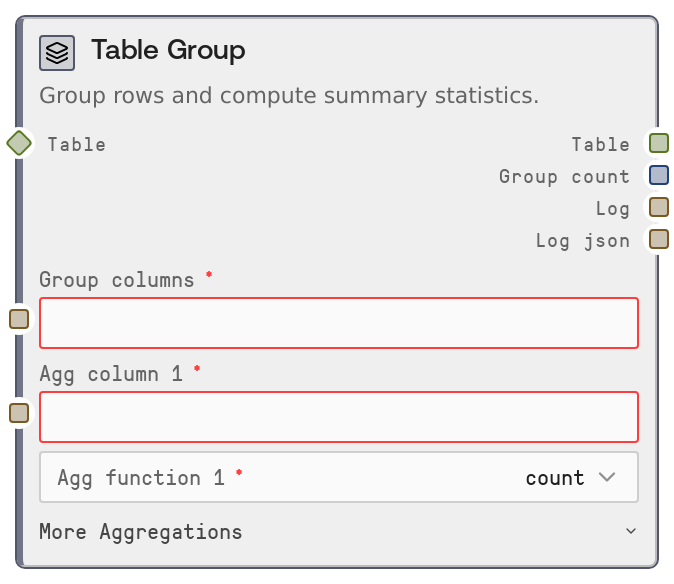
Table Group
SaltTableGroupBy groups a table by one or more key columns and computes summary statistics on up to three selected value columns. It supports common aggregations such as count, sum, mean, median, min, max, std, nunique, first, and last, and returns a compact aggregated table with metadata about the operation. Each aggregation produces a new column named using the pattern {column}_{function}.
Usage
Use this node to roll up or summarize tabular data, for example when calculating metrics per customer, per time period, or per category. It fits naturally after loading and cleaning data with nodes like SaltTableFromCSV, SaltTableFromJSON, SaltTableFilter, SaltTableFillNull, SaltTableCastType, or SaltTableSelectColumns, and before feeding results into SaltDisplayTable, SaltChart, or further joins via SaltTableJoin. Typical scenarios include: counting orders per customer, computing total revenue per product category, or calculating average session duration per user. Configure the node by specifying one or more group columns as a comma-separated list, then defining one to three (aggregation column, aggregation function) pairs. Ensure all referenced columns exist in the input table and choose aggregation functions appropriate to the data type (for example, sum or mean for numeric columns, count or nunique for identifiers or categories).
| Field | Required | Type | Description | Example |
|---|
| table | True | TABLE | The input table to group. Must be a Salt table or compatible dataframe-like structure. All columns referenced in group_columns and aggregation columns must exist in this table. Larger tables will require more memory and processing time. | A sales table with columns ["order_id", "customer_id", "order_date", "product_category", "quantity", "price", "region"]. |
| group_columns | True | STRING | Comma-separated list of column names to group by. At least one group column is required, and each listed column must exist in the input table. Whitespace around commas is ignored. Grouping uses dropna=false, so rows with nulls in group columns are included and grouped together rather than dropped. | "customer_id, region" to compute metrics per customer within each region. |
| agg_column_1 | True | STRING | Name of the first column to aggregate. Must be an existing column in the input table. Can be numeric or non-numeric, but numeric aggregations (sum, mean, std, median) are meaningful only for numeric data. | "price" to compute monetary metrics such as total revenue per group. |
| agg_function_1 | True | STRING | Aggregation function to apply to agg_column_1. Must be one of: "count", "sum", "mean", "median", "min", "max", "first", "last", "std", "nunique". | "sum" to compute total revenue per (customer_id, region) for the "price" column. |
| agg_column_2 | False | STRING | Optional second column to aggregate. Leave empty to skip this aggregation. If provided, it must be a valid column name in the input table. | "order_id" to later count orders per group with agg_function_2="count". |
| agg_function_2 | False | STRING | Aggregation function for agg_column_2. Must be one of: "count", "sum", "mean", "median", "min", "max", "first", "last", "std", "nunique". Ignored if agg_column_2 is empty. | "count" to compute the number of orders per (customer_id, region) using the "order_id" column. |
| agg_column_3 | False | STRING | Optional third column to aggregate. As with agg_column_2, leave empty to skip. If set, it must be an existing column in the input table. | "quantity" to track units sold per group when paired with a suitable aggregation function. |
| agg_function_3 | False | STRING | Aggregation function for agg_column_3. Must be one of: "count", "sum", "mean", "median", "min", "max", "first", "last", "std", "nunique". Ignored if agg_column_3 is empty. | "sum" to compute total quantity sold per (product_category, region) when aggregating the "quantity" column. |
Outputs
| Field | Type | Description | Example |
|---|
| table | TABLE | The grouped and aggregated table. It contains one row per unique combination of the specified group_columns, plus one column for each defined aggregation. Aggregation columns are named {column}_{function}, such as "price_sum" or "order_id_count". | With group_columns="customer_id, region" and aggregations (price, sum) and (order_id, count), the output columns could be ["customer_id", "region", "price_sum", "order_id_count"], where each row summarizes one (customer_id, region) group. |
| group_count | INT | The number of distinct groups produced by the operation. This equals the number of rows in the aggregated output table. | If grouping by customer_id and region yields 1,200 unique combinations, group_count will be 1200. |
| log | STRING | A human-readable description of the grouping and aggregation, including group columns, input row count, resulting group count, and the list of aggregations performed. | "Grouped by [customer_id, region]: 50,000 rows → 1,200 groups. Aggregations: sum(price), count(order_id)" |
| log_json | STRING | A JSON-formatted string with structured metadata about the operation, including input and output row counts and the grouping and aggregation parameters. | {"node_type": "SaltTableGroupBy", "input_rows": 50000, "output_rows": 1200, "parameters": {"group_columns": ["customer_id", "region"], "aggregations": {"price": "sum", "order_id": "count"}}} |
Important Notes
- Performance: Grouping and aggregating large tables can be CPU and memory intensive. Consider pre-filtering rows with SaltTableFilter and removing unused columns before grouping to improve performance.
- Limitations: Only up to three aggregation columns are configurable in a single node. To compute more metrics, chain multiple SaltTableGroupBy nodes or combine results using SaltTableJoin.
- Behavior: If no valid group_columns are provided, or if none of the specified aggregation columns exist, the node raises a clear error instead of producing an empty or incorrect table.
- Behavior: Grouping uses dropna=false, so rows with null values in group columns are included and form groups with null keys. This can produce extra groups representing missing categories.
- Data type compatibility: Numeric functions such as sum, mean, median, and std are intended for numeric columns. Applying them to non-numeric columns may cause errors or yield non-useful results; for text or ID columns, prefer count or nunique.
Troubleshooting
- Group column 'X' not found: At least one of the names in group_columns does not exist in the table. Check for typos, correct capitalization, and verify that upstream nodes (like SaltTableSelectColumns or SaltTableJoin) did not drop or rename the column.
- Aggregation column 'Y' not found: One of agg_column_1, agg_column_2, or agg_column_3 refers to a non-existent column. Confirm the column is present in the input table and that the input string does not contain leading or trailing spaces.
- At least one aggregation is required: All aggregation columns are empty or invalid. Set at least agg_column_1 to a valid column and choose an aggregation function from the supported list.
- Unexpected output column names: Aggregation columns are always named {column}_{function}. If you need different names, add a downstream transformation such as SaltTableSelectColumns or SaltTableCastType to rename or adjust them.
- Slow execution on large datasets: If the node runs slowly or consumes too much memory, reduce the number of group_columns, filter the input first, or aggregate in stages and merge smaller aggregated tables with SaltTableJoin.