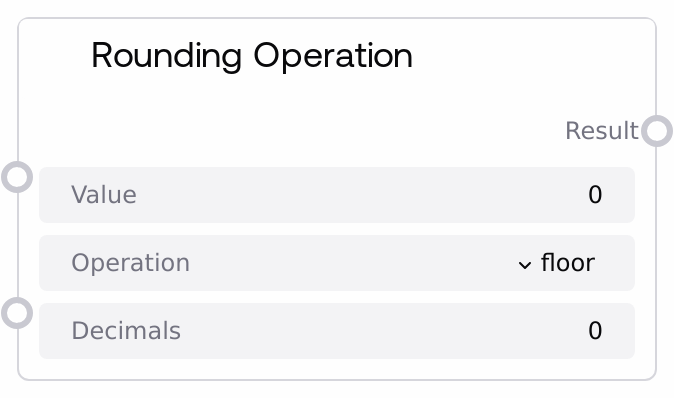
Rounding Operation
This node applies a chosen rounding strategy to a single floating-point value and returns the result as a float. It supports floor, ceiling, standard rounding with configurable decimal places, and truncation toward zero. Use it whenever you need deterministic numeric rounding before further calculations, comparisons, or display.
Usage
Use this node when you need to clean, normalize, or format a numeric value before passing it into logic, thresholds, or presentation layers. Typical scenarios include rounding sensor or metric outputs, preparing model scores for comparison, enforcing fixed decimal precision for logs or UI, and aligning values with business rules (such as rounding prices or percentages). Place it downstream of nodes that emit FLOAT values (for example, SaltFloatMathOperation, SaltAdvancedMathOperation, or SaltStatisticalOperation) and upstream of nodes that are sensitive to exact numeric values, such as SaltComparisonOperation, branching/conditional nodes, or string-formatting nodes. Choose floor for conservative lower bounds, ceil for safety margins or upper bounds, round to get symmetric rounding with a specific number of decimal places (ideal for currency or percentages), and trunc to simply drop the fractional part without shifting toward positive or negative infinity. Keep the decimals setting consistent with how downstream consumers interpret the value (for example, 2 decimals for monetary amounts).
| Field | Required | Type | Description | Example |
|---|
| value | True | FLOAT | The numeric value to be rounded. Must be a floating-point number within the range -1e10 to 1e10. Values are not clamped automatically beyond this range; the UI restricts configuration to this interval. This is the primary operand that the selected rounding operation will transform. | 72.958 |
| operation | True | ENUM | Specifies which rounding method to apply. Allowed values: floor (rounds down to the nearest integer), ceil (rounds up to the nearest integer), round (standard rounding to the nearest value at the specified number of decimal places), trunc (removes the fractional part, truncating toward zero, so -3.9 becomes -3). | round |
| decimals | True | INT | Number of decimal places to keep when using the round operation. Must be an integer from 0 to 10 inclusive. For operations floor, ceil, and trunc this parameter is ignored and the result will be an integer-valued float. | 2 |
Outputs
| Field | Type | Description | Example |
|---|
| result | FLOAT | The rounded numeric result produced by the selected operation. For floor, ceil, and trunc, the result is an integer value represented as a float (for example, 5.0 or -3.0). For round, the result is rounded to the specified number of decimal places while still stored as a FLOAT type. | 72.96 |
Important Notes
- Performance: The node performs a single elementary numeric operation and is effectively instantaneous, even when used many times within a large workflow.
- Limitations: The decimals parameter only affects the round operation; when using floor, ceil, or trunc, the decimals input has no effect and the output is always integer-valued (as a float).
- Behavior: Trunc (truncate) rounds toward zero, which differs from floor for negative values (for example, an input of -2.7 yields floor = -3.0 but trunc = -2.0). Choose carefully if you work with negative numbers.
- Behavior: If an invalid operation value is somehow provided (outside floor, ceil, round, trunc), the node falls back to returning 0.0, which can silently affect downstream logic if not checked.
Troubleshooting
- Unexpected 0.0 output: If the node frequently returns 0.0, verify that the operation input is exactly one of floor, ceil, round, or trunc. Any unsupported value causes a 0.0 fallback.
- Decimals not applied: If the output appears as an integer-valued float (like 13.0) despite setting decimals > 0, ensure that operation is set to round. The decimals parameter is ignored for floor, ceil, and trunc.
- Confusing results with negative values: If negative inputs seem to round in an unexpected direction, confirm whether you intended floor (toward negative infinity) or trunc (toward zero). Switching between them often resolves perceived discrepancies in rounding behavior.