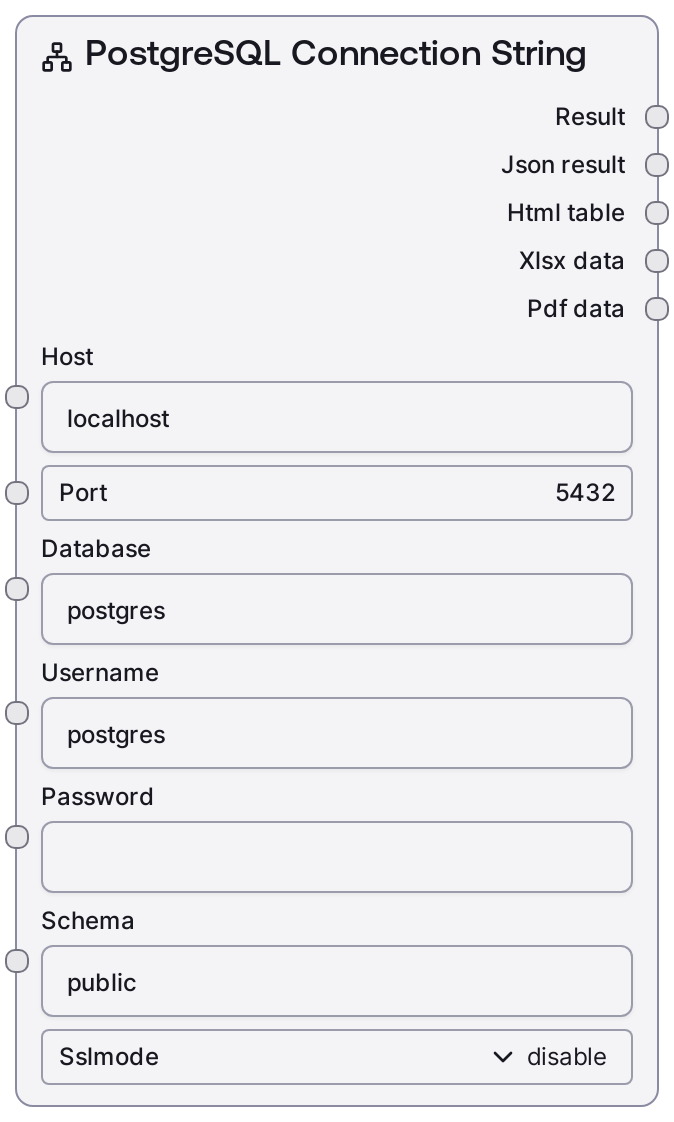
PostgreSQL Connection String
This node constructs a PostgreSQL database connection string from explicit connection parameters such as host, port, database, username, password, schema, and SSL mode. It standardizes how Postgres connection information is represented so downstream database nodes can connect consistently. The node is credential-aware and is designed as the entry point for Postgres-related workflows.
Usage
Use this node whenever you need to connect to a PostgreSQL database in a Salt workflow and want a clean, reusable connection URI. It typically appears early in a pipeline, where you define or parameterize database access, and its output is then fed into query or ingestion nodes such as SaltPostgresQuery, SaltPostgresExecute, or other Postgres/CData nodes that accept a connection string. Common scenarios include analytics pipelines (reading from reporting databases), ETL jobs (extracting data from Postgres into other systems), and automation flows that read or write records in response to AI decisions. You can either hard-code values like host/database for a fixed environment or expose them as inputs and drive them from configuration or environment nodes. Prefer this node over hand-typing URIs to avoid formatting mistakes and to keep connection configuration centralized. Pass the generated connection string into downstream nodes’ connection_string or equivalent connection input, and keep secrets in Salt credential storage rather than embedding them directly.
| Field | Required | Type | Description | Example |
|---|
| host | True | STRING | Hostname or IP address of the PostgreSQL server. Must be reachable from the Salt runtime environment. Use a bare hostname or IP; do not include protocol prefixes. | analytics-db.internal.company.local |
| port | True | INT | TCP port on which PostgreSQL listens. Must be between 1 and 65535. Default installations commonly use 5432. | 5432 |
| database | True | STRING | Name of the PostgreSQL database to connect to. It must exist on the target server, and the specified user must have access to it. | customer_analytics |
| username | True | STRING | PostgreSQL username for authentication. Ensure this role has sufficient privileges on the target database and schema. | reporting_user |
| password | True | PASSWORD | Password for the PostgreSQL user. Treated as sensitive information; use Salt credential management rather than hard-coding production secrets. | |
| schema | True | STRING | Default PostgreSQL schema that should be used when table names are not schema-qualified. Often `public`, but may be a dedicated application or analytics schema. | analytics |
| sslmode | True | CHOICE["disable", "require", "verify-ca", "verify-full"] | SSL mode for the connection. `disable` uses plain TCP with no encryption. `require` encrypts traffic but does not strictly verify certificates. `verify-ca` verifies that the server certificate is signed by a trusted CA, and `verify-full` additionally validates the server hostname. This must align with your database server’s SSL configuration. | require |
Outputs
| Field | Type | Description | Example |
|---|
| connection_string | STRING | A fully formatted PostgreSQL connection URI derived from the provided parameters. This string is intended for consumption by downstream database nodes that open connections to Postgres. | postgresql://reporting_user:@analytics-db.internal.company.local:5432/customer_analytics?sslmode=require&search_path=analytics |
Important Notes
- Performance: The node itself only assembles a string and is effectively instantaneous; performance considerations occur in downstream nodes that execute queries using this connection.
- Limitations: Only a single host and port are supported; multi-host high-availability connection strings (for example, certain cluster or failover formats) are not directly modeled through these inputs.
- Behavior: Incorrect
sslmode settings relative to server configuration (for example, using verify-full without proper certificates or hostname configuration) will cause connection attempts in downstream nodes to fail.
- Behavior: The
schema value is typically propagated into the connection string or related configuration; whether it becomes the effective default search_path depends on how underlying drivers and downstream nodes interpret it.
Troubleshooting
- Common Error 1: Downstream nodes report "could not connect to server" or "connection refused". Verify that
host and port are correct, the database server is running, and network/firewall rules allow access from the Salt environment.
- Common Error 2: Downstream nodes show authentication errors such as "password authentication failed for user". Confirm that
username and password are correct, that the user exists, and that it has privileges on the specified database.
- Common Error 3: SSL-related messages such as certificate verification failures or handshake errors when using
require, verify-ca, or verify-full. Adjust sslmode to match your server configuration or ensure that CA certificates and hostnames are configured correctly on the runtime host.
- Common Error 4: Queries in downstream nodes cannot find tables when names are not schema-qualified. Check that the
schema matches where your tables actually live, or explicitly reference tables as schema.table_name in queries.