If
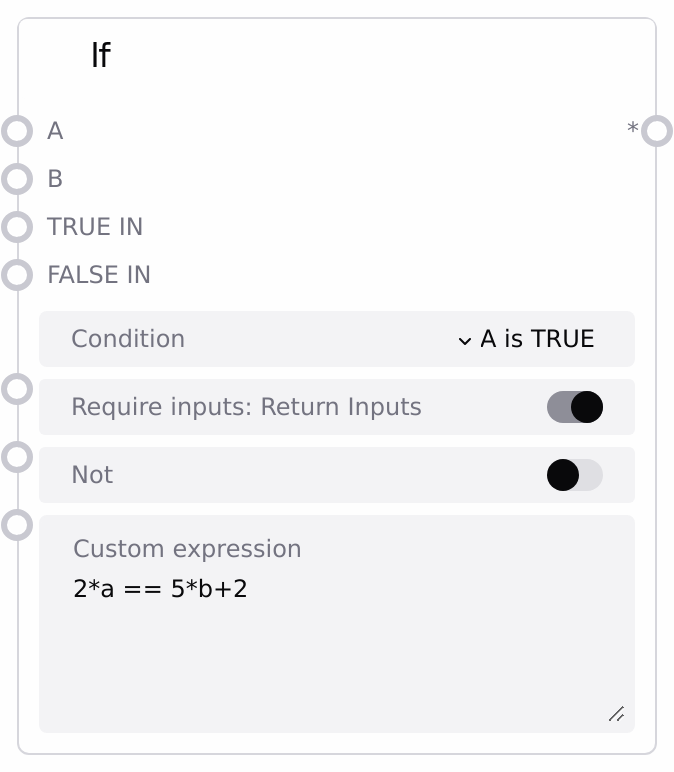
Usage
Use this node to implement conditional branching or gating in a Salt workflow. Typical scenarios include choosing between two processing branches (e.g., high- vs low-cost pipeline), deciding whether to run an expensive step based on a score or flag, or validating data before further processing. Connect A and B to upstream nodes producing the values you want to compare. If you want the node to choose between two data branches, also connect TRUE_IN and FALSE_IN and enable require_inputs.
Set condition to one of the built-in options (truth checks, equality/inequality, relational comparisons, identity, membership, or bitwise/logical operations). For more advanced logic, select CUSTOM and enter a Python-like expression in custom_expression using A/a and B/b, and optionally named globals from Memory Storage logic. Enable require_inputs ("Return Inputs") when your goal is to route either TRUE_IN or FALSE_IN forward; disable it ("Return Boolean") when you only need the boolean decision as input to downstream logic nodes. Place this node between value-producing nodes and the part of the pipeline that should receive either the chosen branch or the boolean flag. Keep expressions as simple as possible and ensure A and B are non-None and type-compatible for the condition you choose.
Inputs
| Field | Required | Type | Description | Example |
|---|---|---|---|---|
| condition | True | STRING (enum) | Condition to evaluate. Supported options: "A is TRUE", "B is TRUE", "A is NONE", "B is NONE", "A == B", "A != B", "A > B", "A >= B", "A < B", "A <= B", "A is B", "A is not B", "A in B", "B in A", "A & B", "A \| B", "A ^ B", "CUSTOM". Conditions that reference A or B require those inputs to be connected and type-compatible. | A > B |
| require_inputs | True | BOOLEAN | Selects output mode. If true ("Return Inputs"), the node forwards TRUE_IN when the condition evaluates to true and FALSE_IN when it evaluates to false. If false ("Return Boolean"), the node outputs a boolean and ignores TRUE_IN and FALSE_IN. | True |
| NOT | True | BOOLEAN | Inverts the result after evaluating the condition. For boolean results, True becomes False and False becomes True. For non-boolean results that support bitwise NOT, it applies bitwise inversion (~ret). | False |
| custom_expression | True | STRING | Expression used only when `condition` is "CUSTOM". Supports Python-like syntax using variables A/a and B/b, plus any named globals from Memory Storage nodes. If the expression references A or B, those inputs must not be None. Unsupported or invalid expressions cause evaluation to fail and the result to default to False. | a is not None and b is not None and 2*a == 5*b + 2 |
| A | False | ANY | First value to use in the condition or custom expression. Required for conditions that mention A (e.g., "A is TRUE", "A == B", "A in B"). Must be compatible with B for binary operations like comparisons or bitwise operations. | 0.9 |
| B | False | ANY | Second value to use in the condition or custom expression. Required for conditions that mention B (e.g., "B is TRUE", "A == B", "B in A"). Must be type-compatible with A for the selected operation. | 0.8 |
| TRUE_IN | False | ANY | Value forwarded when the final condition result (after any NOT) is true, used only if `require_inputs` is true. Can be any Salt data type such as image, text, configuration, or structured data. | Use high-quality image enhancement branch |
| FALSE_IN | False | ANY | Value forwarded when the final condition result (after any NOT) is false, used only if `require_inputs` is true. Typically represents a fallback or cheaper branch. | Use baseline enhancement branch |
Outputs
| Field | Type | Description | Example |
|---|---|---|---|
| * | ANY | Single output whose type depends on `require_inputs`. If `require_inputs` is true, outputs either TRUE_IN (when the condition is true) or FALSE_IN (when the condition is false). If `require_inputs` is false, outputs a boolean indicating the evaluation result. | With require_inputs = true: an image object from the chosen branch; with require_inputs = false: true |
Important Notes
- Performance: The node uses lazy evaluation to determine which inputs are needed based on the chosen condition and whether inputs are required, avoiding unnecessary computation of unused branches.
- Limitations: Comparisons and membership checks like
A > B,A <= B,A in B, andB in Arequire A and B to be types that implement those operations; otherwise an error is logged and the condition defaults to False. - Behavior: If an error occurs while processing a condition or custom expression, the node logs the error and treats the result as False, which either returns FALSE_IN (if
require_inputsis true) or the boolean False. - Behavior: For the
CUSTOMcondition, the node determines which inputs must be evaluated by scanning the expression for references toa/Aandb/B. If the expression references an input that is None, the computation may be skipped or fail, effectively resulting in a False outcome.
Troubleshooting
- Condition always evaluates to False: Verify that A and B are connected, non-None where required, and of compatible types for the selected condition. For
CUSTOM, check that the expression is valid and referencesA/aandB/bcorrectly. - Output is boolean when a branch value is expected: Confirm that
require_inputsis set to true ("Return Inputs") and that both TRUE_IN and FALSE_IN are connected. Ifrequire_inputsis false, the node always outputs a boolean and ignores branch inputs. - Branches appear inverted: Check whether
NOTis enabled. Disable it if you want the raw condition result, or adjust the condition so the selection matches your intended logic. - Errors logged about processing condition and defaulting to FALSE: This usually indicates incompatible types or an invalid custom expression. Simplify the condition, ensure A and B support the required operations, and for
CUSTOMtest the expression with simple known values first.