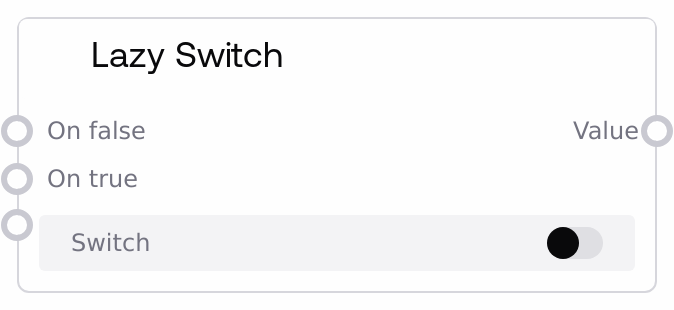
Lazy Switch
Lazy Switch routes one of two possible inputs depending on a boolean flag. It is lazy: only the selected branch is required and evaluated, so the inactive branch can be left unconnected or computationally heavy without being triggered. This makes it ideal for conditional logic around expensive operations or large data flows.
Usage
Use Lazy Switch when you need to choose between two alternative values (images, prompts, numbers, objects, and similar) based on a boolean condition, while avoiding unnecessary computation on the unused path. It typically sits in the logic portion of your pipeline, after nodes that decide or compute a boolean condition (for example, comparison nodes, user-controlled toggles, or workflow configuration inputs) and before nodes that consume the selected value (for example, model execution, image processors, text transformers). A common pattern is: (1) build two alternative branches (such as a heavy upscaling chain versus a simple passthrough), (2) feed their outputs into on_false and on_true, and (3) drive switch with a boolean from a configuration or control node. The lazy behavior means only the actually chosen branch must be connected and computed; the other can be left unconnected without causing errors. Combine this node with other SALT/Logic components such as SaltLazyConditional or list/index-based routers to build more complex conditional workflows, using Lazy Switch wherever you need a simple true/false fork over any wildcard data type.
| Field | Required | Type | Description | Example |
|---|
| switch | True | BOOLEAN | Controls which input is forwarded. When true, the node outputs on_true; when false, it outputs on_false. This must be a boolean value coming from a prior node, such as a comparison, a toggle, or a configuration input. | true |
| on_false | True | WILDCARD | Value to output when switch is false. This is a lazy wildcard input: it can be any supported type (image batch, text prompt, number, object, and so on), and it is only required and evaluated if switch is false. If switch is true, this branch is not demanded, so its upstream chain is not executed. | An image batch representing the original, non-upscaled images used when a boolean Enable Upscale flag is false. |
| on_true | True | WILDCARD | Value to output when switch is true. This is also a lazy wildcard input, evaluated only if switch is true. Any upstream chain providing this value will only run when the true branch is selected, which is useful for heavy operations such as high-resolution upscales or complex prompt-processing pipelines. | A high-resolution upscaled image batch produced by an advanced upscaling chain, used when a boolean Enable Upscale flag is true. |
Outputs
| Field | Type | Description | Example |
|---|
| value | WILDCARD | The selected value from either on_false or on_true, matching the data type of the chosen branch. Downstream nodes should treat this output as if they were directly connected to the selected input branch, such as an image batch, text string, numeric value, or structured object. | An image batch of 4 images, either original or upscaled, passed to a final save or display node depending on the switch state. |
Important Notes
- Performance: Because inputs are marked lazy, only the active branch is required and computed; this can significantly reduce unnecessary computation for heavy branches like image generation, upscaling, or large text processing chains.
- Limitations: Both branches should ultimately provide compatible types for downstream consumers (for example, both image-like when feeding an image processor), even though the node itself accepts any wildcard type.
- Behavior: If the chosen branch input is missing or unconnected, the node may return a null or invalid value, which can cause downstream errors; always ensure the branch corresponding to the expected switch value is properly wired.
- Behavior: The unselected branch is not evaluated at all during a run, so any side effects or computations in that branch will not occur unless it becomes the selected branch based on the switch value.
Troubleshooting
- Selected branch output is None or invalid: Symptom: downstream nodes fail or report missing data when switch is true or false. Cause: the active branch input (on_true or on_false) is unconnected or its upstream chain does not produce a value. Fix: verify that the branch corresponding to the current switch value is fully wired and returns a valid output type.
- Downstream type mismatch errors: Symptom: a node after Lazy Switch reports an unexpected type, such as expecting an image but receiving text. Cause: on_true and on_false feed different, incompatible types into a downstream node that expects a specific type. Fix: ensure both branches produce compatible data types for the shared downstream path or separate the branches so they feed different downstream nodes.
- Workflow appears to compute both branches: Symptom: you see upstream nodes in both branches running even when only one should be active. Cause: those branch outputs might be used elsewhere in the workflow, forcing their evaluation independent of Lazy Switch. Fix: confirm that heavy branches are only consumed through Lazy Switch or other lazy-enabled nodes, and remove any direct connections that bypass the lazy routing.
- Toggling switch does not change output: Symptom: changing a toggle or condition driving switch has no visible effect. Cause: the switch input may be wired to the wrong source or overridden by a constant. Fix: trace the boolean signal path and ensure the intended control node output is connected directly to the switch input, then re-run the workflow.