Storage List & URL
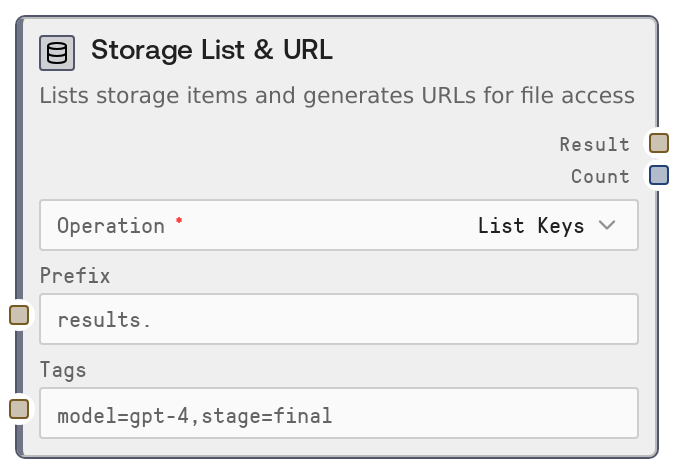
Storage List & URL lets you inspect persistent storage and generate shareable access links. It supports three operations: listing keys within a namespace (optionally filtered by prefix and tags), listing all namespaces, and generating a signed download URL for a specific key. The node returns both a string result (JSON array or URL) and a count so you can build dynamic, data-driven workflows.
Usage
Use this node when you need to discover, filter, or externally share data stored in Salt persistent storage. Common scenarios include enumerating stored results after writes (List Keys), discovering which namespaces exist for your user (List Namespaces), and generating download links to share stored files with external systems or users (Get Signed URL). Place it after storage-writing or data-processing nodes and before iteration, parsing, or integration nodes that consume the listed keys, namespaces, or URLs. For example, you might write results with a storage write node, then use Storage List & URL in List Keys mode to build a list of artifacts, loop over them in a downstream iterator, or send a signed URL to a chat or email integration.
Inputs
| Field | Required | Type | Description | Example |
|---|---|---|---|---|
| operation | True | COMBO | What action to perform. Options: List Keys (returns keys in a namespace), List Namespaces (returns all namespaces for your user), or Get Signed URL (returns a temporary download link for a single key). | List Keys |
| namespace | False | STRING | Namespace to operate in for List Keys and Get Signed URL. Ignored for List Namespaces. If left blank or whitespace, it defaults to "default". Must exactly match the namespace used when the data was written. | project-alpha |
| prefix | False | STRING | Key prefix filter used only with List Keys. When set, only keys whose paths start with this string are returned. Useful for grouping runs or experiments under a common prefix. | runs/2024-04-01/ |
| tags | False | STRING | Optional metadata tag filter for List Keys. Provide a comma-separated list of key=value pairs. Only keys whose stored metadata matches all specified tags are returned. Whitespace is trimmed. | model=gpt-4o,stage=final,customer_id=acme-co |
| key_path | False | STRING | Exact key path for which to generate a signed URL, used only with Get Signed URL. Must be a valid storage key and should match the key used by the storage write operation. | runs/2024-04-01/summary_report.pdf |
| expiration_hours | False | INT | How long the signed URL should remain valid, in hours. Valid range is 1 to 168 (up to 7 days). Shorter durations improve security; use higher values only if downstream consumers need extended access. | 24 |
Outputs
| Field | Type | Description | Example |
|---|---|---|---|
| result | STRING | Primary result of the operation. For List Keys, this is a JSON-encoded array of key path strings. For List Namespaces, this is a JSON-encoded array of namespace name strings. For Get Signed URL, this is a single URL string that can be used to download the stored object during its validity window. | ["runs/2024-04-01/summary.json","runs/2024-04-01/logs.txt"] |
| count | INT | Number of items returned or affected. For List Keys, the number of keys in the JSON array. For List Namespaces, the number of namespaces. For Get Signed URL, always 1 when successful. | 2 |
Important Notes
- Performance: Listing keys in very large namespaces can be slower and more resource-intensive; use prefix and tags filters to narrow the result set when possible.
- Limitations: Get Signed URL can only generate links for existing keys; if the key does not exist, the node raises a key-not-found error instead of returning a URL.
- Behavior: If namespace is left empty or only whitespace, it automatically falls back to the "default" namespace, which may differ from your intended project-specific namespace.
- Behavior: List Namespaces ignores namespace, prefix, tags, key_path, and expiration_hours; only the selected operation matters for that mode.
- Security: Signed URLs grant temporary read access to the underlying object; treat them as sensitive and keep expiration_hours minimal for confidential data.
Troubleshooting
- Key not found in namespace: This occurs when using Get Signed URL with a key_path that does not exist under the given namespace. Double-check the namespace and key path for typos and ensure the data was written successfully with those exact values.
- Storage List & URL failed: User ID is not available in this context.: The platform did not supply salt_user_id. Ensure the node is run within a standard Salt workflow context where authentication is configured, and avoid calling it from unsupported environments.
- Unknown operation value: The operation input has an invalid value. Ensure it is exactly one of: List Keys, List Namespaces, or Get Signed URL.
- Unexpected empty results with List Keys: If you get an empty list but expect keys, verify that namespace is correct and that prefix and tags are not over-restrictive (try clearing them to confirm keys exist).