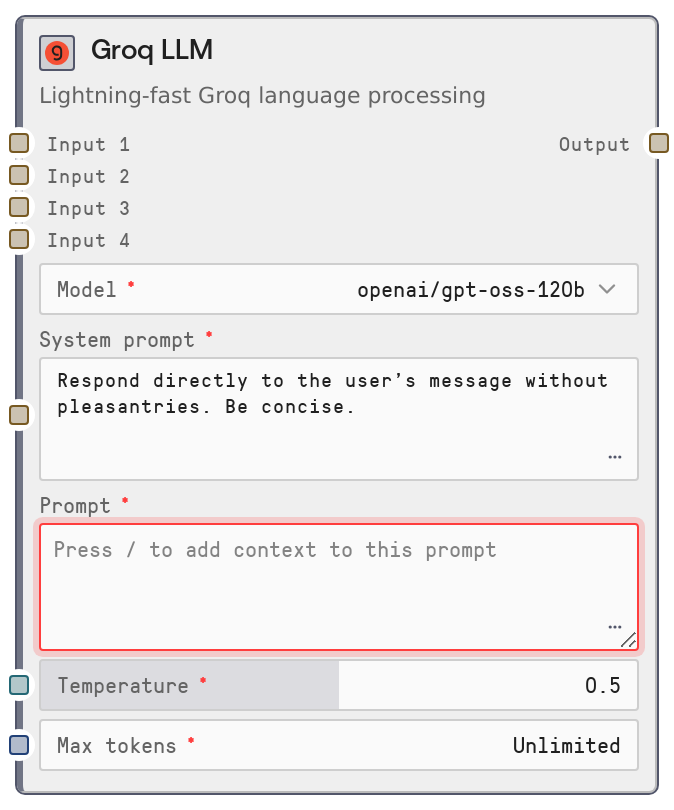
Groq LLM
LiteLLMGroq is a legacy LLM node that routes prompts to Groq models through the shared LiteLLM service. It lets you select a Groq model, provide a system prompt and user prompt (with dynamic context variables), and returns a single text response. The node is marked as Deprecated and is kept mainly for backward compatibility with older workflows; new flows should use the unified SaltLLM node instead.
Usage
Use LiteLLMGroq in older or migrated workflows that were built around the LiteLLM* family and specifically need Groq as the provider. Place this node after any nodes that gather or prepare context (for example, knowledgebase lookups or text preprocessing) and before downstream logic that consumes generated text, such as SaltAgent, routing or branching nodes, or storage and writer nodes. It accepts a main prompt plus up to four string context inputs (input_1–input_4) that can be referenced inside the prompt as {{input_1}}, {{input_2}}, {{input_3}}, and {{input_4}}. Under the hood it calls the central LiteLLM microservice, which handles Groq model invocation and returns a single text output. In new designs, prefer the SaltLLM node with Groq-backed models; LiteLLMGroq should mainly be used to keep existing pipelines functioning until you migrate them.
| Field | Required | Type | Description | Example |
|---|
| model | True | STRING (enumerated list) | The Groq model to use for generation. Values are populated dynamically from the LiteLLM service for provider "groq" (with a cached fallback catalog if the service is unreachable). You must pick one of the listed options; arbitrary strings are not allowed. | groq/llama-3.1-70b-versatile |
| system_prompt | True | STRING | Instruction text that sets behavior, tone, and formatting for the model. If non-empty, it is sent as a system message. Can be multiline and should be concise but explicit, as it conditions all subsequent responses. | You are a precise financial analyst. Answer using bullet points and avoid any casual language. |
| prompt | True | DYNAMIC_STRING | The main user prompt. You can embed placeholders like {{input_1}}–{{input_4}} which will be replaced with the corresponding optional inputs using simple string substitution. Designed to connect to other nodes by flowing their outputs into these inputs. | Summarize the following research for an executive audience: {{input_1}} Highlight risks and opportunities in no more than 300 words. |
| temperature | True | FLOAT | Controls randomness and creativity of outputs. A value of 0 makes responses more deterministic; 1 makes them more varied. Valid range is 0 to 1 and it is exposed as a slider in the UI. | 0.4 |
| max_tokens | True | INT | Upper bound on the number of tokens in the response. Zero typically means to use the service default. Positive values are clamped between 0 and 4096. Higher values allow longer outputs but increase cost and latency. | 1024 |
| input_1 | False | STRING | Optional context string, commonly connected from a knowledgebase or retrieval node. Accessible in the prompt as {{input_1}}. Empty string if not provided. | Transcript of the last customer success call about the Acme rollout, including objections and follow-up items. |
| input_2 | False | STRING | Second optional context string, also substituted into the dynamic prompt. Useful for combining multiple knowledge sources or partial results. | Internal product spec for the Acme rollout, including SLAs, feature availability, and integration details. |
| input_3 | False | STRING | Third optional context string for additional background, prior messages, or precomputed analysis. | List of known issues from the last three Acme incident reports with timestamps and severity levels. |
| input_4 | False | STRING | Fourth optional context string, letting you merge even more external data into a single compiled prompt. | Most recent NPS survey responses from Acme stakeholders about the reliability of the platform. |
Outputs
| Field | Type | Description | Example |
|---|
| Output | STRING | The text generated by the selected Groq model in response to the compiled messages, which include the system prompt and the user prompt with inlined context inputs. Downstream nodes treat this as a plain string, typically passing it into agents, routers, parsers, or storage nodes. | Based on the provided call transcript and product specifications, Acme is primarily concerned about deployment risk, integration timelines, and support responsiveness. Key risks include... |
Important Notes
- Performance: Requests go through the LiteLLM microservice with a default timeout that can be up to several minutes, so very long or complex prompts can be slow; avoid unnecessarily large context strings when low latency is important.
- Limitations: This node is explicitly categorized under a Deprecated menu and may not receive new features or provider-specific enhancements; plan to migrate to SaltLLM for long-term workflows.
- Behavior: The prompt field is treated as a simple template and every occurrence of {{input_n}} is replaced with the corresponding input value using straightforward string replacement; there is no validation if a placeholder is missing or misspelled.
- Behavior: If max_tokens is too low and the Groq service truncates the response, the underlying logic records a warning; if you see answers cut off mid-sentence, increase max_tokens and re-run.
- Behavior: Available model options are cached per provider for about one hour; recently added or removed Groq models might not appear or disappear immediately until the cache expires or the runner process is restarted.
Troubleshooting
- Common Error 1: "Model ID not found for model: " – This occurs when the selected model name is not present in the current Groq model list. Re-open the node, choose a model from the dropdown again, and re-run the workflow. If a model was recently added, wait for the model cache to refresh or restart the execution environment.
- Common Error 2: Very slow or seemingly hanging executions – Very long context strings in input_1–input_4 combined with high max_tokens can cause long waits. Reduce the amount of text passed as context, lower max_tokens, or break the task into multiple smaller calls.
- Common Error 3: Output appears to ignore some context – Ensure your dynamic prompt actually references the context inputs using the correct placeholders (for example, {{input_1}}). If you forget the placeholder or mistype it, the context is never included in the request sent to Groq.
- Common Error 4: Node cannot be added due to LLM usage limits – Some workspaces limit the number of LiteLLM nodes (including LiteLLMGroq) per workflow. If you hit a limit or validation error related to node counts, consolidate multiple legacy LiteLLM nodes into a single SaltLLM node or reduce the number of LLM steps.