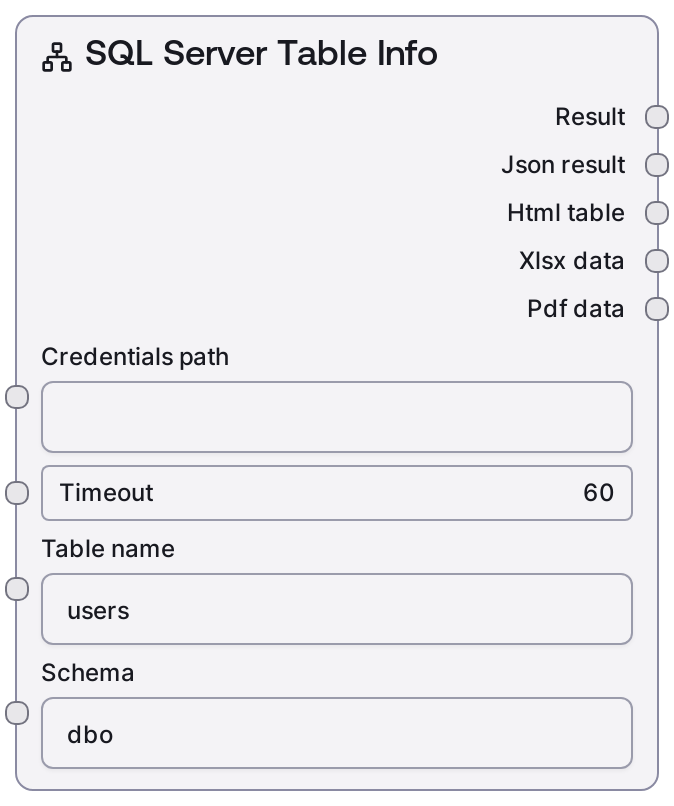
SQL Server Table Info
This node inspects a Microsoft SQL Server table and returns its structural metadata, including column names, data types, nullability, and common constraints. It uses configured MSSQL credentials and a shared database base node to establish the connection and perform the metadata lookup. Outputs are provided as both human-readable text and structured JSON, making the node suitable for documentation, validation, and automated query building.
Usage
Use this node when you need to understand or validate the structure of a SQL Server table before building queries or performing data operations. A common workflow is: (1) configure and store MSSQL credentials referenced by credentials_path, (2) optionally use SaltMSSQLListTables to discover tables in a schema, (3) pass the chosen schema_name and table_name into SaltMSSQLTableInfo, and (4) feed its JSON output into nodes that generate SQL, perform schema checks, or construct data-entry forms. Place this node early in your pipeline when schema knowledge is required for downstream logic, and keep schema_name/table_name synchronized with your database naming conventions and environments (dev/stage/prod).
Inputs
| Field | Required | Type | Description | Example |
|---|---|---|---|---|
| credentials_path | True | STRING | Path to the stored MSSQL credentials matching the 'mssql' credential_template. This typically points to a JSON or configuration file holding connection parameters such as server, database, username, and password. The file must be accessible to the Salt runtime and should not be committed with real secrets. | /workspace/credentials/mssql_reporting_env.json |
| timeout | False | INT | Maximum number of seconds to wait for the metadata request before it is aborted. Use a higher value for slow networks or heavily loaded databases. Must be a positive integer; if omitted, a sensible default from the base node is used. | 30 |
| schema_name | False | STRING | Name of the SQL Server schema where the table resides. If not provided, the connection's default schema (commonly 'dbo') is assumed. Must correspond to an existing schema the configured user can access. | sales |
| table_name | True | STRING | The exact name of the table whose metadata you want to retrieve. Combined with schema_name, it must uniquely identify a table in the target database. If the table does not exist or is not accessible, the node will fail. | orders |
Outputs
| Field | Type | Description | Example |
|---|---|---|---|
| text | STRING | Human-readable description of the table structure. Typically includes the fully-qualified table name followed by a list of columns with their data types, nullability, and key information, plus a summary of important constraints. Ideal for logs, documentation, or natural-language reasoning steps. | Table [sales].[orders] Columns: - order_id (INT, NOT NULL, PRIMARY KEY) - customer_id (INT, NOT NULL, FOREIGN KEY -> sales.customers.customer_id) - order_date (DATETIME, NOT NULL, default = getdate()) - status (NVARCHAR(50), NULL) - total_amount (DECIMAL(18,2), NOT NULL) Constraints: - PK_orders (PRIMARY KEY CLUSTERED on order_id) - FK_orders_customer (FOREIGN KEY customer_id REFERENCES sales.customers(customer_id)) |
| json | JSON | Structured JSON representation of the table metadata. Includes table and schema names, a list of column definitions (with data types, length/precision, nullability, default values, and key flags), and constraint details where available. This is suitable for programmatic consumption in downstream nodes that generate SQL, validate schemas, or auto-build user interfaces. | {'schema': 'sales', 'table': 'orders', 'columns': [{'name': 'order_id', 'data_type': 'int', 'is_nullable': False, 'is_primary_key': True, 'is_foreign_key': False, 'max_length': None, 'precision': 10, 'scale': 0, 'default_value': None}, {'name': 'customer_id', 'data_type': 'int', 'is_nullable': False, 'is_primary_key': False, 'is_foreign_key': True, 'references': {'schema': 'sales', 'table': 'customers', 'column': 'customer_id'}}, {'name': 'order_date', 'data_type': 'datetime', 'is_nullable': False, 'is_primary_key': False, 'is_foreign_key': False, 'default_value': 'getdate()'}, {'name': 'status', 'data_type': 'nvarchar', 'is_nullable': True, 'is_primary_key': False, 'is_foreign_key': False, 'max_length': 50, 'default_value': None}], 'constraints': [{'name': 'PK_orders', 'type': 'PRIMARY KEY', 'columns': ['order_id']}, {'name': 'FK_orders_customer', 'type': 'FOREIGN KEY', 'columns': ['customer_id'], 'references': {'schema': 'sales', 'table': 'customers', 'columns': ['customer_id']}}]} |
Important Notes
- Performance: The node only queries metadata, which is typically fast, but slow or remote SQL Server instances can still introduce noticeable latency. Increase timeout for busy production databases.
- Limitations: The metadata model focuses on common relational details (columns, data types, keys, and typical constraints) and may not expose highly specialized SQL Server features such as full-text indexes or advanced partitioning in its JSON output.
- Behavior: This node shares the 'mssql' credential_template with other MSSQL nodes (such as SaltMSSQLQuery and SaltMSSQLExecute). A change or misconfiguration in those credentials can cause multiple MSSQL nodes to fail simultaneously.
- Behavior: When the specified schema or table does not exist, the node fails with an error instead of returning an empty result. It is good practice to call SaltMSSQLListTables first to validate that the table actually exists.
Troubleshooting
- Error: table or object not found: Confirm that schema_name and table_name exactly match the database objects, including spelling. Use SaltMSSQLListTables to inspect available tables in the target schema and adjust your inputs accordingly.
- Authentication or login failed: If you receive login or authorization errors, verify that credentials_path points to the correct secret file and that it contains valid SQL Server connection details. Ensure the referenced user has permission to read metadata for the specified schema and table.
- Request timed out: If the node times out, increase the timeout input and verify that the SQL Server instance is reachable and not under heavy load. For high-latency connections (for example, cross-region or VPN), consider running schema inspection steps during off-peak times.
- Missing or partial metadata: If some expected columns or constraints are missing in the JSON output, double-check that you are connected to the correct database and that your user has sufficient privileges to view all metadata. Restricted roles may only see a subset of schema information.