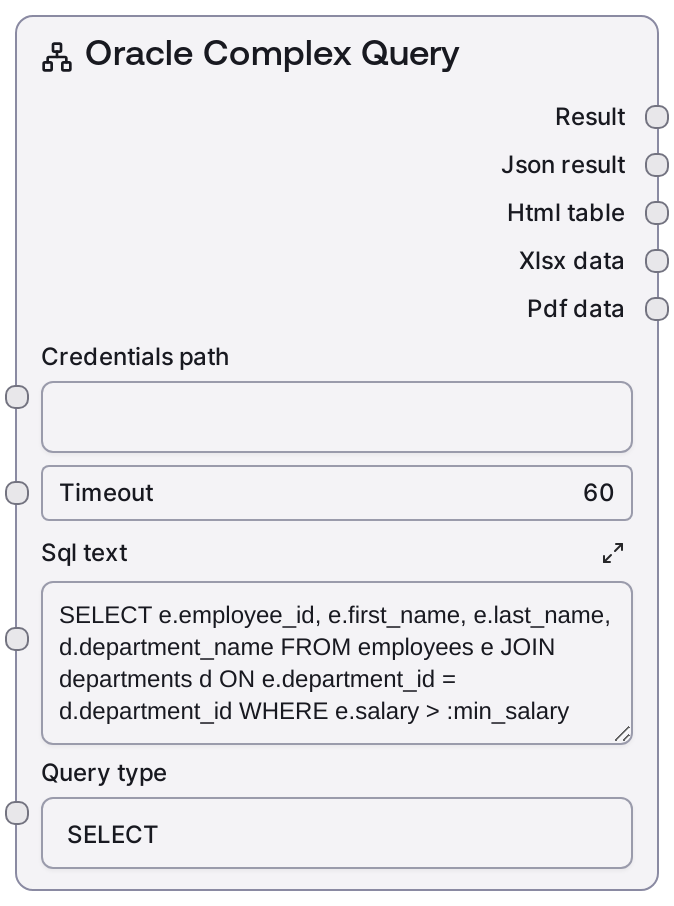
Oracle Complex Query
This node submits complex Oracle SQL statements to the Oracle integration service using the supplied connection URI and query parameters. It is designed for advanced read-style queries involving multiple tables, joins, aggregations, and analytic/window functions. The node returns a formatted text summary for quick inspection along with structured JSON data that can be reused downstream in the workflow.
Usage
Use SaltOracleComplexQuery when you need to run sophisticated queries against an Oracle database rather than simple single-table selects. Typical workflows start with a credentials or connection node that provides the Oracle connection URI, followed by an object or text node that supplies the SQL and any parameters. Place this node after configuration/credentials nodes (for example, nodes that hold the Oracle connection URI or environment configuration) and before nodes that parse, transform, or export tabular data. Common downstream consumers include nodes that convert table-like JSON into CSV, feed rows into analytics or LLM prompts, or write results into other databases or storage services. It pairs well with configuration nodes that store query templates, list/object nodes that hold parameter maps, and follow-up nodes that summarize or visualize query results. For best results, keep your SQL fully specified (including schemas where needed), validate parameter names and types, and test on smaller result sets before scaling up to large data volumes.
| Field | Required | Type | Description | Example |
|---|
| connection_uri | True | STRING | Full Oracle connection URI or DSN used by the Oracle service to connect to the target database. Typically includes host, port, service name or SID, and authentication information (directly or via an alias). Must point to a reachable Oracle instance with appropriate network access and permissions. | oracle:thin:@//db-prod.internal.company.com:1521/FINANCE |
| sql | True | STRING | The Oracle SQL statement to execute. Intended for complex SELECT-style queries using multiple joins, subqueries, aggregations, window functions, and advanced clauses. Must be valid Oracle SQL; typically a single statement, not a batch of semicolon-separated commands. | SELECT d.department_name, e.employee_id, e.last_name, SUM(s.amount) AS total_sales FROM departments d JOIN employees e ON e.department_id = d.department_id JOIN sales s ON s.employee_id = e.employee_id WHERE s.sale_date BETWEEN DATE '2024-01-01' AND DATE '2024-03-31' GROUP BY d.department_name, e.employee_id, e.last_name HAVING SUM(s.amount) > 50000 ORDER BY d.department_name, total_sales DESC |
| parameters_json | False | STRING | JSON object representing bind parameters for the SQL statement. Keys should match the named parameters in the SQL (e.g., :start_date, :min_total) and values must be serializable to the Oracle driver’s supported types (dates as strings in an agreed format, numbers, strings, etc.). Leave empty when no bind parameters are used. | {"start_date": "2024-01-01", "end_date": "2024-03-31", "min_total": 50000} |
| query_mode | False | STRING | Logical query type or mode hint for the Oracle service, such as 'READ_ONLY', 'ANALYTIC', or similar. This can be used by the backend to route or optimize the request. If not specified, a default read/query mode is used. | READ_ONLY |
| timeout_seconds | False | INT | Maximum time in seconds the node should wait for the Oracle service to complete the query before aborting. Use lower values for interactive/UX-sensitive workflows and higher values for heavy analytics queries. Must be a positive integer. | 60 |
| max_rows | False | INT | Optional limit on the number of rows returned. This may be enforced either by the service or by adding an effective cap on the result set. Useful to avoid pulling excessively large datasets into the workflow. Must be a positive integer if provided. | 1000 |
Outputs
| Field | Type | Description | Example |
|---|
| text | STRING | Human-readable text representation of the query outcome, such as a formatted table preview, a summary of row counts, and possibly truncated sample rows. This is useful for inspection, logging, or feeding directly into text-oriented nodes or LLM prompts. | Query executed successfully. Rows returned: 125 Columns: department_name, employee_id, last_name, total_sales Top 3 rows: 1) SALES, 104, Johnson, 153240.75 2) SALES, 97, Patel, 149832.10 3) MARKETING, 88, Chen, 98210.50 |
| data | JSON | Structured JSON payload containing the full result set and metadata suitable for programmatic use. Commonly includes an array of rows (as objects keyed by column name), and may include column metadata, row counts, or execution details. This is the primary output for downstream data processing, transformation, or export. | { "columns": ["DEPARTMENT_NAME", "EMPLOYEE_ID", "LAST_NAME", "TOTAL_SALES"], "rows": [ {"DEPARTMENT_NAME": "SALES", "EMPLOYEE_ID": 104, "LAST_NAME": "Johnson", "TOTAL_SALES": 153240.75}, {"DEPARTMENT_NAME": "SALES", "EMPLOYEE_ID": 97, "LAST_NAME": "Patel", "TOTAL_SALES": 149832.10} ], "row_count": 125, "execution_ms": 842 } |
Important Notes
- Performance: Complex joins, aggregations, and window functions can be expensive on large tables; use WHERE filters, proper indexing, and the max_rows input to keep response times manageable.
- Limitations: This node is designed for query-style statements; using it for heavy DML or multi-statement scripts is not recommended and may be rejected or behave unpredictably.
- Behavior: Result sets may be truncated or limited depending on max_rows or service-side safety limits; always check row_count and related metadata in the JSON output.
- Behavior: If the Oracle service or database is unreachable, the node will fail fast with a connection or timeout error rather than retrying indefinitely; design workflows to handle such failures gracefully.
Troubleshooting
- ORA-00933 / ORA-00936 / syntax errors: These indicate invalid Oracle SQL syntax. Validate the SQL directly against your database (e.g., using SQL Developer), ensure you are using Oracle-specific syntax, and remove trailing semicolons or unsupported constructs.
- Bind parameter mismatch: Errors mentioning missing or invalid bind variables usually mean the JSON parameter keys don’t match the placeholders in the SQL (e.g., :start_date). Align the parameter names and ensure values are of the correct type and format (especially dates and numbers).
- Timeout exceeded: If the query frequently times out, simplify the SQL, add filters to reduce scanned data, increase timeout_seconds, or work with your DBA to add or adjust indexes.
- Empty or unexpectedly small result set: Verify WHERE conditions (particularly date ranges and joins), confirm that the connection_uri points to the intended environment (dev/test/prod), and test the query directly on the same database to confirm the data actually matches your filters.