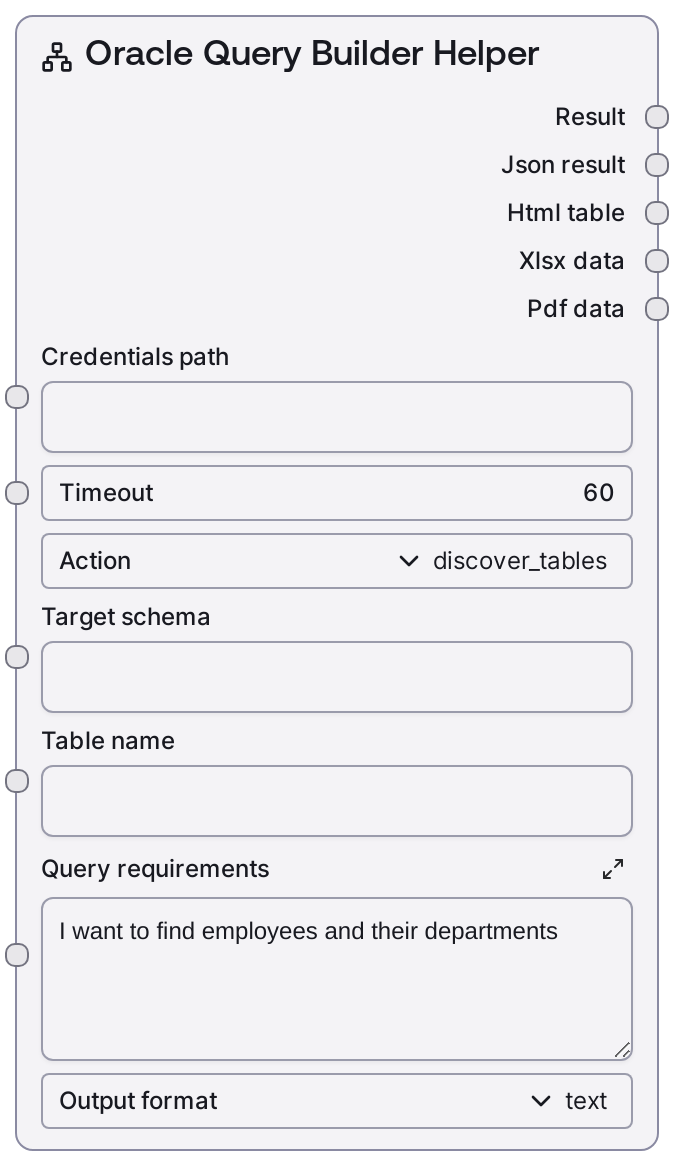
Oracle Query Builder Helper
SaltOracleQueryBuilder is an interactive helper for exploring an Oracle database and scaffolding SQL queries. It can list tables in a schema, inspect table columns, suggest simple JOIN relationships, and build and execute a basic query from natural-language-style requirements. Results can be returned in multiple formats for downstream analysis or reporting.
Usage
Use this node when you need to understand an Oracle schema and quickly assemble queries without manually writing SQL from scratch. Typical workflows include: (1) early exploration using action="discover_tables" to list available tables (optionally within a specific target_schema), then action="get_table_columns" to inspect column structures of key tables; (2) relationship discovery with action="suggest_joins" on a chosen table_name to receive join recommendations (for example, joining employees to departments) and then porting those suggestions into manual SQL or other query-building nodes; and (3) guided query building with action="build_query", where you describe requirements in query_requirements (such as "I want to find employees and their departments") and the node constructs and executes a basic SELECT query, returning both the data and the generated SQL. In a typical pipeline, place this node after Oracle connectivity/test nodes (like SaltOracleTestConnection or SaltOracleDatabaseInfo) and before downstream consumers such as analytics, reporting, or export nodes that operate on tabular results. It pairs well with SaltOracleVisualQuery for more detailed visual composition and SaltOracleComplexQuery when you already have a full SQL statement to run. For best results, start with discovery actions to validate schema understanding, use target_schema consistently in multi-schema environments, and treat build_query as a helper for simple or demo-style queries rather than a full query-generation engine.
| Field | Required | Type | Description | Example |
|---|
| action | True | ["discover_tables", "get_table_columns", "suggest_joins", "build_query"] | Determines which operation the node performs. "discover_tables" lists tables for the specified schema; "get_table_columns" retrieves column metadata for a single table; "suggest_joins" returns simple recommended JOIN configurations for a table; "build_query" constructs and executes a basic SELECT query derived from the free-text query_requirements. | build_query |
| target_schema | True | STRING | Oracle schema to explore or use as context. If left empty, the node uses the current user schema. When provided, it is sent to the backend for table discovery and column info, and is used as schema context for join suggestions. | HR |
| table_name | True | STRING | Name of the table used by "get_table_columns" and "suggest_joins". For "get_table_columns", this must be non-empty or the node will raise an error. For "suggest_joins", it is the base table for which join relationships (such as to "departments") are suggested. | employees |
| query_requirements | True | STRING | Free-text description of the data you want to retrieve when action is "build_query". The implementation uses simple keyword checks (for example, detecting both "employee" and "department") to choose between a predefined join query and a generic sample query. It does not perform full natural-language understanding. | I want to list employees and their department names. |
| output_format | True | ["text", "html", "xlsx", "pdf", "all"] | Specifies how the result is formatted. "text" returns a default text summary with JSON; "html" returns an HTML table representation; "xlsx" and "pdf" return Excel and PDF exports; "all" attempts to return all supported representations in one payload, suitable for versatile reporting workflows. | all |
Outputs
| Field | Type | Description | Example |
|---|
| result | JSON/TEXT (wrapped database response) | The output is the formatted response from the Oracle backend, wrapped by the database base node formatter. For "discover_tables", it typically contains a list of tables; for "get_table_columns", detailed column metadata; for "suggest_joins", a "suggestions" object with recommended JOIN definitions; and for "build_query", both the executed query results and metadata fields such as "built_query" (the generated SQL) and "requirements" (the original description). When output_format is "all", the result may also include multiple export artifacts (HTML, XLSX, PDF) alongside the core JSON. | {"data":[{"EMPLOYEE_ID":101,"FIRST_NAME":"Neena","LAST_NAME":"Kochhar","DEPARTMENT_NAME":"Administration"}],"built_query":"SELECT e.employee_id, e.first_name, e.last_name, d.department_name FROM employees e JOIN departments d ON e.department_id = d.department_id","requirements":"I want to find employees and their departments","meta":{"rows":1,"schema":"HR"}} |
Important Notes
- Performance: Each action triggers a remote call to an Oracle-backed service (for example, list-tables, table-info, query). Performance depends on schema size and query complexity; large schemas or broad queries may incur noticeable latency.
- Limitations: The join suggestion and query-building behaviors are intentionally simplified. Join suggestions are based on hard-coded patterns (such as employees to departments), and build_query uses keyword checks rather than a general AI query planner. They are best used as starting points, not authoritative SQL generators.
- Behavior: get_table_columns and suggest_joins validate input and will raise an error if table_name is empty. discover_tables accepts an empty target_schema and defaults to the current user schema when no schema is provided.
- Behavior: When output_format is set to "all", the node uses a multi-format formatter that may attach several export representations in addition to JSON. Downstream nodes must be prepared to handle this richer structure instead of assuming a single plain JSON payload.
Troubleshooting
- Missing table name: If you see an error such as "Table name is required for column discovery" or "Table name is required for join suggestions", ensure that table_name is set to a valid table (for example, "employees") when using get_table_columns or suggest_joins.
- Unknown action: An error like "ValueError: Unknown action: " occurs when action is not one of the expected values. Set action to exactly one of "discover_tables", "get_table_columns", "suggest_joins", or "build_query".
- Unexpected or empty results from build_query: If build_query returns no rows or an unexpected query, your query_requirements text may not match the simple patterns used internally (for example, both "employee" and "department" words). Try rephrasing to include the key entities or manually refine the generated built_query SQL in another query node.
- Downstream format issues: If downstream nodes fail or behave unexpectedly when output_format is "html", "xlsx", "pdf", or "all", they may only support the default text+JSON structure. Switch output_format to "text", or insert a node designed to parse and route the richer multi-format result.