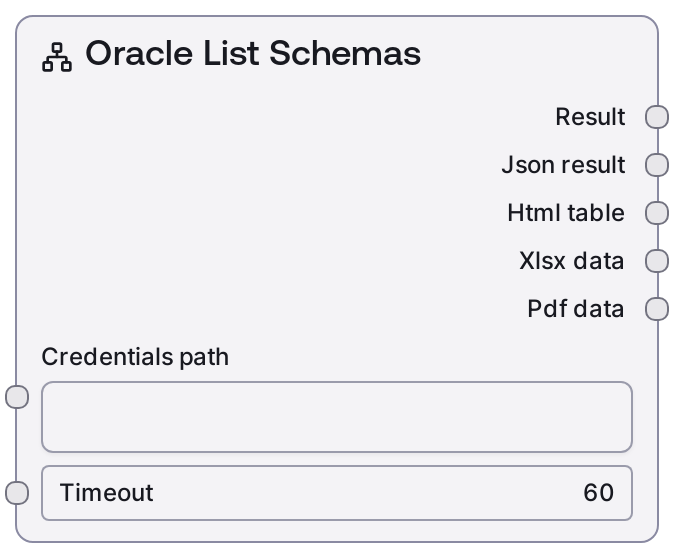
Oracle List Schemas
This node connects to an Oracle database using a configured credential profile and retrieves the list of accessible schemas. It invokes the Oracle service’s list-schemas operation and formats the response into both a human-readable summary and a JSON payload. It is intended for quick schema introspection before exploring tables or constructing queries.
Usage
Use this node when you need to discover which schemas exist and are accessible in an Oracle database before selecting specific tables or building queries. A typical workflow is: configure and store Oracle credentials, optionally validate connectivity with Oracle Test Connection or Oracle Database Info, then run Oracle List Schemas to enumerate accessible schemas. The resulting schema names can be used as inputs to Oracle List Tables, Oracle Table Info, Oracle Query, Oracle Complex Query, Oracle Visual Query Builder, or Oracle Query Builder Helper. Place this node early in database-focused pipelines to drive dynamic UI selectors, schema exploration steps, or automatic metadata collection. For best practices, log or inspect the json output to understand its structure, and use that to drive conditional logic (for example, only proceed if a required schema like HR or SALES is present).
| Field | Required | Type | Description | Example |
|---|
| credentials_path | True | STRING | Reference to the stored Oracle credentials that the node will use to authenticate and connect. This is typically a path or identifier inside Salt’s credential storage and must match a profile compatible with the credential_template "oracle". The credentials should include host, port, user, password, and any other required Oracle connection parameters. If this value is incorrect or points to incomplete credentials, the service call will fail. | secrets/oracle/prod-hr-readonly.json |
| timeout | False | INT | Maximum number of seconds to wait for the Oracle list-schemas request to complete. If the Oracle instance or network is slow, set a higher value to avoid premature timeouts. If set too low, you may see timeout errors; if set extremely high, failures may take longer to surface in your workflow. | 30 |
Outputs
| Field | Type | Description | Example |
|---|
| text | STRING | Human-friendly textual summary of the schemas returned by Oracle. This is suitable for display in logs, dashboards, or inspector views and typically includes a title and a list of schema names. | Oracle Schemas - HR - SALES - FINANCE - SYS Total schemas: 4 |
| json | STRING | JSON-encoded representation of the Oracle list-schemas response. Commonly includes an array of schema objects and may include counts or additional metadata depending on the backend. Use this for programmatic processing, filtering, or driving downstream nodes. | {"schemas": [{"name": "HR", "owner": "HR"}, {"name": "SALES", "owner": "SALES"}], "schema_count": 2} |
| html | STRING | HTML-formatted view of the schema list, when provided by the shared database base node. Useful for embedding into rich dashboards or reports that can render HTML tables or lists. | Oracle Schemas |
| file | STRING | A file path or identifier pointing to an exported version of the results (for example, a CSV or spreadsheet) when exports are enabled by the base node. This is intended for workflows that pass data into file-based processing or sharing steps. | exports/oracle/list_schemas_2024-05-10_134500.xlsx |
| meta | STRING | JSON-encoded metadata about the operation, such as endpoint name, execution duration, or status flags. This is helpful for logging, monitoring, and diagnostics in larger workflows. | {"endpoint": "/list-schemas", "duration_ms": 420, "database": "ORCL", "status": "success"} |
Important Notes
- Performance: On large or busy Oracle instances, listing schemas may take longer than expected; if you encounter intermittent timeouts, gradually increase the timeout input and consider running schema discovery during off-peak hours.
- Limitations: The node only returns schemas that the connected Oracle user has permission to see. If the account has restricted privileges or limited access to data dictionary views, the schema list may not represent the full database.
- Behavior: This node does not take any schema filter or query text; it always calls the backend /list-schemas operation with an empty parameter body, relying entirely on the Oracle service and user permissions to determine what is returned.
- Behavior: Output formatting is handled by a shared database base node, ensuring that you consistently receive both readable text and JSON; this makes it straightforward to plug the node into existing database workflows that expect a standard output layout.
Troubleshooting
- Empty schema list: If the text output shows "Oracle Schemas" but no entries, confirm that the credentials_path points to an Oracle user with privileges to view schemas. You may need to use a more privileged account or request additional grants from your database administrator.
- Timeout or connection errors: Errors indicating a timeout or inability to reach the Oracle service are often caused by network issues, incorrect host or port in the stored credentials, or a heavily loaded database. Verify the credential details, ensure the database is reachable from your environment, and increase the timeout value if necessary.
- Authentication or authorization failures: Messages about invalid username or password or insufficient privileges indicate problems with the stored credentials or user rights. Update the credential profile referenced by credentials_path with valid Oracle credentials and verify that the user can access schema metadata.
- Unexpected JSON shape in downstream nodes: If a downstream node fails when parsing the json output, first inspect the raw json string (for example by logging it) to confirm field names and structure, then adjust your downstream logic to align with those keys, such as "schemas" and "schema_count".