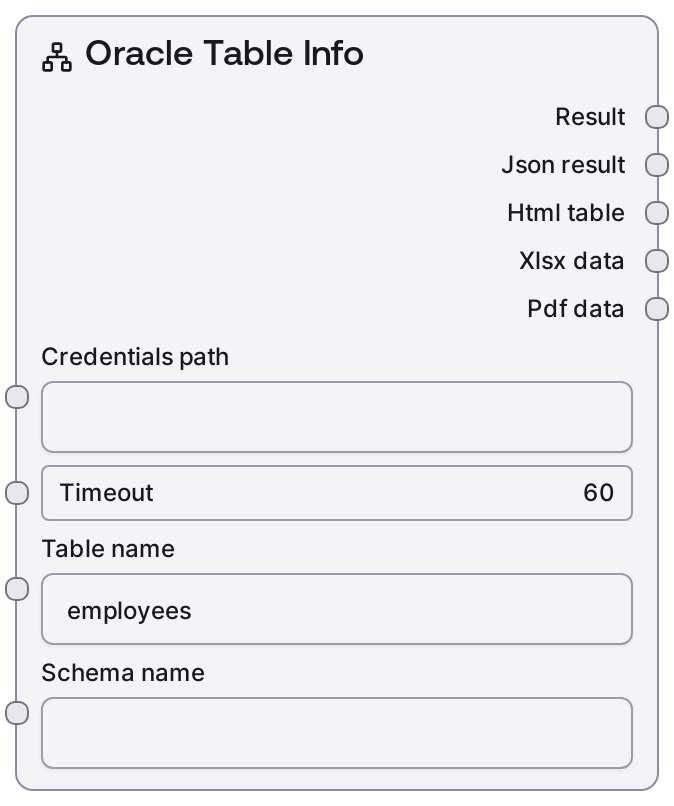
Oracle Table Info
This node inspects the structure and metadata of a table in an Oracle database. It loads Oracle credentials, calls a table-info endpoint with the provided table and optional schema, and returns both human-readable text and JSON describing columns, types, and related details. Use it to quickly understand or validate table schemas before building queries or transformations.
Usage
Use SaltOracleTableInfo when you need to understand the layout of an Oracle table—its columns, data types, and other metadata—without manually querying the data dictionary. It typically appears early in a workflow, right after verifying connectivity with an Oracle connection test node and selecting credentials, and before nodes that build or run queries such as SaltOracleQuery, SaltOracleExecute, or visual Oracle query builders. A common pattern is: (1) choose or load Oracle credentials → (2) optionally use schema/table discovery nodes to see available schemas and tables → (3) pass the chosen table and schema into SaltOracleTableInfo → (4) feed its JSON output into downstream logic that generates SQL, configures BI reports, or validates data integration mappings. For best results, explicitly specify schema_name in multi-schema environments and choose a timeout that is long enough for your environment but short enough to surface network or service issues quickly.
| Field | Required | Type | Description | Example |
|---|
| credentials_path | True | STRING | Path or identifier for the stored Oracle credentials configuration. These credentials must conform to the "oracle" credential template and include host, port, service/SID, username, and password required by the underlying Oracle service. | /data/config/credentials/oracle_prod.json |
| timeout | True | INT | Maximum time in seconds to wait for the table metadata request to complete. If the table-info call exceeds this value, the node fails with a timeout error. | 60 |
| table_name | True | STRING | Name of the Oracle table whose metadata you want to retrieve. Must be a valid table accessible to the authenticated user in the given or default schema. | EMPLOYEES |
| schema_name | True | STRING | Oracle schema that owns the table. If left empty, the node uses the current user’s default schema. In shared or multi-schema databases, specifying this value explicitly is recommended. | HR |
Outputs
| Field | Type | Description | Example |
|---|
| text | STRING | Human-readable summary of the table metadata. Typically contains the table and schema names followed by a concise list of columns with data types and nullability, suitable for display or quick inspection. | Oracle Table Info: EMPLOYEES (Schema: HR) Columns: - EMPLOYEE_ID (NUMBER, nullable: NO) - FIRST_NAME (VARCHAR2(20), nullable: YES) - LAST_NAME (VARCHAR2(25), nullable: NO) - HIRE_DATE (DATE, nullable: NO) ... |
| json | JSON | Structured JSON payload containing detailed metadata for the specified table. Includes fields such as table name, schema, and an array of column descriptors with data type, length or precision, nullability, and key flags. This output is designed for downstream automation and tooling. | {'table': 'EMPLOYEES', 'schema': 'HR', 'columns': [{'name': 'EMPLOYEE_ID', 'dataType': 'NUMBER', 'precision': 6, 'scale': 0, 'nullable': False, 'isPrimaryKey': True}, {'name': 'FIRST_NAME', 'dataType': 'VARCHAR2', 'length': 20, 'nullable': True}, {'name': 'LAST_NAME', 'dataType': 'VARCHAR2', 'length': 25, 'nullable': False}]} |
Important Notes
- Performance: Metadata retrieval is generally quick but may slow down on large schemas or high-latency networks; if you see sporadic timeouts, consider increasing the timeout input.
- Limitations: The node only returns metadata for tables the Oracle user is authorized to access. Missing privileges can lead to errors or empty responses.
- Behavior: An empty
schema_name causes the node to default to the current user’s schema, which can be convenient but confusing when multiple schemas share the same table name.
- Behavior: The exact JSON shape of the output depends on the backing table-info endpoint. Downstream consumers should be coded defensively to handle additional optional fields.
Troubleshooting
- Table not found or empty metadata: If the node reports that the table does not exist or returns no columns, verify the
table_name spelling, confirm that the table lives in the specified schema_name, and check that the connected user has metadata access to that table.
- Timeout exceeded: When you encounter timeout errors, increase the
timeout value and check for network latency or Oracle server slowness. Ensure that the metadata service is reachable from the environment where this node runs.
- Authentication or connection errors: Errors indicating login failures or connection problems usually stem from an incorrect
credentials_path or a misconfigured credentials file. Validate those settings using a dedicated Oracle connection test node before running this node.
- Downstream JSON parsing issues: If later steps fail when reading the
json output, log and inspect the raw JSON structure, then update your field mappings or parsing logic to match the actual metadata format returned.