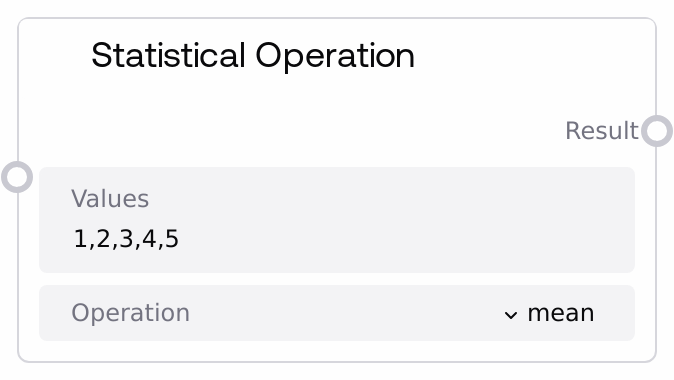
Statistical Operation
This node parses a comma-separated string of numbers and applies a selected statistical operation. It supports descriptive statistics such as mean, median, mode, standard deviation, and variance, as well as aggregate operations like sum, product, and count. It returns a single floating-point result, and if parsing fails or the list is empty, it logs a warning and returns 0.0.
Usage
Use this node when you need to summarize or analyze a numeric series within a Salt workflow, especially when your numbers arrive as text (e.g., user input, CSV-like fields, or other string-processing outputs). A typical pattern is: an upstream node generates or cleans a comma-separated list of numbers, then Statistical Operation computes a statistic like mean, standard deviation, or count from that list. The FLOAT result can then drive decision logic (for example, comparisons via SaltComparisonOperation), additional math (via SaltFloatMathOperation or SaltAdvancedMathOperation), or text generation/reporting where the statistic is injected into prompts or summaries. It works well in the SALT/Utility/Math category alongside nodes like SaltIntMathOperation, SaltFloatMathOperation, and SaltRoundingOperation to build richer analytic pipelines. Ensure that the 'values' string is well-formed and numeric; if the source is noisy, consider upstream validation or sanitization nodes before this one.
| Field | Required | Type | Description | Example |
|---|
| values | True | STRING | Comma-separated list of numeric values to analyze. The node splits the string on commas, trims whitespace from each token, and converts each token to a float. Any token that cannot be parsed as a float causes the entire operation to fail and return 0.0. Empty tokens (e.g., from consecutive commas) are ignored; if no valid numbers remain, the node logs a warning and returns 0.0. | 18.5, 20, 19.2, 21.0, 20.3 |
| operation | True | STRING_ENUM[mean\|median\|mode\|std\|variance\|sum\|product\|count] | The statistical operation to perform on the parsed list of numbers. 'mean' computes the arithmetic average; 'median' returns the middle value of the sorted list (or the average of the two central values if the count is even); 'mode' returns the single most frequent value; 'std' computes the population standard deviation; 'variance' computes the population variance; 'sum' totals all values; 'product' multiplies all values; and 'count' returns the number of parsed values as a float. If an unknown operation is supplied, the node logs a warning and returns 0.0. | std |
Outputs
| Field | Type | Description | Example |
|---|
| result | FLOAT | The numeric result of the selected statistical operation, always returned as a float. For 'count' this is the number of values (e.g., 5.0), for 'sum' and 'product' it is the aggregated value, and for mean/median/mode/std/variance it is the corresponding statistic. If parsing fails, the list is effectively empty, or the operation is unknown, the output is 0.0. | Given values "18.5, 20, 19.2, 21.0, 20.3" and operation "mean", the result would be 19.8 |
Important Notes
- Performance: The node operates entirely in-memory and is efficient for typical list sizes (from a few elements up to thousands); extremely long value strings will increase parsing and computation time but do not require external services.
- Limitations: The parser is strict about numeric format. Any non-numeric token that cannot be converted to a float (such as 'N/A' or locale-specific formats like '1,5' for 1.5) causes the node to return 0.0 rather than partially processing the list.
- Behavior: Mode is computed using frequency counts and returns only a single value even if multiple values share the highest frequency, so multi-modal datasets will be reduced to one representative mode.
- Behavior: Standard deviation and variance are calculated as population statistics (dividing by N), which may differ from sample statistics (dividing by N−1) used in some statistical tools.
- Behavior: The 'product' operation can quickly overflow or underflow floating-point precision with many large or very small numbers, possibly resulting in extremely large values, infinities, or zeros.
Troubleshooting
- Common Error 1: Output is always 0.0 even with non-empty input. Check the 'values' string for tokens that are not valid floats (letters, special symbols, localized decimal separators). Clean or normalize the string upstream so each comma-separated token is a standard numeric literal.
- Common Error 2: Mode result is not the expected one in cases with several repeated values. The node returns only a single mode and does not expose ties. If you need all modes or different tie-breaking rules, compute frequencies upstream and select values manually.
- Common Error 3: Standard deviation or variance does not match external analytics tools. This node uses population formulas (division by N). If your reference tool uses sample formulas (division by N−1), adjust the result downstream using other math nodes to align the definitions.
- Common Error 4: Need an integer count but receive a float. The 'count' operation outputs a FLOAT (e.g., 5.0). If you require an integer, cast or round it using SaltRoundingOperation (e.g., with 'trunc' or 'round') or another appropriate math utility.