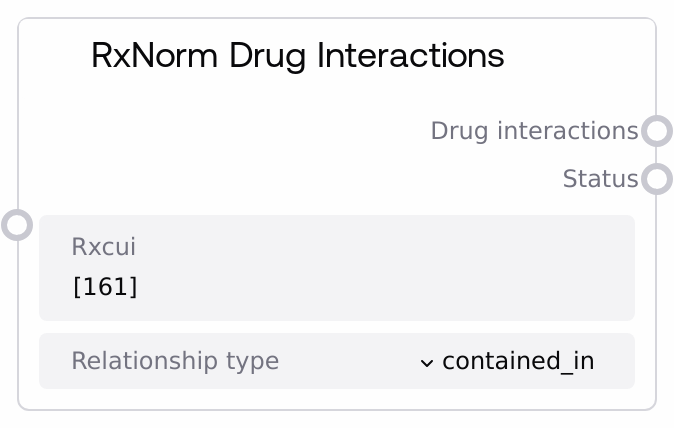
RxNorm Drug Interactions
This node queries an RxNorm API wrapper to retrieve relationship-based interaction or related-concept data for one or more RxCUI identifiers. It supports a fixed set of RxNorm relationship types (such as contained_in, has_ingredient, or reformulated_to) and returns a structured JSON bundle plus a status message. It is useful for exploring how a drug relates to other concepts (ingredients, dose forms, brand names, and similar) based on RxNorm relationships.
Usage
Use this node when you need to understand how a medication (identified by its RxCUI) is related to other drugs or concepts via RxNorm relationships, for example to determine its ingredients, formulations, or related brand and generic products. It typically appears downstream of nodes that resolve free-text drug names or codes into RxCUIs, such as "RxNorm Drug Search", "RxNorm Approximate Match", "RxNorm Concept Info", or "RxCUI by NDC". You pass in one or more RxCUI values and select a relationship type (for instance, "contains" to see what a multi-ingredient product contains, or "has_ingredient" to see its ingredients). The output JSON can then be consumed by downstream analysis or reporting nodes, or by custom logic that checks for potential interactions or formulary relationships. In population or patient-level medication review workflows, pair this node with "Population Medication Analysis" to map from drug classes to detailed relationship graphs, and with any clinical decision support or visualization nodes that interpret the resulting structure. When you need to examine several drugs together, prefer batching multiple RxCUIs in a single list value to reduce repeated network calls.
| Field | Required | Type | Description | Example |
|---|
| rxcui | True | STRING | One or more RxNorm Concept Unique Identifiers (RxCUIs) to analyze. Accepts either a single RxCUI as a plain string (for example, "161") or a JSON array string of multiple RxCUIs (for example, "[161, 6428]"). The value must be non-empty and should correspond to valid RxNorm concepts to get meaningful results. If provided as a list string, it must be valid JSON or the node will return an error. | [161, 6428, 856838] |
| relationship_type | True | STRING | The RxNorm relationship type to query for each provided RxCUI. Must be one of the predefined options: "boss_of", "consists_of", "constitutes", "contained_in", "contains", "dose_form_of", "doseformgroup_of", "form_of", "has_boss", "has_dose_form", "has_doseformgroup", "has_form", "has_ingredient", "has_ingredients", "has_part", "has_precise_ingredient", "has_quantified_form", "has_tradename", "ingredient_of", "ingredients_of", "inverse_isa", "isa", "part_of", "precise_ingredient_of", "quantified_form_of", "reformulated_to", "reformulation_of", "tradename_of". The UI exposes these as a dropdown to prevent invalid values. | has_ingredient |
Outputs
| Field | Type | Description | Example |
|---|
| drug_interactions | STRING | A JSON-formatted string containing the requested relationship or interaction data for each RxCUI. The structure includes the list of queried RxCUIs, the relationship_type, and a data object keyed by RxCUI, where each key maps to the result returned by the RxNorm API wrapper for that concept and relationship. Downstream nodes can parse this JSON to drive visual graphs, clinical rules, decision support, or reporting. | {"rxcui":[161,6428],"relationship_type":"has_ingredient","data":{"161":{"interactionTypeGroup":[{"sourceName":"ExampleSource","interactionType":[{"comment":"May increase risk of bleeding when combined.","minConceptItem":[{"rxcui":"161","name":"warfarin"},{"rxcui":"855332","name":"aspirin"}]}]}]},"6428":{"interactionTypeGroup":[]}}} |
| status | STRING | A human-readable status message describing the outcome of the call. On success it indicates that drug interaction or relationship data was retrieved for the given RxCUIs and relationship type. On failure, it contains an error description such as parameter validation issues, JSON parsing errors, or downstream API errors. | Successfully retrieved drug interactions for RXCUI [161, 6428] with relationship type has_ingredient |
Important Notes
- Performance: You can pass multiple RxCUIs at once using the JSON array string format (such as "[161,6428,856838]") to batch queries; this is usually more efficient than calling the node separately for each RxCUI.
- Limitations: If the underlying RxNorm service does not have interaction or relationship data for a given RxCUI and relationship type, the corresponding entry in the data map may be empty or minimal, so always handle missing or sparse results in downstream logic.
- Limitations: The node only accepts relationship types from its predefined list and cannot query arbitrary new relationship labels even if they exist in RxNorm.
- Behavior: If the rxcui input is an empty string or only whitespace, the node immediately returns an empty JSON object ("{}") for drug_interactions and an error status instead of calling the external API.
- Behavior: When rxcui is provided as a list string (starting with "[" and ending with "]"), it is parsed as JSON; invalid JSON will trigger an exception that is caught and returned as an error message in the status output.
- Behavior: The node checks for an "error" key on the combined results object and, if present, returns the results but surfaces this as an API error in the status message for easier debugging of upstream service issues.
Troubleshooting
- Empty RXCUI error: If the status output is "Error: RXCUI cannot be empty" and drug_interactions is "{}", ensure that the rxcui field is not blank and does not contain only spaces before running the node.
- JSON parse issues for multiple RxCUIs: If you see a status like "Error getting drug interactions: Expecting value: line 1 column 2 (char 1)", your rxcui value is likely an invalid JSON array string. Use a correctly formatted value such as "[161, 6428]" without extra quotes, stray characters, or trailing commas.
- Unexpected empty data: When the status indicates success but the data object for a given RxCUI is empty, verify that the RxCUI is valid for the selected relationship_type; try another relationship (for example, "has_ingredient" instead of "contains") or confirm the concept using "RxNorm Concept Info".
- API error surfaced in status: If the status begins with "API Error:" and drug_interactions contains an error field, there was a problem in the underlying RxNorm service or network. Check network connectivity, service availability, and where applicable any environment-level configuration of the RxNorm API wrapper.