Table Sample
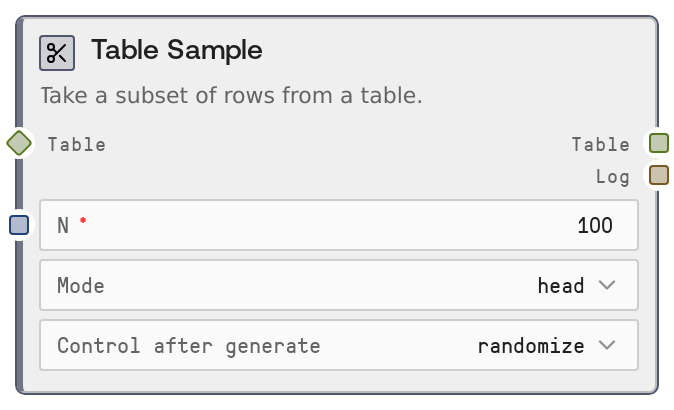
Table Sample reduces a table to a smaller subset of rows for quick inspection, debugging, and prototyping. You can return the first N rows (head), last N rows (tail), or a random sample of N rows, optionally with a fixed seed for reproducibility. If N is larger than the table, it safely returns all available rows and logs what was sampled.
Usage
Use this node when working with large tables and you want a smaller, representative subset for exploration, visualization, or downstream experimentation. It typically appears after a table loader (for example, SaltTableFromCSV or SaltTableFromJSON) or after one or more transformation nodes (SaltTableFilter, SaltTableSort, SaltTableJoin, SaltTableGroupBy) to validate intermediate results without processing the full dataset. For example, you might load a 2000000-row CSV, filter it with SaltTableFilter, then pipe into Table Sample to inspect 100 random rows with SaltDisplayTable or to build a prototype chart with SaltChart. In workflows, upstream nodes usually provide TABLE or DATAFRAME outputs, such as SaltTableFromCSV, SaltTableFromJSON, or other table transform nodes. Downstream nodes often include SaltDisplayTable for interactive inspection, SaltTableInfo for structural checks, or SaltTableOutput to export a small sampled file. Common patterns include: (1) adding a sampling step early in development to speed iteration; (2) feeding random samples to language-model or analytics nodes to test prompts or logic; (3) using deterministic random sampling (via seed) for reproducible debugging. Best practices: keep N modest (for example, 50 to 1000) when previewing datasets; use head mode to quickly verify schema and parsing, tail mode to catch trailing anomalies (for example, malformed last rows), and random mode when you want a more representative subset. Use a non-zero seed when you need consistent runs for debugging or demo purposes, and remove or increase N in production pipelines to avoid unintentionally discarding data.
| Field | Required | Type | Description | Example |
|---|
| table | True | TABLE | The tabular dataset to sample from. Accepts TABLE or DATAFRAME types produced by other table nodes. Must have at least 1 row to return data; if empty, the result will be an empty table. Columns and schema are preserved exactly from the input. | A TABLE created by SaltTableFromCSV loading 'clickstream_2024_01.csv' with 2300000 rows and columns: ['user_id', 'timestamp', 'url', 'country', 'device_type']. |
| n | True | INT | Number of rows to return in the sample. Must be an integer greater than or equal to 1. If n is greater than the input row count, the entire table is returned without error. | 100 |
| mode | True | STRING | Sampling strategy. 'head' returns the first N rows in original order; 'tail' returns the last N rows in original order; 'random' returns N randomly selected rows. All modes preserve the original columns and types. | random |
| seed | False | INT | Random seed for reproducible random sampling. Only used when mode is 'random'. A value of 0 means no seed is applied (non-deterministic random sample). Any positive integer produces repeatable samples for the same input table and N. | 42 |
Outputs
| Field | Type | Description | Example |
|---|
| table | TABLE | The sampled table containing up to N rows from the input, with the same columns, data types, and metadata. For 'head' and 'tail', rows are taken from the top or bottom of the table; for 'random', rows are randomly selected and returned with a fresh, sequential index. | A TABLE with 100 rows and columns ['user_id', 'timestamp', 'url', 'country', 'device_type'], sampled randomly from an original 2300000-row clickstream dataset. |
| log | STRING | A human-readable summary of the sampling operation, including how many rows were sampled, the mode used, and the original row count. Useful for debugging and audit logs. | Sampled 100 rows (random) from 2300000 rows |
Important Notes
- Performance: Sampling is efficient and works directly on the in-memory table; however, if you pass a very large table, converting to and from the internal data frame still incurs some overhead.
- Limitations: The node never returns more than the input row count; if n is larger than available rows, it just returns the full table without warning, so verify logs if you expect strict sizing.
- Behavior: In random mode, a seed of 0 disables deterministic seeding, leading to different samples across runs; any positive seed value will produce consistent samples for the same input.
- Behavior: Tail and random modes reset row indexing in the output sample, so indices will not match the original table's row positions.
Troubleshooting
- Unexpected sample size: If you expect N rows but see fewer, check the input table's row count; when N exceeds the available rows, the node returns all rows and logs the actual number sampled.
- Non-reproducible random samples: If random samples differ between runs, confirm that mode is set to 'random' and that seed is a positive integer; a seed of 0 intentionally produces non-deterministic sampling.
- Empty output table: If the sampled table is empty, inspect the upstream node (for example, SaltTableFilter or SaltTableJoin) to ensure it actually produced rows; this node does not generate rows if the input is empty.