Table Cast Type
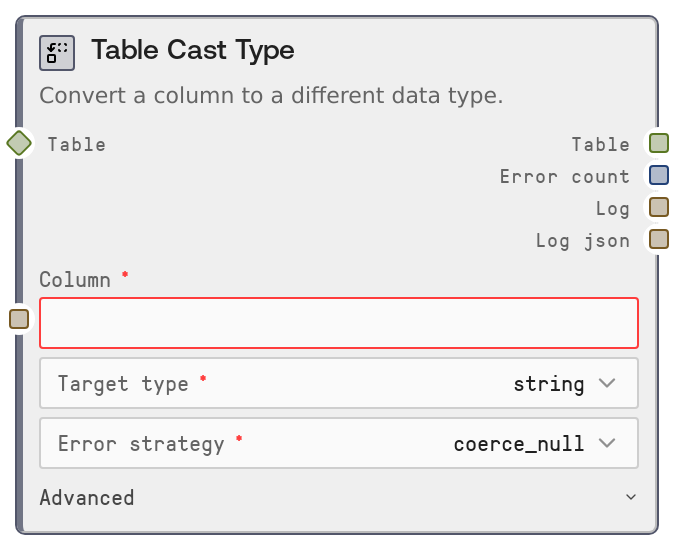
Usage
Use this node when you need to standardize or correct column data types before analytics, joins, aggregations, or charting. Common scenarios include converting numeric-looking strings from CSV imports into real numbers, turning yes/no or 0/1 fields into booleans, and parsing timestamp strings into datetime objects for time-based grouping or filtering. It typically appears downstream of ingestion nodes such as SaltTableFromCSV or SaltTableFromJSON and upstream of transform/analysis nodes like SaltTableFilter, SaltTableGroupBy, SaltChart, SaltTableInfo, and SaltTableOutput.
Choose target_type based on how the column will be used: use float or int for metrics, bool for flags, datetime for time-series, and string for free text. Use error_strategy="coerce_null" to keep all rows while marking invalid values as null, "raise" when you need strict data quality and want the workflow to fail fast, and "drop_row" when rows with invalid values should be excluded from further processing. When converting to datetime, provide datetime_format if the input format is known and consistent (for example %Y-%m-%d %H:%M:%S) to improve accuracy and performance. Combine this node with SaltTableFillNull to repair missing or coerced-null values, and with SaltTableInfo to verify resulting data types and null counts.
Inputs
| Field | Required | Type | Description | Example |
|---|---|---|---|---|
| table | True | TABLE | Input tabular data to modify. Can be a Salt table or a DataFrame-like structure. Must contain the column specified in column. Only the selected column is cast; all other columns are preserved as-is. | A table with columns: ["user_id" (string), "signup_date" (string), "is_active" (string), "monthly_spend" (string)]. |
| column | True | STRING | Name of the column to cast to a new type. Must exactly match an existing column name. If the column is missing, execution fails with an error listing the available columns. | monthly_spend |
| target_type | True | STRING enum | Target data type for the specified column. Allowed values: "string", "int", "float", "bool", "datetime". string converts all values to text; int and float convert to numeric values; bool maps common true/false representations; datetime parses date or datetime strings. | float |
| error_strategy | True | STRING enum | Controls how values that cannot be parsed into the target type are handled. Allowed values: "coerce_null" (unparseable values become null, all rows kept), "raise" (the node raises an error as soon as an invalid value is found), "drop_row" (rows containing unparseable values in the target column are removed from the output table). | coerce_null |
| datetime_format | False | STRING | Optional strptime-style format string used only when target_type is "datetime". When provided, it guides datetime parsing (for example %Y-%m-%d or %Y-%m-%d %H:%M:%S). When omitted, automatic parsing is used, which may be slower or ambiguous for certain formats. | %Y-%m-%d %H:%M:%S |
Outputs
| Field | Type | Description | Example |
|---|---|---|---|
| table | TABLE | The resulting table after casting the specified column to the selected type. Other columns are unchanged. Depending on error_strategy, some rows may be dropped (drop_row) or contain nulls where values could not be parsed (coerce_null). | A table where "monthly_spend" is now a numeric float column [19.99, 0.0, null, 42.5] instead of strings like ["19.99", "0", "N/A", "42.5"]. |
| error_count | INT | Number of values in the target column that failed to parse into the requested type. Counts only cases where a previously non-null value became null because of conversion failure. | 42 |
| log | STRING | Human-readable summary of the cast operation, including the column name, target type, number of failed parses, and the selected error strategy. | Cast [monthly_spend] to float: 42 values failed (coerce_null) |
| log_json | STRING | Structured JSON string describing the operation, including node name, input and output row counts, parameters (column, target_type, error_strategy, datetime_format if set), and error_count. Designed for logging, monitoring, and audit pipelines. | {"node":"SaltTableCastType","input_rows":10000,"output_rows":9975,"parameters":{"column":"monthly_spend","target_type":"float","error_strategy":"drop_row"},"error_count":25} |
Important Notes
- Performance: Casting large columns, especially to datetime, can be slow and memory-intensive; providing a precise datetime_format often improves performance and reliability.
- Limitations: Bool casting only recognizes common textual representations such as true/false, 1/0, yes/no, t/f, y/n (case-insensitive); other non-null values become null or trigger row drops or errors depending on error_strategy.
- Behavior: With error_strategy="drop_row", the output table may have fewer rows than the input, which can impact downstream joins, time-series alignment, or aggregations expecting stable row counts.
- Behavior: When casting to int, the column uses a nullable integer type so existing nulls and failed parses remain as null instead of being forced to 0, preserving information about missing or invalid data.
- Behavior: When casting to string, the node preserves actual missing values as null rather than turning them into literal strings like "nan" or "None".
Troubleshooting
- Error: Column 'X' not found. Available: ...: The specified column does not exist in the input table. Check spelling and capitalization, or inspect the upstream table schema using a node like SaltTableInfo to confirm column names.
- Error: Cannot convert 'value' to float/int/bool/datetime in column 'X'.: This occurs when error_strategy is "raise" and at least one value is invalid for the chosen target_type. Either clean the data upstream (for example with SaltTableFilter or SaltTableFillNull) or switch error_strategy to "coerce_null" or "drop_row".
- Many more nulls after casting than expected: If error_strategy is "coerce_null" and many values become null, verify that target_type is appropriate and that datetime_format (if used) matches the actual data format. Inspect a sample of the raw column values to adjust your settings or preprocess the data.
- Unexpected reduction in row count: If the output has fewer rows, error_strategy is likely set to "drop_row" and some values could not be parsed. Use error_count and log_json to see how many rows were affected, or switch to "coerce_null" if preserving all rows is more important than dropping bad ones.