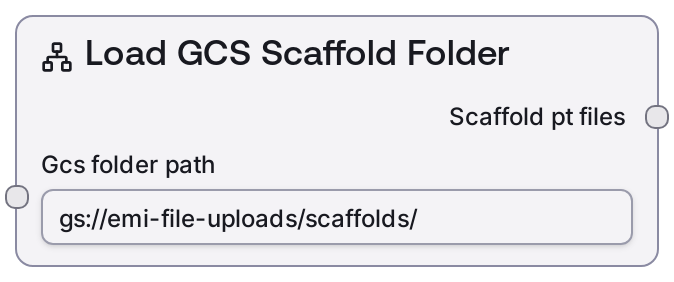
Load Cloud Scaffold Folder
This node takes a cloud folder path (gs:// or s3://) that contains precomputed scaffold .pt files and returns a structured reference object. The folder is expected to hold paired *_ss.pt and *_adj.pt tensors used for RFDiffusion scaffold-guided or fold-conditioned protein design. The node does not load any files into memory; it only validates the path format, normalizes it, and emits a typed reference that downstream biotech services can consume.
Usage
Use this node when you already have precomputed RFDiffusion scaffold tensors stored in cloud storage and want to drive scaffold-guided protein generation. Typically, you first run a separate pipeline (such as RFDiffusion’s make_secstruc_adj.py) that generates _ss.pt and _adj.pt files into a folder in GCS or S3. Then, in a Salt biotech workflow, add this node early in the pipeline and point it at that folder with a gs://bucket/path or s3://bucket/path value. There is usually no direct Salt upstream dependency; the folder is managed externally. Downstream, connect the scaffold_pt_files output to nodes that configure or run RFDiffusion scaffold-guided or fold-conditioned inference, which accept the SCAFFOLD_PT_FILES type (for example a scaffold-guided RFDiffusion configuration or generation node). The node automatically detects whether the path is GCS or S3, ensures it ends with a trailing slash, and encodes both a generic cloud_folder_path and a backward-compatible gcs_folder_path so that different generations of GPU services can read it. Prefer this node over regenerating .pt files when you want to reuse existing scaffolds, keep workflows lightweight, and avoid moving large tensors through the orchestration layer.
| Field | Required | Type | Description | Example |
|---|
| gcs_folder_path | True | STRING | Cloud folder path containing scaffold .pt files. Must start with gs:// for Google Cloud Storage or s3:// for Amazon S3. The folder should contain, for each scaffold, a pair of PyTorch tensors: scaffold_name_ss.pt (secondary structure tensor) and scaffold_name_adj.pt (block adjacency matrix). The node will trim whitespace and automatically ensure the path ends with a trailing /. Any other URI schemes (file://, http://, etc.) or missing scheme will result in a validation error. | gs://protein-scaffolds/rfdiffusion/1abc_run01 or s3://protein-scaffolds-prod/rfdiffusion/scaffolds_batch_2024_09_15 |
Outputs
| Field | Type | Description | Example |
|---|
| scaffold_pt_files | SCAFFOLD_PT_FILES | A small reference object describing where scaffold .pt files are stored in cloud storage. It includes a type discriminator (cloud_path), the detected provider (gcs or s3), a normalized cloud_folder_path ending with /, and a backward-compatible gcs_folder_path alias used by some GPU services. The actual .pt file contents are not inlined; downstream biotech nodes and services use this reference to locate and stream the *_ss.pt and *_adj.pt tensors directly from GCS or S3. | {"type": "cloud_path", "provider": "gcs", "cloud_folder_path": "gs://protein-scaffolds/rfdiffusion/1abc_run01/", "gcs_folder_path": "gs://protein-scaffolds/rfdiffusion/1abc_run01/"} |
Important Notes
- Performance: The node never reads or lists the contents of the cloud folder; it only validates and normalizes the path and returns a small dictionary. This makes it safe to use with very large scaffold datasets (GBs of .pt files) without memory or network overhead in the workflow engine.
- Limitations: Only gs:// and s3:// paths are supported. Any other scheme (such as file:///local/path, http://..., or bare bucket names without a scheme) will raise an error before the node emits its output.
- Behavior: If the input path does not end with a /, the node appends a trailing slash in both cloud_folder_path and gcs_folder_path in the output. This normalization can make the returned path string slightly different from the literal input but is required for compatibility with downstream services.
- Behavior: The output always includes a gcs_folder_path key, even for S3 paths. This is intentional for backward compatibility with GPU services that historically read only gcs_folder_path while now also supporting S3 via the same field.
Troubleshooting
- Common Error 1: Error message like Invalid cloud path format. Expected gs://bucket/path or s3://bucket/path, got: file:///local/path indicates that the input path uses an unsupported scheme. Fix it by supplying a valid GCS or S3 URI such as gs://my-bucket/scaffolds or s3://my-bucket/scaffolds.
- Common Error 2: Downstream RFDiffusion or GPU node reports that no scaffold .pt files were found, even though this node succeeded. The cause is usually that the bucket or folder is incorrect, the files are missing or misnamed, or access permissions block the GPU service. Verify that the folder contains matching _ss.pt and _adj.pt pairs and that the GPU service has read access.
- Common Issue 3: The output shows an unexpected / at the end of the path (for example, gs://bucket/scaffolds/ instead of gs://bucket/scaffolds). This is normal and by design—paths are normalized to end with /. Adjust any custom downstream logic to handle the normalized form rather than relying on the exact input string.