Primitive Value Converter
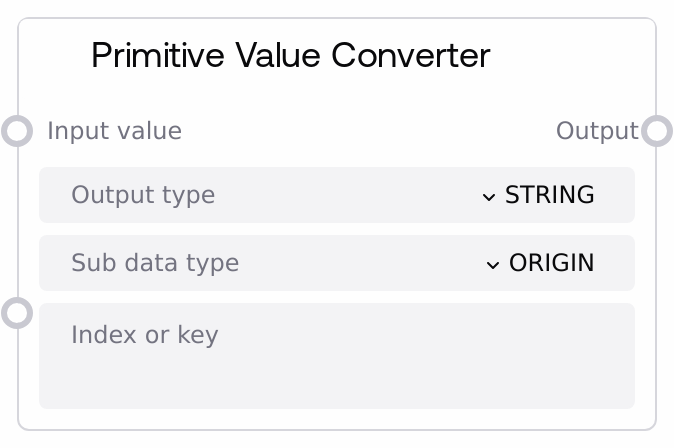
Usage
Use this node whenever you need to normalize or reshape data types between nodes in a Salt workflow. Typical scenarios include: converting numeric strings into numbers before arithmetic, turning comma-separated or line-based text into a LIST, mapping key:value text into a DICT, standardizing booleans from free-form user input, or pulling a single element out of a list/dict for downstream nodes that accept only scalars.
Place it downstream of any node that can output loosely structured text or mixed-type data (for example, language model responses, HTTP/API responses, or generic WILDCARD outputs) and upstream of nodes that require specific primitive types (e.g., numerical filters, conditional/branching nodes, list iteration nodes, or JSON builders).
Common integration patterns include: - After an LLM generation node: parse a bullet list or numbered list text into a LIST; or parse key:value lines into a DICT. - After an HTTP/JSON fetch node: extract a single field from a JSON dict and cast it to STRING/INT/FLOAT/BOOLEAN. - Before control-flow or comparison nodes: ensure values are proper BOOLEAN, INT, or FLOAT. - Before list/dict processing nodes: normalize raw text into a structured LIST or DICT, with elements coerced to a consistent subtype using sub_data_type.
Best practices: first decide what your downstream node expects (single value vs collection, and which type), then set output_type accordingly. For human-authored or LLM-authored text, prefer LIST/DICT output with sub_data_type set to the type you need, and format the text as comma-separated values, bullet/numbered lists, or key:value lines. Use index_or_key only when you really want a single element; otherwise leave it empty to keep the full structure.
Inputs
| Field | Required | Type | Description | Example |
|---|---|---|---|---|
| input_value | True | WILDCARD | The value to convert. Can be a string, number, boolean, list, dict, or other primitive. Strings may be raw values, comma-separated lists (for example, "a,b,c"), key:value pairs (for example, "key1: value1, key2: value2"), or multi-line text with bullet/numbered list items or key:value lines. Lists and dicts will have their elements/values cast according to sub_data_type. | priority: high, retries: 3, timeout: 2.5 |
| output_type | True | STRING | Target type to convert to. Allowed values: "STRING", "INT", "FLOAT", "BOOLEAN", "LIST", "DICT". For "LIST" or "DICT", the node parses or reshapes the input into a collection (based on patterns in input_value) and applies sub_data_type to each element or value. For "STRING" with index_or_key empty, non-strings are JSON-formatted. | LIST |
| sub_data_type | False | STRING | Element/value subtype to cast to when producing LIST or DICT, or when extracting a single element. Allowed values: "ORIGIN" (keep original type), "STRING", "INT", "FLOAT", "BOOLEAN". For strings representing lists or dicts, each parsed element/value is cast with this rule. Also used when extracting via index_or_key (for both list and dict). If omitted, defaults to "STRING". | INT |
| index_or_key | False | STRING | For LIST/DICT operations and string extraction cases. If non-empty and input_value is a list, it is interpreted as a zero-based index (a string that can be converted to an integer). If non-empty and input_value is a dict, it is used as a key. When used with output_type = "STRING", the selected element is returned as a single casted scalar. If left empty, the node returns the full list/dict (or full value) instead of a single element. | 0 |
Outputs
| Field | Type | Description | Example |
|---|---|---|---|
| output | WILDCARD | The converted value in the requested target type. For output_type = "STRING" with empty index_or_key, non-string inputs (lists, dicts, numbers, booleans) are JSON-formatted into a human-readable string. For output_type = "LIST", you get a list whose items are cast via sub_data_type. For output_type = "DICT", you get a dictionary with values cast via sub_data_type. In error cases, the node returns type-appropriate default values such as empty string, 0, 0.0, False, an empty list, or an empty dict. | {'retries': 3, 'timeout': 2.5} |
Important Notes
- Parsing logic for strings: The node infers structure from the text. Comma-separated strings without any colon are treated as lists; comma-separated strings with colon in parts are treated as dicts; otherwise, multi-line key:value or bullet/numbered lines are parsed into dicts or lists respectively.
- Sub-data-type casting: sub_data_type is applied to each list element or dict value, and also when extracting a single element via index_or_key. Invalid casts (for example, converting "abc" to INT) are logged and the original value is kept for that element.
- Element extraction behavior: When output_type is "STRING" or sub_data_type is "STRING" with a list/dict input and index_or_key set, the node returns a single scalar element. If the index or key is invalid, it logs a warning and returns the default STRING value (empty string).
- Defaults on failure: If conversion fails at a higher level (type mismatch or parsing error), the node falls back to a type-appropriate default: empty string for STRING, 0 for INT, 0.0 for FLOAT, False for BOOLEAN, an empty list for LIST, and an empty dict for DICT. This keeps pipelines running but may hide bad input if not monitored.
- DICT output nuance: When output_type is "DICT" and the processed input is not already a dict (which is uncommon when starting from non-string inputs), the node returns the processed structure as-is. Strings are not further parsed in this branch, so prefer to start from well-structured string formats when targeting DICT.
Troubleshooting
- Unexpected empty list or dict: If the output is an empty list or empty dict, your input string may not match the expected patterns (comma-separated, key:value, bullets, or numbers). Check the exact formatting of input_value and ensure commas, colons, or list markers are present where needed.
- "Error: Invalid index or key" warning: This occurs when index_or_key cannot be converted to an integer for lists, is out of range, or does not exist as a key in a dict. Verify that the index is within the list bounds or that the key matches exactly (including case) and adjust index_or_key.
- Numbers not converting correctly: When using sub_data_type = "INT" or "FLOAT", non-numeric substrings (for example, "5s" or "N/A") will fail casting and remain as original strings. Clean the input upstream or adjust formatting (for example, send just 5 instead of "5s").
- Output type fallback: If you see logs about an unsupported type for your chosen output_type and the result behaves like a list, it means the value did not match handled cases and was coerced to LIST behavior. Double-check output_type spelling and ensure it is exactly one of STRING, INT, FLOAT, BOOLEAN, LIST, or DICT.