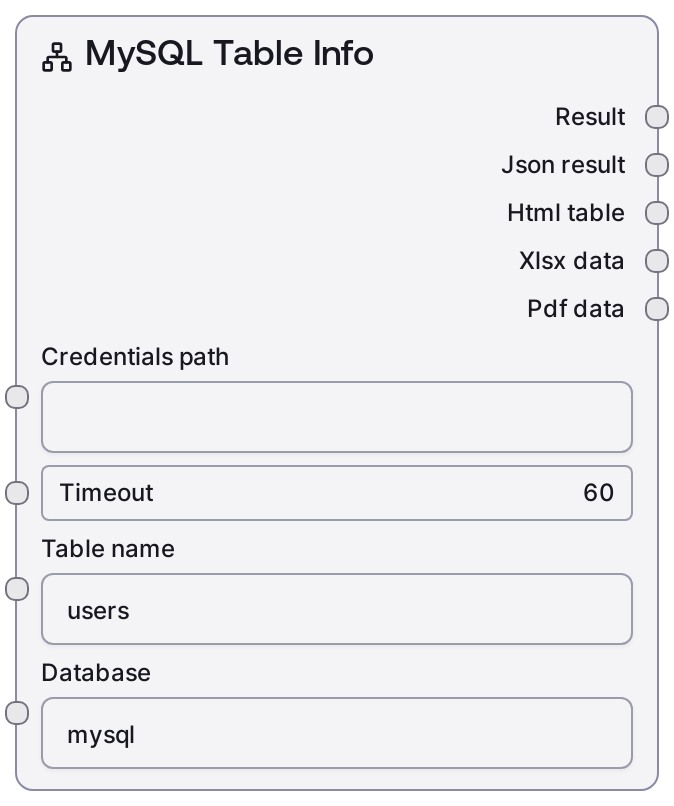
MySQL Table Info
SaltMySQLTableInfo queries a MySQL database (via the Salt CData integration) for detailed information about a single table. It uses stored MySQL credentials plus the selected database and table name to call the backend "/table-info" endpoint. The node returns a human-readable text summary along with structured JSON data describing the table’s columns and properties.
Usage
Use SaltMySQLTableInfo when you need to understand the structure of an existing MySQL table before writing queries or generating code. Typical scenarios include schema inspection for prompt engineering, generating CRUD operations, validating that a table exists with the expected columns, or building schema-aware downstream logic (for example, mapping columns to application fields). It usually appears after a credential or connection configuration node that provides "credentials_path" and a timeout value, and it is commonly used alongside other MySQL nodes such as "SaltMySQLListTables" (to discover tables first) and "SaltMySQLQuery" (to query once you know the schema). A common pattern is: use SaltMySQLListTables to find available tables, feed the chosen "table_name" into SaltMySQLTableInfo to get detailed column info, then build or refine SQL in SaltMySQLQuery or SaltMySQLExecute using that schema. For best results, always specify the correct "database" name (especially on servers hosting multiple schemas) and keep timeouts reasonable for your environment.
| Field | Required | Type | Description | Example |
|---|
| credentials_path | True | STRING | Filesystem path or configuration key pointing to stored MySQL CData credentials. These credentials must match the "mysql" credential template and include host, port, username, password, and any other required connection details. The node uses this to authenticate and connect before calling the "/table-info" endpoint. | /workspace/credentials/mysql/prod_mysql_credentials.json |
| timeout | True | INT | Maximum time in seconds to wait for the backend service to return table information. If the request exceeds this duration, it will fail with a timeout error. Choose a higher value for slow or remote databases. | 30 |
| table_name | True | STRING | Exact name of the MySQL table to inspect. Must exist in the specified "database". Case-sensitivity depends on the MySQL server’s filesystem and configuration, but it is safest to match the actual table name exactly. | users |
| database | True | STRING | Logical database (schema) name in the MySQL server where the table resides. This value is passed to the backend along with "table_name" to scope the metadata lookup to a specific schema. | customer_app |
Outputs
| Field | Type | Description | Example |
|---|
| text | STRING | A human-readable summary of the table information, labeled with the database and table name (for example, "Table Info: customer_app.users"). This typically includes an overview that is suitable for passing into LLM prompts or logs. | Table Info: customer_app.users Columns: - id (INT, PRIMARY KEY, AUTO_INCREMENT, NOT NULL) - email (VARCHAR(255), UNIQUE, NOT NULL) - created_at (DATETIME, NOT NULL) Total columns: 3 |
| json | STRING | A JSON-encoded string containing the raw table metadata returned by the "/table-info" endpoint. This usually includes a list of columns with names, data types, nullability, default values, and possibly index or key information. Downstream nodes can parse this JSON to drive dynamic behavior. | { "table": "users", "database": "customer_app", "columns": [ {"name": "id", "type": "INT", "nullable": false, "primary_key": true, "auto_increment": true}, {"name": "email", "type": "VARCHAR(255)", "nullable": false, "unique": true}, {"name": "created_at", "type": "DATETIME", "nullable": false} ] } |
Important Notes
- Performance: The node makes a remote call to the CData-backed MySQL service; response time depends on network latency and database responsiveness, though table-info requests are typically fast.
- Limitations: If "table_name" does not exist in the specified "database", the backend will return an error and no metadata will be produced; the node does not auto-correct or search for similar table names.
- Behavior: The node uses the generic database base-node formatting, so output always includes a text summary plus a JSON string; downstream consumers should parse the JSON rather than scraping the text.
- Behavior: The "credential_template" and service are fixed to "mysql", so the same node cannot be repurposed for other databases such as PostgreSQL or SQL Server.
- Limitations: The exact shape of the metadata (for example, whether indexes, foreign keys, or constraints are included) depends on the backend "/table-info" implementation and may vary between environments.
Troubleshooting
- Table not found or similar error: If you see an error indicating the table does not exist, verify the "database" value and ensure "table_name" matches the actual table (including pluralization and underscores). Use SaltMySQLListTables first to confirm the name.
- Authentication or connection failed: Errors about invalid credentials or inability to connect usually mean "credentials_path" is wrong or points to malformed credentials. Confirm the path, ensure it matches the "mysql" template, and verify that host and port are reachable from the Salt environment.
- Request timed out: A timeout error indicates the "timeout" value is too low for the current network or server load. Increase the "timeout" input and check MySQL server performance or VPN or remote network latency.
- Unexpected JSON structure downstream: If a downstream node fails when parsing the "json" output, log or inspect the raw JSON string to see the actual keys returned by the backend. Adjust your downstream parsing logic to match those keys instead of assuming a fixed schema.