Code Executor
Usage
Use Code Executor when you need a quick, flexible transformation or decision step that isn’t covered by built-in nodes. Typical scenarios include custom formatting, lightweight data cleaning, conditional branching logic, or small numerical/text transformations before calling a model or an API.
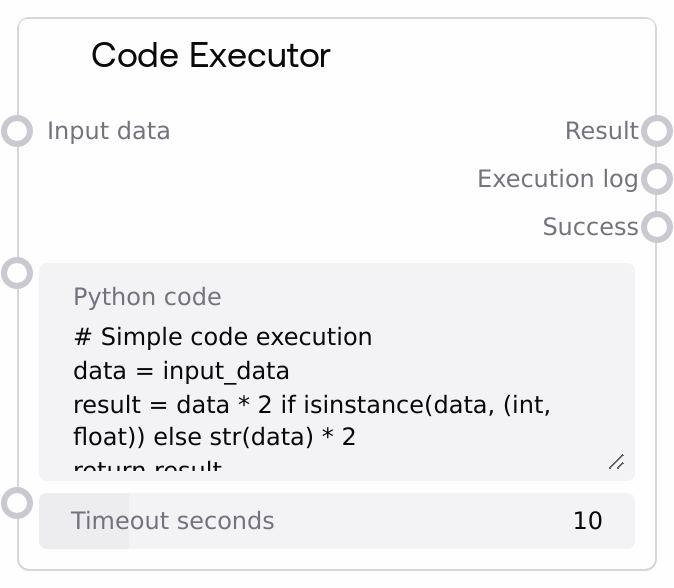
In a typical workflow, Code Executor appears mid-pipeline: upstream nodes (such as data loaders, API fetchers like SaltAPIFetcher, or JSON processors like SaltJSONListProcessor) supply input_data. Your Python code reads input_data, performs the required transformation, and the resulting result output is then consumed by downstream nodes (for example, table/chart nodes, routing/if-else nodes, LLM prompt builders, or storage/export nodes).
Your code runs in a restricted environment: only a curated set of safe built-ins and a few standard modules (for example, math, random, datetime, json, time) are available; dangerous operations (file I/O, subprocesses, arbitrary imports, exec, eval, and similar patterns) are blocked. Best practices include keeping code small and deterministic, designing code to handle unexpected input_data types gracefully, using logger for debug messages that appear in the execution log, and returning a single well-structured object so downstream nodes can reliably consume it.
Inputs
| Field | Required | Type | Description | Example |
|---|---|---|---|---|
| python_code | True | STRING | Python source code to execute against a single input. The code should use the variable input_data to access the incoming value and either return the final result or assign it to a variable named result or output. The environment is restricted: only safe built-ins and a few standard libraries are available. Forbidden patterns such as import os, exec(, eval(, and open( cause validation failure before execution. | # Normalize numeric input and tag it value = input_data if isinstance(value, (int, float)): normalized = (value - 50) / 10 result = {"raw": value, "normalized": normalized, "category": "high" if value > 60 else "low"} else: result = {"error": "Expected number", "received_type": type(value).__name__} return result |
| timeout_seconds | True | FLOAT | Maximum wall-clock time in seconds allowed for the user code to run. Valid range is approximately 1.0 to 60.0 seconds. If execution exceeds this, the engine treats it as a failure and the node returns success = false with an error message in execution_log. | 15.0 |
| input_data | False | * | Arbitrary data passed into the Python code as input_data. This can be a number, string, list, dict, table-like object, or any other type produced by previous nodes. Your code must handle the actual runtime type and should avoid assumptions that could raise type errors. | {"user_id": 42, "events": ["login", "view_item", "checkout"], "total_spent": 123.45} |
Outputs
| Field | Type | Description | Example |
|---|---|---|---|
| result | * | The value computed by your Python code. This is taken from (in order of preference) the explicit return value, a variable named result, or a variable named output. If neither is set and no explicit return is used, the node may fall back to the last value defined in the local environment. The type is whatever your code produces: scalar, list, dict, or a more complex object for downstream processing. | {"user_id": 42, "high_value": true, "score": 0.93} |
| execution_log | STRING | A human-readable summary string of the execution. It includes a success message plus any captured stdout and stderr output from your code. Use this to debug or audit what your script did, including printed messages or non-fatal warnings. | Execution completed successfully \| Output: normalized score: 0.87 \| Warnings: Deprecated field 'age' encountered, using 'birth_year' instead |
| success | BOOLEAN | Indicates whether the code ran without raising an exception. true means execution finished normally; false means the node caught an error, such as validation failure, runtime exception, or timeout. When false, result is typically null or None and execution_log contains an error message. | true |
Important Notes
- Performance: Although timeout_seconds can be set up to 60 seconds, long-running or CPU-heavy code will slow down your entire workflow. Keep transformations lightweight and avoid large in-memory loops where possible.
- Limitations: The execution environment blocks dangerous operations including filesystem access, system commands, interactive input, custom imports via import, exec, and eval. Attempts to use these patterns cause validation failure and the node returns success = false with an "Invalid Python code" message.
- Behavior: If your code does not explicitly return a value or assign to result or output, the node may use the last defined local variable as the output. This can be surprising; it is safer to explicitly return the value you want.
- Behavior: All print output and anything written to stdout or stderr inside your code is captured and appended to execution_log. Use this for debugging, but avoid printing very large objects as this can bloat logs.
- Integration: The node exposes a wildcard * input and output, so it can sit almost anywhere in a workflow. Ensure downstream nodes can handle whatever structure and type you emit from result, for example by always emitting a dict with consistent keys for routing or templating nodes.
Troubleshooting
- Common Error 1 – 'Invalid Python code': The node immediately returns success = false and execution_log set to "Invalid Python code". This usually means your script contains forbidden patterns such as import os or exec(, or has a syntax error. Remove unsafe operations, verify your indentation, and test the code in a local Python shell before pasting it into the node.
- Common Error 2 – Runtime type errors (for example, 'Execution error: unsupported operand type'): Your code assumed a certain input_data type such as number but received something else like a string or dict. Add isinstance checks and fallback branches, and log unexpected types using logger.info so you can see them in execution_log.
- Common Error 3 – Empty or null result: Downstream nodes see None or an empty value in result. This often happens when the code finishes without an explicit return or without setting result or output. Always end your script with return some_value or set result = some_value to make the output explicit.
- Common Error 4 – Slow or hanging code: If the script performs heavy computation or waits on external resources, it may exceed timeout_seconds, be terminated by the engine, and return success = false with an "Execution error" message. Reduce complexity, avoid unbounded loops, or increase timeout_seconds within reasonable limits if needed.