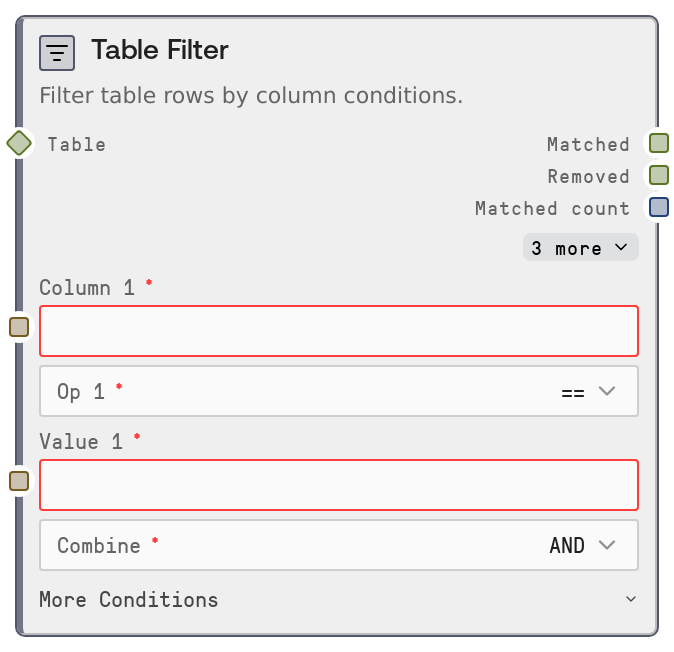
Table Filter
This node filters a table based on one to three column conditions, each specifying a column, operator, and comparison value. It supports numeric, text, and datetime comparisons with operators such as equality, ranges, contains, regex, and null checks. The node outputs both the rows that match the filter and those that were removed, along with counts and an audit log.
Usage
Use this node when you need to subset a structured dataset before analysis, visualization, or further transformation. Common scenarios include filtering orders by status and date, narrowing user lists by activity thresholds, or excluding low-quality records. Place it after ingestion nodes like SaltTableFromCSV or SaltTableFromJSON, and before nodes such as SaltTableGroupBy, SaltTableSort, SaltTableFillNull, or SaltChart. Define up to three conditions (for example: status == active, total_amount > 100, order_date >= 2024-01-01) and choose whether to combine them with AND (all conditions must be true) or OR (any condition may be true). The node auto-casts comparison values for numeric and datetime columns to avoid type mismatches. Use the matched output as the main data stream and inspect the removed output with SaltDisplayTable or SaltTableInfo to validate your filters. The log_json output can be stored or processed downstream for auditing and monitoring.
| Field | Required | Type | Description | Example |
|---|
| table | True | TABLE | Input table to be filtered. Accepts a Salt table object or a DataFrame-like structure. Must include all columns referenced by the filter conditions; otherwise the node raises an error listing available columns. | A sales table with columns: order_id, customer_id, order_date, status, total_amount, country. |
| column_1 | True | STRING | Name of the column for the first (mandatory) filter condition. Must exactly match a column name in the input table, including case and spacing. | status |
| op_1 | True | ENUM[==, !=, >, <, >=, <=, contains, not contains, starts with, ends with, regex, is null, is not null] | Comparison operator for the first condition. Relational operators (==, !=, >, <, >=, <=) are type-aware for numeric and datetime columns. Text operators (contains, not contains, starts with, ends with, regex) operate on string-converted values. The is null and is not null operators ignore the value field. | == |
| value_1 | True | STRING | Comparison value for the first condition. Automatically cast to numeric for numeric columns and to timestamp for datetime columns (ISO-like formats recommended). Ignored when using is null or is not null. | active |
| combine | True | ENUM[AND, OR] | Logical operator for combining multiple conditions. AND requires all defined conditions to be true for a row; OR accepts rows that satisfy at least one condition. | AND |
| column_2 | False | STRING | Optional column name for the second condition. Leave blank to use only the first condition. If set, it must exist in the input table. | total_amount |
| op_2 | False | ENUM[==, !=, >, <, >=, <=, contains, not contains, starts with, ends with, regex, is null, is not null] | Comparison operator for the second condition. Same semantics and constraints as op_1. | > |
| value_2 | False | STRING | Comparison value for the second condition. Auto-cast for numeric and datetime columns. Ignored for is null and is not null. | 100 |
| column_3 | False | STRING | Optional column name for the third condition. Leave blank if not needed. If set, it must be a valid column in the input table. | order_date |
| op_3 | False | ENUM[==, !=, >, <, >=, <=, contains, not contains, starts with, ends with, regex, is null, is not null] | Comparison operator for the third condition. Same semantics and constraints as op_1. | >= |
| value_3 | False | STRING | Comparison value for the third condition. Auto-cast for numeric and datetime columns. Ignored when using is null or is not null. | 2024-01-01 |
Outputs
| Field | Type | Description | Example |
|---|
| matched | TABLE | Table containing all rows that satisfy the combined filter conditions. Inherits metadata from the input table and is intended as the main downstream dataset for further processing or export. | A table of 5430 rows where status == 'active', total_amount > 100, and order_date >= '2024-01-01'. |
| removed | TABLE | Table containing all rows that do not satisfy the combined conditions. Useful for debugging filters, auditing exclusions, or analyzing records that were filtered out. | A table of 2170 rows representing orders that are inactive, low value, or older than the specified date. |
| matched_count | INT | Number of rows in the matched output table. Provides a quick metric of how many rows passed the filter and can drive conditional logic in workflows. | 5430 |
| removed_count | INT | Number of rows in the removed output table. Indicates how many rows were excluded by the filter and can highlight overly strict conditions. | 2170 |
| log | STRING | Human-readable summary of the filter, including conditions, input row count, matched row count, and removed row count. Adds a warning line if the filter results in zero matched rows. | Filtered [status] == active AND [total_amount] > 100 AND [order_date] >= 2024-01-01: 7,600 rows → 5,430 rows (2,170 removed) |
| log_json | STRING | Structured JSON string describing the operation for audit trails or automated monitoring. Contains node_type, timestamp, input_rows, output_rows, and parameters such as conditions and combine mode. | {"node_type":"SaltTableFilter","timestamp":"2025-03-10T14:23:45Z","input_rows":7600,"output_rows":5430,"parameters":{"conditions":[{"column":"status","op":"==","value":"active"},{"column":"total_amount","op":">","value":"100"},{"column":"order_date","op":">=","value":"2024-01-01"}],"combine":"AND"}} |
Important Notes
- Performance: Filtering runs in memory over the full dataset; very large tables can be slow or memory-intensive. If performance is an issue, pre-filter at the source or split processing into smaller batches.
- Limitations: Only up to three conditions are supported in a single node. For more complex logic or more than three conditions, chain multiple Table Filter nodes or combine with other transform nodes.
- Behavior: Comparison values are auto-cast for numeric and datetime columns. If casting fails, such as a non-numeric string compared to a numeric column, the node raises a descriptive error instead of silently mis-filtering.
- Behavior: Any condition where a column field is blank is ignored. If all three column fields are blank, the node raises an error stating that at least one filter condition is required.
- Behavior: String-based operators (contains, not contains, starts with, ends with, regex) operate on string representations of column values and treat nulls as non-matches. Regex uses the underlying engine’s regular expression rules, so special characters may need escaping.
Troubleshooting
- Common Error 1: "Column 'X' not found. Available: ..." – The specified column does not exist, often due to a typo or differing header names. Inspect the input with SaltDisplayTable or SaltTableInfo, copy the exact column name, and update the filter configuration.
- Common Error 2: "Cannot compare column 'amount' (numeric) with non-numeric value 'abc'." – The comparison value is not compatible with the column’s numeric type. Change the value to a numeric string, such as 100, or adjust the column’s type upstream if it should be text instead of numeric.
- Common Error 3: "At least one filter condition is required." – All column_1, column_2, and column_3 fields are empty or whitespace. Provide at least column_1, op_1, and value_1, where applicable, to define a valid condition.
- Common Error 4: Filter returns zero matched rows unexpectedly – Review the log output and inspect the removed table with SaltDisplayTable. Check whether AND was used instead of OR, whether comparison operators are appropriate, and that datetime values are formatted correctly for the column type. Adjust conditions or combine mode accordingly.