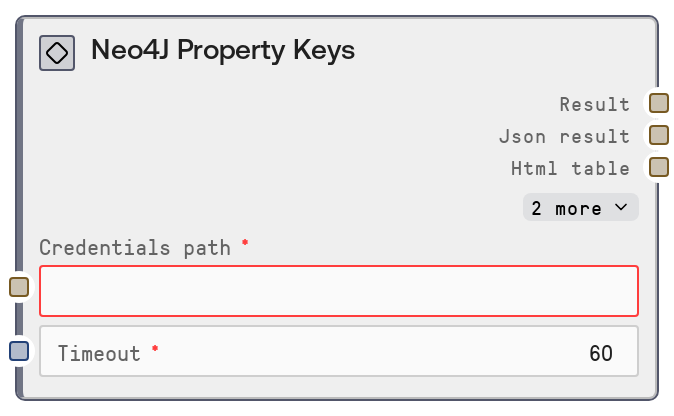
Neo4J Property Keys
This node connects to a Neo4J database using stored credentials and lists all distinct property keys used across nodes and relationships. It calls the Neo4J connector’s "/property-keys" endpoint and formats the response into a human-readable text summary along with the raw JSON payload. This helps you quickly understand the attribute landscape of your graph schema without writing Cypher queries.
Usage
Use this node when you need an overview of all property names present in your Neo4J graph, for example before designing queries, building analytics pipelines, or validating data consistency across labels and relationship types. Place it early in a workflow after a credentials or configuration step that provides the "credentials_path" and timeout settings, and before nodes that depend on schema knowledge such as "SaltNeo4JQuery", "SaltNeo4JNodesByLabel", or "SaltNeo4JRelationshipsByType". A common pattern is: configure Neo4J credentials → run "SaltNeo4JPropertyKeys" to inspect available properties → use the discovered keys to build targeted Cypher queries or configure downstream extraction and transformation nodes. For broader schema exploration, combine it with "SaltNeo4JNodeLabels", "SaltNeo4JRelationshipTypes", "SaltNeo4JDatabaseInfo", and "SaltNeo4JSchemaInfo" to get a full picture of the graph structure.
| Field | Required | Type | Description | Example |
|---|
| credentials_path | True | STRING | Filesystem path or configuration reference where Neo4J credentials are stored using the "neo4j" credential template. This must point to a valid credentials file or secret reference that includes the connection URI, username, password, and any required options for the Neo4J data connector. | /workspace/credentials/neo4j_prod.json |
| timeout | True | INT | Maximum time in seconds the node will wait for the Neo4J service to respond before failing. Use higher values for large schemas or slow networks, and lower values for interactive, low-latency workflows. | 30 |
Outputs
| Field | Type | Description | Example |
|---|
| text | STRING | Human-readable summary of the retrieved property keys, suitable for inspection, logging, or display in a UI panel. Typically includes a short description and a list or count of keys returned from Neo4J. | Neo4J Property Keys: - name - created_at - email - last_login - purchase_total Total property keys: 5 |
| json | STRING | Raw JSON string payload returned by the Neo4J connector's "/property-keys" endpoint. This usually contains an array of property key names and possibly metadata, and is intended for programmatic consumption by downstream nodes. | {"propertyKeys": ["name", "created_at", "email", "last_login", "purchase_total"]} |
| metadata | STRING | Additional metadata as a JSON string, such as execution status, timing information, or service-level details. Downstream nodes can use this to debug, monitor, or log the behavior of the call. | {"status": "success", "source": "neo4j", "endpoint": "/property-keys", "duration_ms": 142} |
| error | STRING | Error message string if the operation fails, otherwise an empty string. Use this to detect failures and branch your workflow, for example to an error handling path. | |
Important Notes
- Performance: Retrieving property keys is typically fast because it is a schema-level operation, but in very large or heavily loaded databases you may still need to increase the timeout to avoid premature failures.
- Limitations: The node returns only distinct property key names; it does not provide information about which labels or relationship types use each key, nor data types or constraints for those properties.
- Behavior: If credentials are invalid or the Neo4J endpoint is unreachable, the node will return an error message and an error-bearing JSON payload instead of the normal property key list.
- Behavior: The content and structure of the JSON output depend on the Neo4J connector service; downstream nodes should parse it defensively and check for fields like "error" or "status" before assuming success.
Troubleshooting
- Invalid credentials or connection URI: If you see errors indicating authentication or connection failures, verify that "credentials_path" points to a valid file and that the stored URI, username, and password are correct.
- Request timeout exceeded: If the node fails with a timeout message, increase the "timeout" value, check network connectivity to the Neo4J instance, and ensure the Neo4J service is responsive.
- Empty property key list: If the call succeeds but returns an empty array, confirm that your Neo4J database actually contains data and properties; test with "SaltNeo4JQuery" on a known node or relationship to validate.
- Unexpected JSON structure downstream: If downstream nodes fail when parsing the JSON output, inspect the "json" and "metadata" outputs to see the exact structure returned by the connector, and adjust parsing logic or node configuration accordingly.