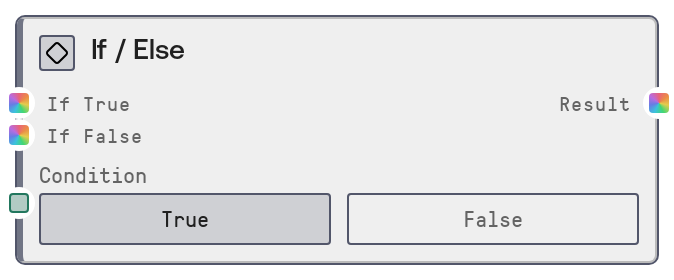
If / Else
This node performs simple conditional routing: based on a boolean condition, it forwards either the `on_true` or the `on_false` input. It supports any data type through a wildcard interface and uses lazy evaluation so only the selected branch is computed. This makes it ideal for lightweight two-way branching without the cost of computing both paths.
Usage
Use this node when you need to choose between two alternative values or processing branches based on a single boolean condition. Common scenarios include switching between two prompts, toggling models or configuration sets, or skipping expensive processing when a check fails (for example, when no data is available). It is typically placed after a node that produces a BOOLEAN flag (such as a comparison, validation result, or user-provided toggle) and before the section of the workflow that should only run under that condition. A typical pattern is: data source → logic/validation node producing condition → If / Else to select either a full processing branch or a fallback/default value → downstream processing or final output. Because on_true and on_false are lazy, you can safely connect heavy sub-workflows to each, knowing only the branch matching the condition will execute. It pairs well with other logic/control nodes such as more advanced conditional routers or merge nodes when you need more complex branching but still want a clear binary decision on a single value.
| Field | Required | Type | Description | Example |
|---|
| condition | True | BOOLEAN | Boolean flag that decides which branch to take. When true, the node outputs the `on_true` value; when false, it outputs the `on_false` value. If the selected branch input is not connected, the output will be empty or null. | true |
| on_true | False | * | Value to pass through when `condition` is true. Accepts any data type (text, numbers, structured objects, images, configuration payloads, etc.). This input is lazy: upstream computation for this branch is only executed if `condition` evaluates to true. | An LLM prompt string such as "Summarize this clinical note for a physician audience." |
| on_false | False | * | Value to pass through when `condition` is false. Accepts any data type, symmetric to `on_true`. Also lazy, so any heavy computation upstream of this input only runs when `condition` is false. | A fallback message like "Insufficient information to generate a summary. Please provide more details." |
Outputs
| Field | Type | Description | Example |
|---|
| result | * | The value selected by the condition: `on_true` if the condition is true, or `on_false` if it is false. The type exactly matches the type produced by the connected branch, so downstream nodes should expect the same structure they would receive from that branch directly. | If `on_true` is connected to a node that returns a JSON-like object with analysis results and `on_false` is a static explanatory string, `result` will be either that analysis object when condition is true or the explanatory string when condition is false. |
Important Notes
- Performance:
on_true and on_false are lazily evaluated; only the branch corresponding to the actual condition executes, which saves time and resources when branches contain heavy operations.
- Limitations: The node supports only one boolean condition and two branches; for multi-way branching, chain multiple If / Else nodes or combine with more advanced conditional nodes.
- Behavior: If the chosen branch input is not connected or its upstream chain produces no value,
result will be empty or null, which may cause downstream nodes that require input to fail.
- Behavior: Because the output type is wildcard (
*), branches can yield different types; ensure downstream nodes can handle all possible result types or normalize outputs to a common structure.
Troubleshooting
- Result is empty or null: Check which branch should be taken for the current
condition and verify that the corresponding input (on_true or on_false) is connected and its upstream nodes are correctly configured.
- Downstream node type errors: If a downstream node reports type or format mismatches, ensure both branches produce compatible types and data structures, or add conversion or normalization steps before the If / Else node or immediately after it.
- Unexpected branch executing: If it appears the wrong branch is being used, inspect the node providing
condition. Confirm it outputs a proper boolean and that any comparison or logic is configured with the intended sense (no unintended negation).
- No performance improvement: If the workflow is slow despite using this node, check that heavy computations are indeed placed behind
on_true or on_false rather than before them; lazy evaluation only helps when expensive nodes live inside the conditional branches.