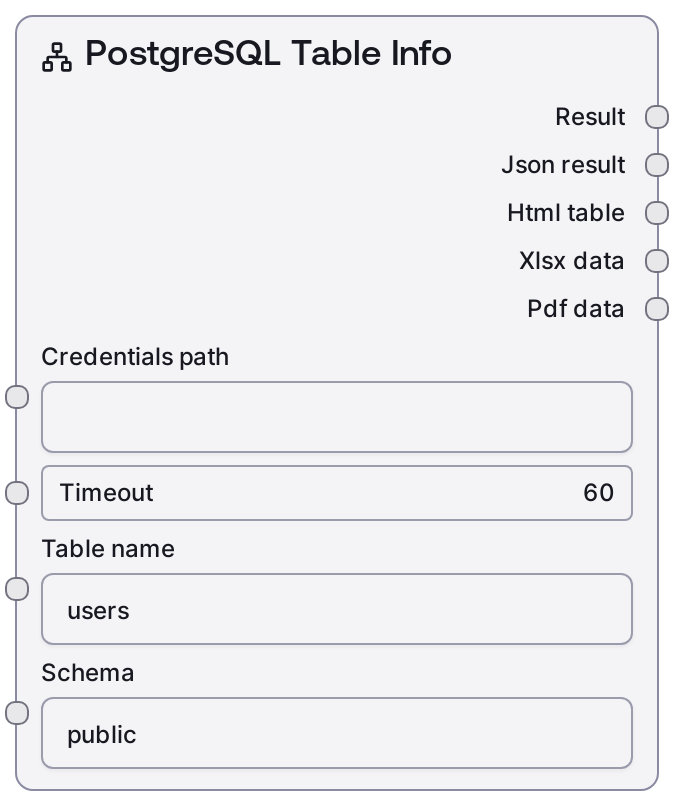
PostgreSQL Table Info
This node queries a PostgreSQL database for metadata about a single table, including its columns and other structural details. It loads your saved PostgreSQL credentials, calls the Salt data service /table-info endpoint, and formats the response into a human-readable text summary plus a raw JSON payload. Use it to inspect table structure programmatically before building queries or data pipelines.
Usage
Use SaltPostgresTableInfo when you need to understand the structure of a specific PostgreSQL table—its columns, data types, and constraints—before writing SQL or configuring downstream analytics. It typically appears early in a workflow after a credentials/config node is set up and before nodes like SaltPostgresQuery, SaltPostgresVisualQuery, or transformation nodes that depend on accurate schema knowledge. A common pattern is: (1) run SaltPostgresListTables to discover available tables in a schema, (2) feed a selected table name into SaltPostgresTableInfo to inspect its structure, and (3) use that information to build queries via SaltPostgresQuery or SaltPostgresVisualQuery, then pass query results to analysis or visualization nodes. For best results, keep schema and table names explicit and avoid mixing schema-qualified names in the table_name field; rely on the separate schema input instead, and rerun this node whenever database schema changes might impact your workflow.
| Field | Required | Type | Description | Example |
|---|
| credentials_path | True | STRING | Path or identifier for the stored PostgreSQL credentials configuration. This must refer to a valid credential bundle that matches the "postgres" credential template so the node can authenticate to the database via the Salt data service. | configs/credentials/postgres_reporting_db.json |
| timeout | True | INT | Maximum time in seconds to wait for the backend /table-info request to complete before failing. Increase for slow networks or heavily loaded databases, but keep it bounded to prevent workflows from hanging. | 30 |
| table_name | True | STRING | Name of the PostgreSQL table to inspect, without the schema prefix. Used together with the schema input to fully qualify the table. Be careful with case sensitivity if your database uses quoted identifiers. | customer_orders |
| schema | True | STRING | Name of the PostgreSQL schema that contains the target table. Defaults to "public" in the UI. Must match the actual schema name in your database, such as "public", "analytics", or "staging". | analytics |
Outputs
| Field | Type | Description | Example |
|---|
| text | STRING | A human-readable summary of the table information returned by the backend service. This typically includes the fully qualified table name and a concise overview of its columns and key attributes, suitable for logs, debugging, or language-model context. | Table Info: analytics.customer_orders Columns: - order_id (integer, primary key) - customer_id (integer, not null) - order_date (timestamp with time zone, not null) - total_amount (numeric(12,2), not null) - status (text, default 'pending') |
| json | JSON | Raw JSON metadata describing the specified table as returned by the /table-info service. This usually includes a list of columns with names, data types, nullability, default values, and key information. Downstream nodes can parse this structure to generate dynamic queries, validations, or UIs. | {'table': 'customer_orders', 'schema': 'analytics', 'columns': [{'name': 'order_id', 'data_type': 'integer', 'is_nullable': False, 'is_primary_key': True, 'default': "nextval('analytics.customer_orders_order_id_seq'::regclass)"}, {'name': 'customer_id', 'data_type': 'integer', 'is_nullable': False, 'is_primary_key': False, 'default': None}, {'name': 'order_date', 'data_type': 'timestamp with time zone', 'is_nullable': False, 'is_primary_key': False, 'default': 'now()'}, {'name': 'total_amount', 'data_type': 'numeric(12,2)', 'is_nullable': False, 'is_primary_key': False, 'default': None}, {'name': 'status', 'data_type': 'text', 'is_nullable': False, 'is_primary_key': False, 'default': "'pending'::text"}]} |
Important Notes
- Performance: The node performs a single /table-info call against the backend service, so it is generally fast; performance issues are more likely to come from network latency or catalog performance on very large databases.
- Limitations: This node is read-only and only returns metadata; it cannot alter schemas or tables and may not expose every advanced PostgreSQL feature (for example, certain index or constraint details may be simplified or omitted depending on backend implementation).
- Behavior: The schema and table_name values are sent as separate parameters; passing a schema-qualified name (such as "public.users") in table_name can result in errors or missing results. Always keep the schema and table name separate.
- Behavior: Credentials are loaded at runtime from credentials_path using the "postgres" template. If the credentials target the wrong database or lack access to system catalogs for the target table, the node will fail instead of returning partial data.
- Integration: SaltPostgresTableInfo is often paired with SaltPostgresListTables (to choose a table) and SaltPostgresQuery or SaltPostgresVisualQuery (to construct queries using the discovered schema information).
Troubleshooting
- Common Error 1: "table does not exist" or an empty result – Confirm that schema and table_name exactly match the table definition. For non-public schemas, ensure schema is set correctly (for example, "staging" or "analytics") and avoid including the schema in table_name.
- Common Error 2: "permission denied for relation" – The credentials referenced by credentials_path lack sufficient privileges to inspect that table. Grant the user appropriate privileges or switch to a credential set with read/catalog access.
- Common Error 3: Request timeout or "service timeout while calling /table-info" – Increase the timeout value, check network connectivity to the Salt data service and PostgreSQL host, and verify that the database is not under heavy load or blocked by firewalls.
- Common Error 4: "failed to load credentials" or configuration errors – Ensure credentials_path is correct, the underlying file or secret exists and is readable, and that it conforms to the expected PostgreSQL credential structure (host, port, database, username, and password or connection URL).