Loop Close
Usage
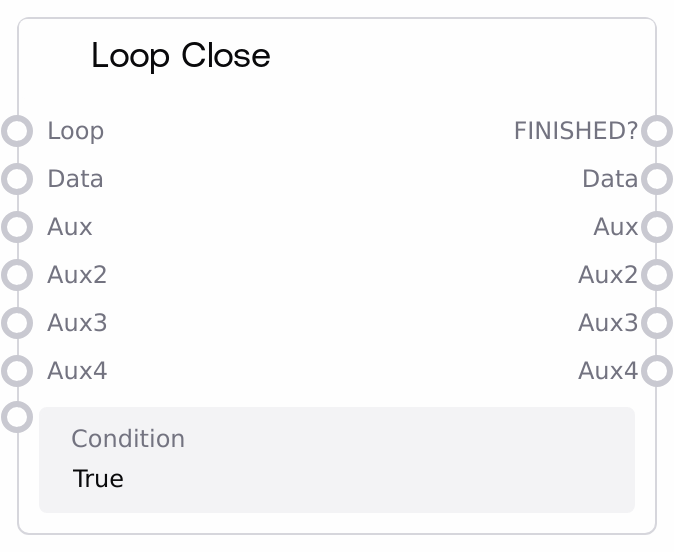
Use Loop Close at the end of a looped region that begins with a Loop Open node. Place Loop Open at the start of the section you want to repeat, connect processing nodes that should run each iteration, and then terminate that section with Loop Close. Connect the LOOP output from Loop Open into the LOOP input of Loop Close to establish the loop. To maintain state across iterations, connect the data and aux (and aux2–aux4 if needed) outputs of Loop Open back into the corresponding inputs of Loop Close, and feed those into nodes inside the loop body.
Typical use cases include multi-pass processing (e.g., multiple denoising or filtering rounds), iterative refinement (where each iteration improves or changes the input), and condition-driven loops (for example, run until a quality threshold is met). For fixed-count loops, configure start, step, and end on Loop Open and use a simple condition of True on Loop Close. For more complex logic, set condition on Loop Close to reference fields like index, start, end, step, finished, and any state carried in data or aux.
In a typical pipeline, upstream of Loop Close you have Loop Open and the nodes that form the loop body. Downstream of Loop Close you branch based on FINISHED?: use it to gate expensive aggregation or export nodes so they only execute once the loop is complete. Related nodes: SaltLoopOpen (required partner), the deprecated SaltWhileLoopOpen/SaltWhileLoopClose and SaltForLoopOpen/SaltForLoopClose, and logic/data inspection nodes that can read from the LOOP object for debugging or dynamic control.
Inputs
| Field | Required | Type | Description | Example |
|---|---|---|---|---|
| LOOP | True | ANY | The loop state object produced by Loop Open. This must be wired directly from the LOOP output of a SaltLoopOpen node. It is a dictionary-like structure that includes fields such as `id`, `start`, `end`, `step`, `index`, `finished`, and `last_id`, plus any shared logic storage variables. Loop Close uses this to determine if the loop bounds have been reached and to discover which nodes belong to the loop body for cloning. | {"id": 12, "start": 1, "end": 5, "step": 1, "index": 3, "finished": false, "last_id": 104} |
| condition | True | STRING | Expression that must evaluate to true for the loop to continue. It is evaluated in a safe context containing the LOOP fields (for example `index`, `start`, `end`, `step`, `finished`) and any variables derived from `data`, `aux`, and shared logic storage. If this expression evaluates to false, or if LOOP.finished is true, the loop terminates and Loop Close emits final outputs instead of scheduling another iteration. An empty string is treated as `True`. | index < end and not finished |
| data | False | ANY | Primary data payload that flows through the loop. Usually connected from the `data` output of Loop Open and then wired into processing nodes in the loop body. Loop Close forwards this into the next iteration's Loop Open (via the dynamically built graph) so that changes accumulate. After the last iteration, this output contains the final processed value. It can be any supported type, such as images, text, or structured objects. | {"images": ["gs://my-bucket/exec_123/frame_03.png"], "pass": 3} |
| aux | False | ANY | First auxiliary state channel to persist between iterations. Use this for counters, running statistics, lists of intermediate results, or any extra data you need to carry through the loop. This is also forwarded into the next Loop Open call and returned when the loop completes. | {"loss_history": [0.9, 0.7, 0.55], "best_loss": 0.55} |
| aux2 | False | ANY | Second auxiliary state channel. Behaves like `aux` but is a separate slot so you can manage multiple independent pieces of loop state, such as one for metrics and one for early-stop flags. | {"should_stop": false} |
| aux3 | False | ANY | Third auxiliary state channel, used when more than two state streams are needed. Forwarded into the next iteration and ultimately returned at loop completion. | {"aggregated_summary": "iter1: ok; iter2: ok; iter3: borderline"} |
| aux4 | False | ANY | Fourth auxiliary state channel. Same semantics as aux/aux2/aux3, mainly for complex looping scenarios that require multiple distinct pieces of per-iteration state. | {"debug_trace": ["i=1: success", "i=2: success", "i=3: retry"]} |
Outputs
| Field | Type | Description | Example |
|---|---|---|---|
| FINISHED? | BOOLEAN | Indicates whether the loop has completed. True when either the LOOP state marks it as finished (for example index has passed end) or the close-side condition evaluates to false. False when another iteration has been scheduled. Downstream logic can branch on this to only run finalization or export steps when FINISHED? is true. | true |
| data | ANY | Final value of the `data` stream once the loop has terminated. This is the cumulatively processed result of all loop iterations. The type and structure match whatever you passed through the `data` input, such as a last updated image batch, processed text, or aggregated JSON. | {"images": ["gs://my-bucket/exec_123/final_frame.png"], "passes": 4} |
| aux | ANY | Final value of the primary auxiliary state after the last iteration. Use this output to retrieve metrics, histories, or other side-channel information that you accumulated during the loop. | {"loss_history": [0.9, 0.7, 0.55, 0.5], "best_loss": 0.5} |
| aux2 | ANY | Final value of the second auxiliary state channel. Only populated if you used aux2 in the loop; otherwise may be null or unchanged. | {"should_stop": true, "stop_reason": "reached target score"} |
| aux3 | ANY | Final value of the third auxiliary state channel, containing whatever state you carried in aux3 over all iterations. | {"aggregated_summary": "3 iterations, all constraints satisfied"} |
| aux4 | ANY | Final value of the fourth auxiliary state channel. Useful for returning debug traces or other optional data from the loop. | {"debug_trace": ["i=1: success", "i=2: success", "i=3: early stop"]} |
Important Notes
- Performance: Loop Close triggers dynamic cloning of all nodes between Loop Open and Loop Close for every iteration. Large loop bodies or heavy models inside the loop can significantly increase execution time and memory usage; keep the loop body as compact as possible.
- Limitations: The LOOP input must come from a SaltLoopOpen node in the same workflow. Supplying arbitrary data or a LOOP from an incompatible node can break the loop mechanics or cause runtime errors.
- Behavior: Loop termination depends on both LOOP.finished and the close-side condition. Even if the close condition is true, the loop will still stop when LOOP.finished is true (for example when the index passes the end bound).
- Behavior: If the underlying graph-building utilities are unavailable or disabled, Loop Close cannot schedule follow-up iterations and may raise an error instructing you to update your execution environment.
- Performance: The execution engine can enforce soft and hard iteration limits to protect against runaway loops. Very large iteration counts may be truncated, and you should monitor logs for warnings about loop guard rails.
- Limitations: The condition expression is evaluated in a restricted, safe environment. It cannot call arbitrary functions or reach out to external services; it is limited to the variables explicitly provided in the loop context.
Troubleshooting
- Loop never terminates (FINISHED? remains false): Check the step and end values configured on Loop Open and ensure your condition expression on Loop Close actually becomes false at some point. If
stepis 0 or the condition does not depend on a changing variable likeindex, the loop may never reach a stopping state. - Engine errors about unsupported loop mechanics: If you see errors mentioning graph construction or that the environment is too old to support loops, the execution engine lacks the dynamic expansion features Loop Close relies on. Upgrade to a version that supports loop nodes before using this functionality.
- data/aux outputs are null or not updated: Confirm that the corresponding outputs from Loop Open are wired back into the same-named inputs on Loop Close and that nodes inside the loop body use and forward those values. Missing or incorrect connections will result in null or stale data at the end of the loop.
- Unexpected early stop due to condition: If the loop stops earlier than expected, log or inspect the LOOP state and the values of any variables used in your condition expression. Syntax errors or references to missing variables can cause the safe evaluator to treat the condition as false, terminating the loop.