Memory Keys
Usage
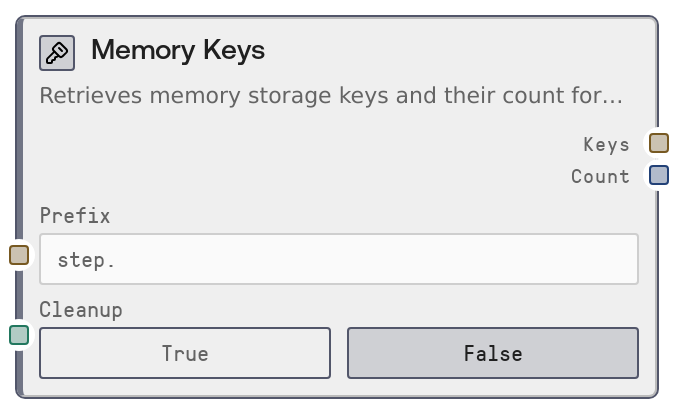
Use the Memory Keys node when you want to see which items have been written into execution-scoped memory during the current workflow run, or when you need to clear that memory at the end of processing. Common scenarios include: (1) debugging—verifying which steps wrote to memory and under what key names, (2) dynamic branching—checking for the presence of specific keys to decide which downstream path to follow, and (3) cleanup—removing all transient memory to prevent stale data from affecting future runs.
Typically, one or more upstream nodes (such as Memory Write or other storage-aware nodes) will have stored intermediate results in execution memory using descriptive key names (e.g., "step.load_data", "cache.response.1"). Insert Memory Keys mid-pipeline (with cleanup disabled) to inspect available keys, then pass the JSON list of keys into an LLM node or a parser node to select which keys to read next via Memory Read. At the end of a workflow, you might add a Memory Keys node with cleanup enabled in a finalization branch to both capture a snapshot of what was stored and then fully clear the execution memory.
Best practice is to establish naming conventions for keys (such as grouping by prefix: "step.", "cache.", "user.") so you can use the prefix filter to focus on a subset of keys. Use cleanup sparingly and intentionally, usually only once at the end of the workflow or within an explicit error-handling/cleanup stage, since it deletes all keys for the current execution regardless of the prefix filter. Memory Keys pairs especially well with Memory Read (for iterating over and consuming stored values) and with conditional/router nodes that branch on the count or on specific key names.
Inputs
| Field | Required | Type | Description | Example |
|---|---|---|---|---|
| prefix | False | STRING | Optional prefix used to filter which keys are returned. Only keys that start with this prefix are included in the output. If the value is empty or only whitespace, all keys for the current execution are listed. This is most effective when you follow naming conventions (e.g., grouping related keys with the same prefix). | step. |
| cleanup | False | BOOLEAN | When true, deletes ALL memory keys for the current execution after listing them, ignoring any prefix filter. This is designed for full cleanup at the end of a workflow. When false, the node only lists keys and leaves memory untouched. Use this option carefully, as it permanently removes all execution-scoped entries. | True |
Outputs
| Field | Type | Description | Example |
|---|---|---|---|
| keys | STRING | A JSON-encoded array of key names that exist in execution-scoped memory and match the optional prefix filter. This is returned as a plain string containing JSON, which can be consumed by LLM nodes, JSON-aware parsers, or custom logic nodes to drive decisions or to iterate over keys with a Memory Read node. | ["step.load_data", "step.clean_data", "cache.model_response_1"] |
| count | INT | The number of keys found and returned in the keys JSON array. Useful for quick checks (for example, ensuring there is at least one result before proceeding) and for logging or monitoring how much transient state your workflow is generating. | 3 |
Important Notes
- Performance: Listing keys requires a storage lookup based on the current workflow_execution_id; in workflows with very large numbers of memory entries, listing all keys (no prefix) may introduce noticeable latency.
- Limitations: The cleanup flag triggers a full cleanup of all memory for the current execution, not a selective cleanup of only the filtered keys. There is no partial-delete mode in this node.
- Behavior: If workflow_execution_id is not present (for example, when running the node outside a normal workflow context), the node raises a ValueError and does not perform any storage operations.
- Behavior: The keys output is a JSON string rather than a native list; any downstream logic that expects structured data should parse this JSON before attempting to index or iterate over it.
Troubleshooting
- Error: Execution ID is not available in this context.: This indicates workflow_execution_id was missing. Ensure the node is part of a properly started Salt workflow execution and not being invoked in isolation or from a context that does not propagate execution metadata.
- Empty result when keys are expected: If keys is "[]" but you believe data was stored, confirm that upstream nodes wrote to execution-scoped memory for this workflow_execution_id and that you are using the correct prefix. Test by clearing the prefix to list all keys.
- Downstream parsing failures: If a node consuming keys fails with a parsing or type error, verify that it either accepts JSON-formatted strings or add a dedicated JSON parsing or transformation node between Memory Keys and that consumer.
- Unexpected loss of memory entries: If later nodes report missing memory keys, check whether cleanup was set to true in Memory Keys earlier in the workflow. Once cleanup runs, all execution-scoped keys for that execution are permanently removed.