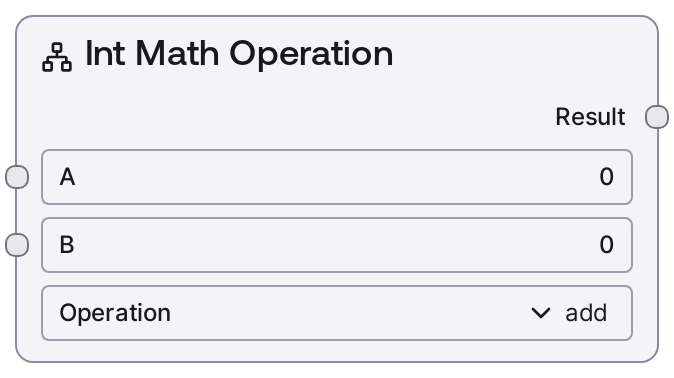
Int Math Operation
This node executes a selected integer math operation on two INT operands and returns the result as an INT. It supports addition, subtraction, multiplication, integer division, modulo, and exponentiation, with built-in safeguards for invalid operations like division or modulo by zero. When an invalid operation or error occurs, it logs the issue and returns 0 instead of failing the workflow.
Usage
Use this node whenever you need simple integer arithmetic within a Salt workflow, such as updating loop counters, computing offsets, deriving indices, or performing small integer calculations between steps. It commonly sits in control or utility sections of a pipeline: upstream nodes provide integer values (for example, counters from SaltIfNodeSimpleLoop, outputs from other math nodes, or parsed user input), and downstream nodes consume the resulting INT for conditions (such as SaltIntConditions or SaltComparisonOperation), routing, or further math. Typical scenarios include incrementing or decrementing counters (add/subtract), computing pagination offsets (page * page_size), calculating remaining retries (total - used), or combining multiple integer counts from different paths. You can pair this node with SaltFloatMathOperation when you also need floating-point calculations in nearby steps, and with SaltRoundingOperation when converting from float results back to integers for subsequent integer-only logic. Prefer divide only when you truly want integer division semantics, use modulo for wrap-around or periodic behavior, and avoid excessively large exponents with power to keep execution fast and memory usage reasonable.
| Field | Required | Type | Description | Example |
|---|
| a | True | INT | First integer operand and left-hand side of the computation. Must lie within [-0xffffffffffffffff, 0xffffffffffffffff] with a step of 1. Used directly in the chosen arithmetic operation. | 10 |
| b | True | INT | Second integer operand and right-hand side of the computation. Must lie within [-0xffffffffffffffff, 0xffffffffffffffff] with a step of 1. For divide and modulo it is the divisor; for power it is the exponent. | 3 |
| operation | True | STRING | Specifies which operation to apply to a and b. Allowed values: "add" (a + b), "subtract" (a - b), "multiply" (a * b), "divide" (integer division a // b), "modulo" (a % b), and "power" (a ** b). Any other value is treated as unknown and causes the node to log a warning and return 0. | add |
Outputs
| Field | Type | Description | Example |
|---|
| result | INT | The integer result of applying the specified operation to a and b. For divide, this is integer division; for modulo, the remainder; for power, the integer exponentiation result. In error or invalid cases (division/modulo by zero, unknown operation, or other exceptions), the node returns 0 so downstream consumers always receive a valid INT. | 13 |
Important Notes
- Performance: All operations are primitive integer operations and very fast for typical operand sizes. However, using very large exponents with the power operation can generate huge integers, significantly increasing memory usage and execution time.
- Limitations: If b is 0 for divide or modulo, the node does not raise an exception; it logs a warning and returns 0. This protects workflow stability but can hide logic bugs if you do not validate inputs.
- Behavior: The divide operation uses integer division (a // b), discarding any fractional part (for example, 10 and 3 with divide produce 3). Behavior with negative numbers follows integer division semantics, which may differ from expectations based on floating-point division.
- Behavior: When an unsupported operation string is provided, or if another runtime error occurs, the node logs the issue and returns 0 instead of stopping the workflow, prioritizing robustness over strict failure.
- Limitations: Although the configured input range is extremely wide, using very large values—especially with power—can cause practical issues such as high memory consumption or slow execution. Keep operands within realistic bounds for production workflows.
Troubleshooting
- Unexpected 0 result: If the node outputs 0 when you expect another value, check whether you are dividing or taking modulo by zero, passing an invalid operation string, or triggering an internal error. In these cases, the node intentionally falls back to 0 and logs a warning or error.
- Truncated division outcomes: If division results appear truncated (for example, 10 divided by 3 yields 3), remember that this node performs integer division using a // b. For fractional results, switch to SaltFloatMathOperation with the divide operation and, if needed, round later with SaltRoundingOperation.
- Slow or memory-heavy runs with power: If your workflow becomes slow or memory-intensive when using the power operation, inspect the magnitude of a and b. Large exponents can create enormous integers; reduce the exponent or consider an alternative numeric approach.
- Unexpected behavior with negative operands: If results for negative inputs, particularly with divide or modulo, seem incorrect, verify that your logic accounts for integer floor-division semantics. If you require different behavior, consider using float-based operations and then converting with SaltRoundingOperation.