Oracle Execute
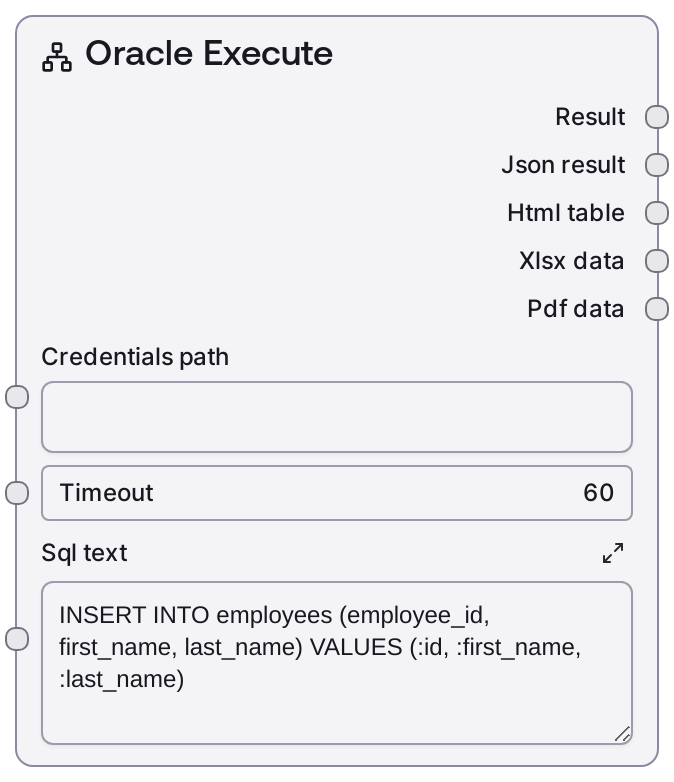
Usage
Use Oracle Execute whenever you need to change data or schema in an Oracle database from a Salt workflow. Typical scenarios include inserting new records (e.g., adding employees), updating existing rows based on business rules, deleting obsolete data, or running DDL such as creating or altering tables. In a common pipeline, you first configure Oracle credentials or a connection URI (e.g., via a credentials file or an upstream connector node such as Oracle Connection String), then feed that into nodes based on DatabaseBaseNode (including Oracle Execute), optionally adjust the timeout, and finally connect the outputs to logging, validation, or follow-up nodes. Upstream nodes often include credential loaders or configuration/template nodes that set the credentials_path; downstream nodes might be text analyzers, report generators, or control-flow nodes that branch based on the JSON status or row counts. Integrate it alongside SaltOracleQuery (for SELECTs), SaltOracleTableInfo (for schema introspection), and SaltOracleTestConnection (for connectivity checks) to build robust database workflows. Prefer parameterized SQL and carefully constrained statements to avoid accidental mass updates or deletes, and test your SQL on a non-production environment before wiring it into automated flows.
Inputs
| Field | Required | Type | Description | Example |
|---|---|---|---|---|
| credentials_path | True | STRING | Path or identifier for the stored Oracle credentials/connection profile used by DatabaseBaseNode. This must refer to a valid Oracle credential template ("oracle") containing host, port, service, username, and password or a compatible connection URI. If invalid or missing, the node will fail to connect. | /workspace/credentials/oracle/hr_prod.json |
| timeout | True | INT | Maximum time, in seconds, to wait for the Oracle execute operation to complete. Long-running DML or DDL should use a higher timeout; extremely low values may trigger timeouts before the database responds. | 30 |
| sql_text | True | STRING | The SQL statement to execute against Oracle. This is intended for non-SELECT operations such as INSERT, UPDATE, DELETE, MERGE, and DDL (CREATE/ALTER/DROP). Multiline is supported; bind placeholders (e.g., :id) are allowed if the underlying service supports parameter binding. Avoid arbitrary user input here without proper validation to prevent destructive operations. | UPDATE employees SET salary = salary * 1.05 WHERE department_id = 50 |
Outputs
| Field | Type | Description | Example |
|---|---|---|---|
| text | STRING | Primary human-readable summary of the execution result, produced by the base node’s default formatter. Typically includes status information (e.g., success/failure) and high-level details such as how many rows were affected or a short message from the service. | Oracle Execute Results: SUCCESS – 12 rows affected by UPDATE statement. |
| json | STRING | Raw JSON payload (as a string) returned by the Oracle execution service via DatabaseBaseNode. This often contains structured fields like status codes, affected row counts, and any messages or errors from the database. Downstream nodes can parse this JSON for automated checks and branching. | {"status": "success", "rows_affected": 12, "sql": "UPDATE employees SET salary = salary * 1.05 WHERE department_id = 50"} |
| html | STRING | Optional HTML-formatted representation of the result, if provided by the base formatter. For execute operations, this is usually a simple HTML summary suitable for dashboards or rich-text report nodes. | Oracle Execute ResultsStatus: success Rows affected: 12 |
| file | STRING | Optional file reference or path produced by the base node if the result is exported to a file (e.g., a log or execution report). For many execute operations this may be empty, but workflows can leverage it when the backend generates artifacts. | /workspace/outputs/oracle/execute_2024-06-01T10-15-30Z.json |
| metadata | STRING | Additional metadata about the execution encoded as a JSON string. This can include timing information, endpoint used ("/execute"), or other diagnostic details added by DatabaseBaseNode. | {"endpoint": "/execute", "elapsed_ms": 245, "service": "oracle"} |
Important Notes
- Performance: Large batch DML (e.g., updating hundreds of thousands of rows) can be slow and may require increasing the timeout; consider batching operations or scheduling them off-peak.
- Limitations: This node is designed for non-SELECT operations; for data retrieval queries use a dedicated query node like "Oracle Query" or "Oracle Complex Query" instead.
- Behavior: The node sends the sql_text as-is to the Oracle backend; incorrect or unsafe SQL can cause constraint violations, locks, or unintended mass updates/deletes.
- Behavior: Credentials are resolved via the shared Oracle credential template; misconfigured credentials_path or template content will lead to connection failures before the SQL is executed.
Troubleshooting
- Common Error 1: "Authentication failed" or similar in the text/json output – verify credentials_path points to a valid Oracle credential profile and that the username/password or connection URI is correct.
- Common Error 2: "Execution timed out" or a timeout indication – increase the timeout input value, optimize the SQL statement (e.g., add indexes or filters), or avoid running heavy maintenance operations through this node.
- Common Error 3: Oracle error codes such as "ORA-00933: SQL command not properly ended" in the JSON payload – check sql_text for syntax issues (missing commas, semicolons, or invalid keywords) and validate it directly against the database before using it in the workflow.
- Common Error 4: Zero rows affected when you expect changes – confirm that the WHERE clause matches existing rows, that you are connected to the correct schema/database, and that any necessary privileges (UPDATE/DELETE/INSERT) are granted to the configured user.