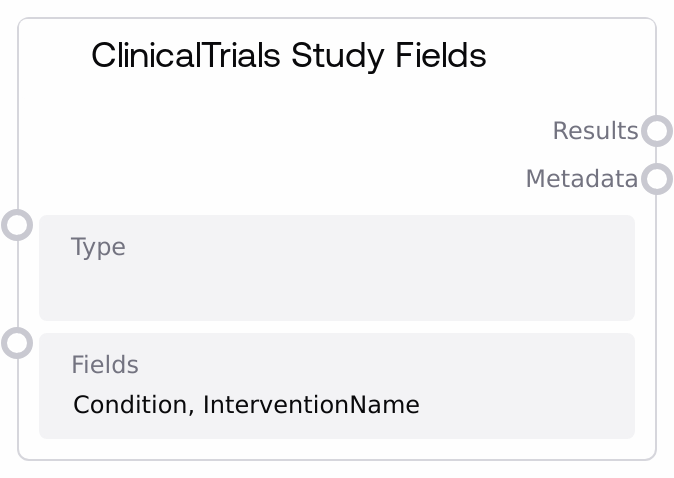
ClinicalTrials Study Fields
This node calls the ClinicalTrials.gov statistics endpoint `/stats/field/values` to fetch aggregated values for selected study fields, such as conditions or intervention names. It accepts optional filters and then returns the raw API response along with simple metadata, both as JSON-formatted strings. It is designed for exploring which field values occur in the registry and for powering downstream analytics or configuration interfaces.
Usage
Use this node when you need lists or distributions of values for specific ClinicalTrials.gov study fields (for example, all conditions or intervention names that appear in registered studies). Place it early in a pipeline that prepares clinical trial registry data for analysis, visualization, or prompt building. Upstream, you typically connect text or configuration inputs that set the type and fields parameters, possibly based on user selections or environment presets. Downstream, route the results output into JSON-parsing or table-building nodes to create structured lists or tables that can be filtered, counted, or visualized, and use the metadata output to quickly check how many top-level items were returned. It works well alongside other ClinicalTrials nodes that fetch study details or search results, forming an end-to-end workflow for clinical trial registry exploration.
| Field | Required | Type | Description | Example |
|---|
| type | False | STRING | Optional filter specifying a field-type category recognized by the ClinicalTrials.gov stats API. When set, returned values are limited to the specified type category; when left empty, no type-based restriction is applied. The exact acceptable values depend on the upstream ClinicalTrials.gov configuration and may represent logical groupings such as study characteristics or other field clusters. | StudyCharacteristics |
| fields | False | STRING | Comma-separated list of ClinicalTrials.gov study field names whose values you want to retrieve. Each entry should be a valid field name (for example, Condition or InterventionName). Whitespace around commas is allowed but should be consistent. If you include invalid or misspelled field names, the corresponding entries in the API response may be empty or absent, without explicit per-field error messages. | Condition, InterventionName, OverallStatus |
Outputs
| Field | Type | Description | Example |
|---|
| results | STRING | A JSON-formatted string containing the raw response from the ClinicalTrials.gov `/stats/field/values` endpoint, based on the provided `type` and `fields` filters. Typically it is a JSON object keyed by field name, with each key mapping to arrays of value/count objects. If a network error, JSON decoding error, or unexpected exception occurs, this output instead contains a short JSON object with an `error` key describing the error category. | {"Condition": [{"field": "Condition", "count": 15234, "value": "Breast Cancer"}, {"field": "Condition", "count": 9812, "value": "Diabetes Mellitus"}], "InterventionName": [{"field": "InterventionName", "count": 2431, "value": "Placebo"}, {"field": "InterventionName", "count": 1875, "value": "Metformin"}]} |
| metadata | STRING | A JSON-formatted string with basic metadata about the call. Currently, this includes `result_count`, which is the number of top-level items in the parsed API response (for example, how many distinct field keys were returned). On any error, this output mirrors the error pattern of `results`, returning a JSON object with an `error` key such as "Network error", "JSON decode error", or "Unknown error". | {"result_count": 2} |
Important Notes
- Performance: Each execution issues an external HTTP GET request with a 30-second timeout; broad queries or slow network conditions can significantly increase latency and may approach the timeout.
- Limitations: The node does not validate or normalize
type and fields against a schema. Invalid, deprecated, or misspelled values are passed directly to the API and may yield empty or partial responses without explicit field-level errors.
- Behavior: On network, JSON decoding, or unexpected runtime errors, the node does not raise exceptions but returns both outputs as small JSON strings containing an
error key, so downstream nodes should always check for an error field before assuming success.
- Behavior: The
result_count value in metadata reflects the number of top-level items in the parsed JSON (for example, the number of distinct fields returned), not the number of individual field values or underlying study records.
- Behavior: The base API URL for ClinicalTrials.gov is inherited from a shared ClinicalTrials base configuration; if that configuration changes (for example, different environment or mirror), this node automatically points to the new base URL while retaining the same endpoint path.
Troubleshooting
- Common Error 1: Both outputs show
{ "error": "Network error" } — The request could not reach the ClinicalTrials.gov service. Check internet connectivity, DNS configuration, proxy or firewall rules, and confirm the ClinicalTrials.gov host is accessible from the Salt runtime environment.
- Common Error 2: Both outputs show
{ "error": "JSON decode error" } — The response was not valid JSON, often due to an HTML error page or truncated content from the upstream service. Verify the base API URL and endpoint configuration, check for any service incidents on ClinicalTrials.gov, and retry after the service stabilizes.
- Common Error 3:
results is valid JSON but does not contain the expected fields — This usually indicates that one or more values in fields or type do not match actual ClinicalTrials.gov identifiers or categories. Start with a single known field such as Condition, verify that it returns data, then gradually add additional fields, consulting the ClinicalTrials.gov field list.
- Common Error 4: A downstream node fails when parsing
results — This node returns its data as a STRING containing JSON. Ensure that the downstream node is configured to parse a JSON string and that no intermediate steps (such as substring operations) have altered or truncated the JSON text.