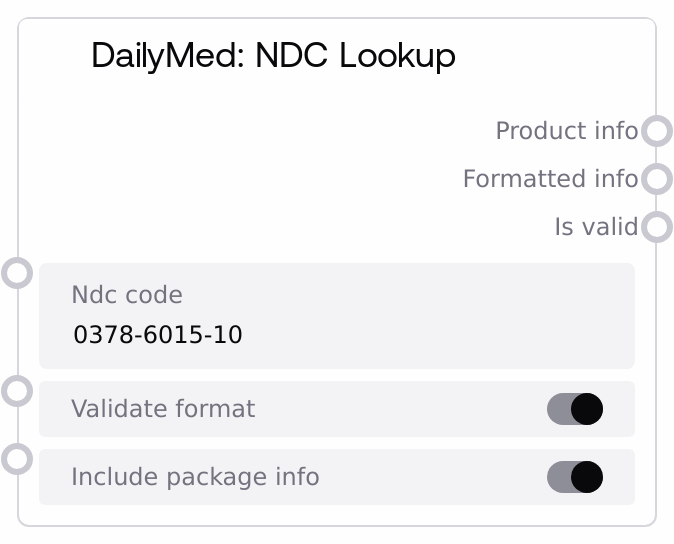
DailyMed: NDC Lookup
This node performs a focused lookup of a single National Drug Code (NDC) against the U.S. DailyMed database. It can optionally validate the basic NDC format before querying and returns both raw JSON product data and a formatted text summary, plus a boolean indicating whether the code maps to a valid product. It is tailored for workflows where you already have an NDC and need authoritative label-level product details, including optional packaging information.
Usage
Use this node when you have an NDC (with or without hyphens) and need to confirm that it corresponds to a real product in the DailyMed database and retrieve structured details. Common scenarios include validating medication identifiers from EHR exports or claims, checking patient-entered NDCs from pill bottles, and enriching structured data feeds with brand/generic names, manufacturer, strength, dosage form, and packaging. Place it downstream of any node that produces an NDC string (for example OCR or form ingestion). The node internally calls the DailyMed API NDC search and returns the first matching product only. The JSON output (product_info) is ideal for downstream analytics or storage nodes, while the formatted_info text is good for user-facing display or logs. Combine it with DailyMedAPINode when you also need name-, ingredient-, or set-id-based search, and with DailyMedIngredientSearchNode when you want to go from ingredient to product lists. In your workflow, branch on is_valid: if true, proceed to parse and use the product_info; if false, surface the formatted_info to the user or error-handling logic.
| Field | Required | Type | Description | Example |
|---|
| ndc_code | True | STRING | The National Drug Code to look up in DailyMed. Hyphens and spaces are allowed and will be stripped before querying. With validate_format enabled, the cleaned code must be 10 or 11 digits and all numeric; otherwise the node returns a format error without calling the API. | 0378-6015-10 |
| validate_format | False | BOOLEAN | If true, performs a simple pre-check that the NDC is 10 or 11 digits after removing hyphens and spaces. On failure, lookup is skipped and an Invalid NDC format error is returned with is_valid set to false. Turn this off if you prefer to always hit the API and let it determine validity. | True |
| include_package_info | False | BOOLEAN | If true, the formatted summary will include a Packaging Information section listing up to the first three package descriptions and their package-level NDCs when available. If false, packaging details are omitted from the formatted summary but remain present in the raw JSON, if provided by the API. | True |
Outputs
| Field | Type | Description | Example |
|---|
| product_info | STRING | A JSON-formatted string representing the first product returned by the DailyMed search for the given NDC, or an error object. On success it typically includes keys such as title, setid, openfda (brand_name, generic_name, manufacturer_name), active_ingredient, strength, dosage_form, route, product_ndc, and packaging. On failure it contains an error field describing the problem. | {"title": "Lisinopril 10 MG Oral Tablet", "setid": "a1b2c3d4-5678-90ab-cdef-1234567890ab", "openfda": {"brand_name": ["Lisinopril"], "generic_name": ["Lisinopril"], "manufacturer_name": ["Mylan Pharmaceuticals Inc."]}, "active_ingredient": ["LISINOPRIL 10 mg"], "strength": ["10 mg"], "dosage_form": ["TABLET"], "route": ["ORAL"], "product_ndc": ["0378-6015"], "packaging": [{"package_ndc": "0378-6015-10", "description": "10 tablets in 1 bottle"}]} |
| formatted_info | STRING | A multi-line, human-readable text summary of the NDC product. It includes a header and, when available, product title, brand name, generic name, manufacturer, active ingredients, strength, dosage form, and optionally packaging lines showing description and package NDCs. If the lookup fails or the format is invalid, this field contains a concise error or not-found message. | NDC Product Information ============================== Product: Lisinopril 10 MG Oral Tablet Brand: Lisinopril Generic: Lisinopril Manufacturer: Mylan Pharmaceuticals Inc. Active Ingredients: LISINOPRIL 10 mg Strength: 10 mg Dosage Form: TABLET Packaging Information: - 10 tablets in 1 bottle (NDC: 0378-6015-10) |
| is_valid | BOOLEAN | True if the NDC passed optional format validation, the DailyMed API returned at least one matching product, and no exception occurred. False if the format check failed, no product was found, or an error happened during the lookup. Downstream logic should always check this flag before trusting product_info as a real product record. | True |
Important Notes
- Performance: Each lookup triggers an external HTTP request to the DailyMed API with a 30-second timeout; avoid using this node in high-frequency loops for bulk NDC processing without batching or caching.
- Limitations: The node returns only the first product from DailyMed for a given NDC. If multiple products or SPLs share that code, they will not all be exposed through this node.
- Behavior: NDC format validation is intentionally simple (digits-only, length 10 or 11 after stripping separators). Codes may pass this check yet legitimately not exist in DailyMed, in which case the node reports an NDC not found error with is_valid set to false.
- Behavior: On any error (invalid format, not found, network issue), product_info is still a JSON string but contains an error key, formatted_info becomes a short error message, and is_valid is false, so always branch on is_valid before parsing product_info.
Troubleshooting
- Invalid NDC format message: If formatted_info shows "Invalid NDC code format. Expected format: 5-4-2 or 4-4-2 digits" and is_valid is false, ensure the input contains only digits plus optional hyphens or spaces and that the total digit count is 10 or 11 once cleaned, or disable validate_format if you must attempt unconventional codes.
- NDC not found response: When product_info contains an error of "NDC not found" and formatted_info says "No product found for NDC: ...", the code is structurally valid but has no entry in DailyMed. Double-check the source system, confirm the NDC is current, and consider whether you are using a repackager or obsolete code.
- Network or API failures: If formatted_info begins with "Error looking up NDC" and product_info contains an error mentioning timeout, connection, or HTTP status, there may be connectivity issues or DailyMed service problems. Verify network access, check for corporate firewall restrictions, and add retry or fallback handling around this node.
- Downstream parsing issues: If a following node fails to parse product_info, remember that it is a JSON string, not a native object. Ensure the consumer explicitly parses JSON, and guard against error payloads by checking is_valid before attempting to access expected drug fields.