Oracle Database Info
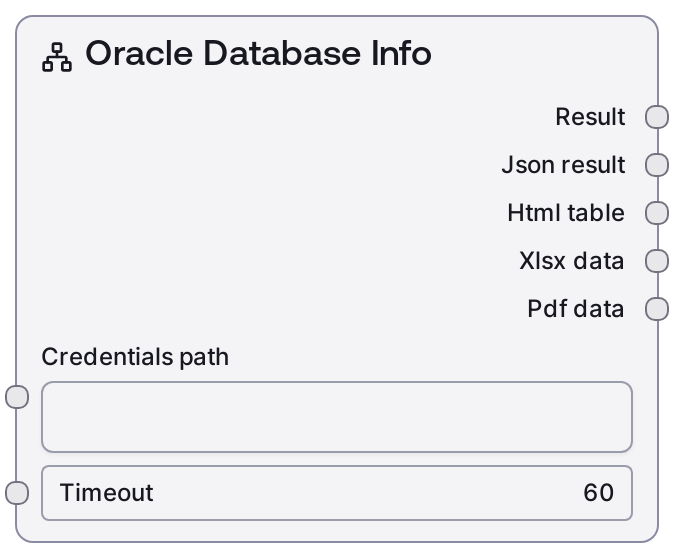
This node connects to an Oracle database using stored credentials and fetches instance-level information such as version, host, and status. It invokes the Oracle service’s "/database-info" operation and formats the result as both human-readable text and structured JSON. It is primarily used to confirm which Oracle environment you are connected to and to inspect high-level database properties without writing SQL.
Usage
Use this node after your Oracle credentials are configured to verify environment details before running queries or schema exploration. It typically appears early in a workflow, following a credential-selection or authentication step and often after the "Oracle Test Connection" node to confirm connectivity. Upstream, provide a valid credentials_path that references an Oracle credential and a timeout suitable for your network conditions; no Oracle-specific parameters (like schema or table) are required. Downstream, route the text output to logging, notifications, or monitoring nodes, and route the JSON output to decision or branching nodes that need to inspect database version, status, or host information. Common patterns include: (1) load credentials → Oracle Test Connection → Oracle Database Info → Oracle List Schemas/Tables → Oracle Query/Execute; (2) load credentials → Oracle Database Info → conditional branch based on version or status to choose compatible operations.
| Field | Required | Type | Description | Example |
|---|
| credentials_path | True | STRING | Reference to a stored Oracle credential configuration that matches the "oracle" credential template (host, port, service/SID, username, password, and related settings). The node uses this to establish the connection and authenticate against the Oracle instance. | vault://database/oracle/prod/hr-readonly |
| timeout | True | INT | Maximum time in seconds to wait for the Oracle "/database-info" request to complete before failing. Must be a positive integer; choose a higher value for slow networks or heavily loaded databases. | 30 |
Outputs
| Field | Type | Description | Example |
|---|
| text | STRING | Human-readable summary of the Oracle database instance information, suitable for logs, dashboards, or audits. Typically includes fields like database name, host, version, and status in a formatted textual block. | Oracle Database Info: - Name: ORCL - Host: oracle-prod-01.internal - Version: 19.18.0.0.0 - Status: OPEN - Platform: Linux x86_64 |
| json | STRING | Structured JSON payload returned by the backend "/database-info" call, serialized as a string. Contains instance metadata such as database_name, host, version, status, and other attributes that can be parsed by downstream automation. | {"database_name": "ORCL", "host": "oracle-prod-01.internal", "version": "19.18.0.0.0", "status": "OPEN", "platform": "Linux x86_64", "instance_id": 1} |
| html | STRING | HTML-formatted representation of the database info if provided by the shared database formatting layer. Useful for embedding a nicely formatted info panel into web-based reports or UI components. | Oracle Database Info- Name: ORCL
- Host: oracle-prod-01.internal
- Version: 19.18.0.0.0
- Status: OPEN
|
| file | STRING | Optional file reference (such as a generated report or JSON file path) produced by the common database node formatter, if enabled. May be empty in simpler configurations but can be consumed by archival or export nodes when present. | /tmp/oracle_database_info_2024-06-12T10-15-00Z.json |
| extra | STRING | Auxiliary output slot reserved by the shared DatabaseBaseNode for additional metadata or service-specific information. This may contain request tracking data or be empty, depending on backend configuration. | {"request_id": "f3c0f9b8-3d9b-4a9f-9bf3-7f4e2ca1e2ab"} |
Important Notes
- Performance: This node makes a single metadata call and is usually fast, but the actual response time depends on network latency and Oracle load; adjust the timeout accordingly for remote or busy instances.
- Limitations: It does not expose schema, tables, or data contents and cannot execute arbitrary SQL; use nodes such as "Oracle List Schemas", "Oracle List Tables", or "Oracle Query" for those operations.
- Behavior: All connection parameters (host, port, service/SID, user, password) are taken from the referenced credential; to change targets, update the credential rather than this node’s inputs.
- Behavior: On connection or authentication failures, the outputs may contain error summaries instead of normal database info; downstream logic should inspect the JSON for error fields or a non-OPEN status before proceeding.
Troubleshooting
- Connection failed or timed out: If the text output mentions a timeout or unreachable host, increase the timeout value and verify that the host and port in the Oracle credential are correct and reachable from the Salt runtime environment.
- Invalid credentials (ORA-01017): Errors indicating invalid username or password mean the stored credential is incorrect. Update the username/password in the referenced Oracle credential and optionally validate first using the "Oracle Test Connection" node.
- Unexpected database details: If the reported database_name, host, or version are not what you expect, you may be using the wrong credential or listener. Double-check the credentials_path and confirm with your DBA which host, port, and service/SID should be used.
- JSON parsing issues downstream: If a downstream node fails when parsing the json output, inspect the json string directly; it may contain an error object or HTML from an upstream failure. Add a guard step that checks for an error field or validates the status before attempting to parse or rely on the metadata.