DailyMed: Ingredient Search
Usage
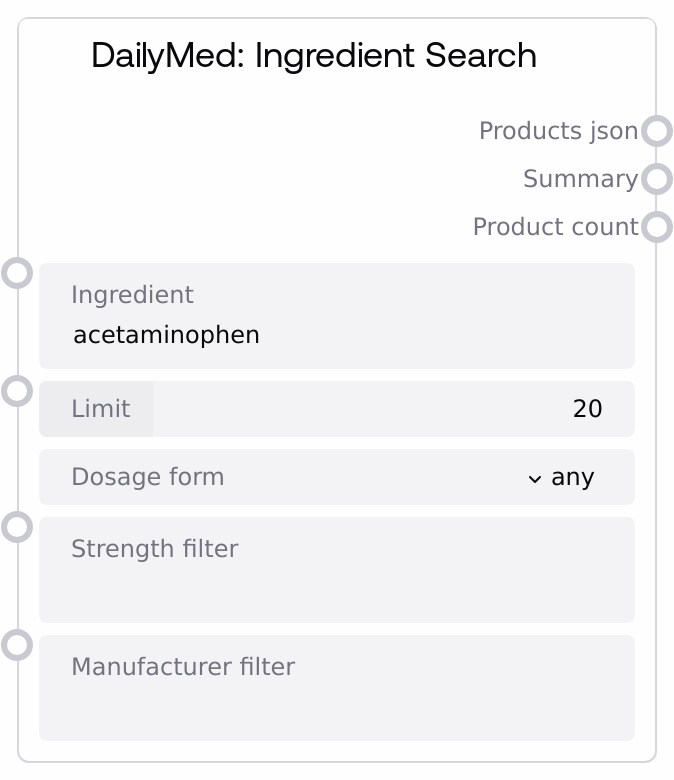
Use this node when you want to find all U.S. drug products that contain a particular active ingredient (for example, acetaminophen, ibuprofen, or amoxicillin) and then narrow that set by dosage form, strength, or manufacturer. It is typically an early step in a pharmacology, formulary, or decision-support workflow where upstream nodes provide an ingredient name (from user input, a clinical rule engine, or another drug-data node). Downstream nodes commonly parse products_json to build tables, filter further, or select a specific product or NDC for detailed inspection.
The node internally uses the DailyMed ingredient search and then refines results in-memory. Filters are partial, case-insensitive text matches, which makes it easy to focus on patterns like a particular strength ("500 mg") or a specific manufacturer string. Common workflow patterns include: selecting only tablets or capsules when assessing oral solid options, narrowing to a single manufacturer’s products for contract or availability checks, or summarizing strength variety before dose-standardization work. It pairs well with DailyMedAPINode for broader search types and DailyMedNDCLookupNode for detailed examination of specific NDCs selected from the ingredient-level results.
Inputs
| Field | Required | Type | Description | Example |
|---|---|---|---|---|
| ingredient | True | STRING | The active ingredient name to search for in DailyMed. This is sent directly as the ingredient parameter to the DailyMed API and should be a valid U.S. drug ingredient name (generic names are typical, for example, acetaminophen or ibuprofen). Matching is not fuzzy beyond what the API supports, so spelling matters, though letter case does not. | acetaminophen |
| limit | True | INT | Maximum number of products to request from DailyMed before local filtering is applied. Must be an integer between 1 and 100 inclusive. Higher values increase coverage and processing time; all further filters (dosage_form, strength_filter, manufacturer_filter) are applied only to this initial set. | 50 |
| dosage_form | False | ENUM | Optional filter on the product dosage form. Allowed values are: any (no filter), tablet, capsule, liquid, injection, cream, ointment. When set to anything other than any, the node keeps only products whose dosage_form field(s) contain the selected value as a case-insensitive substring (for example, tablet will match ORAL TABLET). | tablet |
| strength_filter | False | STRING | Optional partial-text filter applied to each product’s strength field(s). If non-empty, the node keeps only products where at least one strength string contains this text (case-insensitive). Use this to narrow to a specific or approximate strength, such as 500 mg or 10 MG/ML. Leave as an empty string to disable strength-based filtering. | 500 mg |
| manufacturer_filter | False | STRING | Optional partial-text filter applied to manufacturer names found in the product’s openfda.manufacturer_name list. If non-empty, only products for which at least one manufacturer name contains this text (case-insensitive) are retained. This is useful for focusing on a particular company or group of companies. | Johnson & Johnson |
Outputs
| Field | Type | Description | Example |
|---|---|---|---|
| products_json | STRING | A JSON-formatted string representing the list of products that match the ingredient query and all applied filters. The top-level structure is an array of product objects, each typically containing fields such as title, setid, active_ingredient, strength, dosage_form, route, product_ndc, and an openfda object (with brand_name, generic_name, manufacturer_name, and related metadata). This output is intended for downstream JSON parsing, tabular display, or further programmatic filtering. | [{"title":"ACETAMINOPHEN 500 MG TABLET","setid":"abcd1234-5678-90ef-ghij-klmnopqrstuv","active_ingredient":["ACETAMINOPHEN 500 MG"],"strength":["500 mg"],"dosage_form":["TABLET"],"route":["ORAL"],"product_ndc":["12345-6789"],"openfda":{"brand_name":["Acetaminophen"],"generic_name":["ACETAMINOPHEN"],"manufacturer_name":["Example Pharma Inc"]}}] |
| summary | STRING | A human-readable, multi-line text summary of the ingredient search. It includes the ingredient name, total filtered product count, a ranked breakdown of the most frequent dosage forms (up to five), the top manufacturers by product count (up to five), and the number of distinct strength values observed across the result set. This is useful for quick inspection, reports, or explaining search results to end users. | Ingredient Search Summary: Acetaminophen ================================================== Total Products Found: 37 Dosage Forms: - TABLET: 18 products - CAPSULE: 9 products - ORAL SUSPENSION: 6 products - CHEWABLE TABLET: 3 products - ORAL SOLUTION: 1 products Top Manufacturers: - Example Pharma Inc: 12 products - Generic Health LLC: 8 products - ACME Laboratories: 5 products - Nationwide Generics Corp: 4 products - Regional Pharma Co: 3 products Strength Variations: 7 different strengths available |
| product_count | INT | The number of products remaining after all filters (dosage_form, strength_filter, and manufacturer_filter) have been applied to the API results. This value may be lower than the limit requested. It is useful for conditional logic, such as branching when no products are found or when the result set is too large or small. | 37 |
Important Notes
- Performance: Each execution makes an HTTP request to the DailyMed service and then processes results locally. Larger limit values increase both network payload size and in-memory filtering time.
- Limitations: All filters (dosage_form, strength_filter, manufacturer_filter) are simple case-insensitive substring checks on text fields. They do not support numeric strength ranges, standardized dosage-form vocabularies, or complex manufacturer grouping.
- Behavior: Filtering is applied only to the subset of results returned by the DailyMed API up to the specified limit. Relevant products beyond that limit will not be considered, so very restrictive filters may eliminate all visible matches even if additional products exist in DailyMed.
- Behavior: On any error (for example, network failure, DailyMed downtime, or unexpected response format), the node returns a JSON object with an error field in products_json, a matching error message in summary, and sets product_count to 0.
Troubleshooting
- No products found after search: If product_count is 0 and the summary states that no products were found, verify that the ingredient name is spelled correctly and recognized by DailyMed. Try increasing limit and temporarily setting dosage_form to any and clearing strength_filter and manufacturer_filter to see the unfiltered result set.
- Error searching for ingredient ...: If the summary starts with Error searching for ingredient and products_json contains an {"error": ...} object, the underlying request to DailyMed likely failed. Check network connectivity, confirm that https://dailymed.nlm.nih.gov is reachable from your environment, and try again later.
- Filters remove too many results: When you expect many products for a common ingredient but see a very small product_count, your filters may be overly strict. Loosen strength_filter (for example, use mg instead of 500 mg) or shorten manufacturer_filter to a distinctive substring, and ensure dosage_form is not unintentionally excluding relevant forms.
- Downstream JSON parsing issues: If a downstream node that expects a list of products fails on products_json, check whether the value is an error object instead of an array. When an error occurs, products_json will look like {"error": "Error searching for ingredient ..."}. Add error handling or validation before parsing.