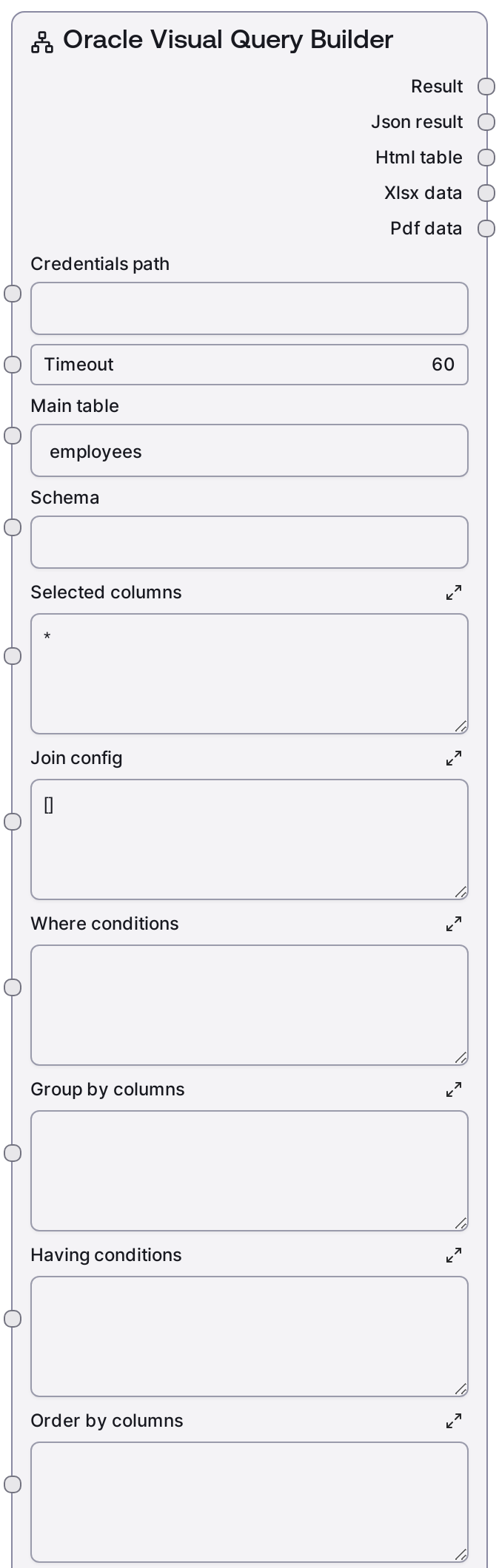
Oracle Visual Query Builder
This node lets you construct Oracle SELECT queries via high-level parameters instead of writing SQL by hand. You specify a main table, optional schema, selected columns, JOIN definitions, WHERE/GROUP BY/HAVING/ORDER BY clauses, and an optional row limit. It then generates the SQL, executes it against Oracle using your configured credentials, and returns results in text/JSON and optionally exportable formats.
Usage
Use this node when you want to query Oracle data with moderate to complex logic (joins, filters, aggregation) but prefer visual-style configuration over raw SQL. It typically appears after a credential-loading or connection-testing node (for example, a credentials selector feeding the shared credentials_path input, then SaltOracleTestConnection to validate access). Upstream, you might first inspect the database with SaltOracleListSchemas, SaltOracleListTables, or SaltOracleTableInfo to discover the correct schema, table, and column names. Then, configure SaltOracleVisualQuery with main_table and optional schema for the base FROM clause, selected_columns as a comma-separated list or *, join_config as a JSON array describing each JOIN, and where_conditions, group_by_columns, having_conditions, order_by_columns, and limit_rows for logic, aggregation, and sorting. Downstream, the node’s output can be sent to reporting, visualization, or export nodes that save HTML, XLSX, or PDF files or to analysis nodes that consume the JSON payload. A common pattern is: test connection → explore schemas and tables → design query visually here → send results to a reporting or output node. For best results, start with small limits and simple conditions, validate the generated query and outputs, then gradually add more joins and filters.
| Field | Required | Type | Description | Example |
|---|
| timeout | True | INT | Maximum time in seconds to wait for the Oracle query to complete before failing. Use higher values for long-running analytic queries and lower values for interactive dashboards. | 60 |
| main_table | True | STRING | The primary table name used in the FROM clause. Must exist in the target schema or default user schema. Do not include schema prefix here; use the separate schema field for that. | employees |
| schema | True | STRING | Oracle schema that owns the main table. Leave empty to use the current user’s default schema. When set, the generated SQL will reference schema.main_table. | HR |
| selected_columns | True | STRING | Comma-separated list of columns or expressions to select, or * for all columns. You can include aliases and qualified names. This is inserted directly into the SELECT clause, so it must be valid Oracle syntax. | e.employee_id, e.first_name, e.last_name, d.department_name, TRUNC(e.hire_date) AS hire_date |
| join_config | True | STRING | JSON array describing JOINs to other tables. Each element may include type (for example INNER, LEFT), table, optional schema, and on as a full join condition string. Invalid JSON will be ignored and joins skipped. | [{"type": "INNER", "table": "departments", "schema": "HR", "on": "employees.department_id = departments.department_id"}, {"type": "LEFT", "table": "locations", "schema": "HR", "on": "departments.location_id = locations.location_id"}] |
| where_conditions | True | STRING | Raw WHERE clause predicates without the WHERE keyword. This string is appended directly after WHERE, so it must be syntactically valid (including logical operators, literals, and expressions). Leave blank for no filtering. | e.salary > 80000 AND d.department_name IN ('Sales', 'Marketing') AND e.hire_date >= DATE '2018-01-01' |
| group_by_columns | True | STRING | Comma-separated list of columns or expressions for the GROUP BY clause, without the GROUP BY keyword. Required if you use aggregate functions and want grouped results. | d.department_name, TRUNC(e.hire_date, 'YYYY') |
| having_conditions | True | STRING | Raw HAVING clause predicates without the HAVING keyword, used to filter aggregated groups. Must be valid Oracle syntax referencing grouped columns or aggregates. | COUNT(*) > 5 AND AVG(e.salary) > 90000 |
| order_by_columns | True | STRING | Comma-separated ORDER BY expressions without the ORDER BY keyword. You can specify ascending or descending using ASC or DESC after each expression. | d.department_name ASC, AVG(e.salary) DESC |
| limit_rows | True | INT | Maximum number of rows to return. A value of 0 means no explicit limit. Valid range is 0 to 10000. Internally this is implemented using Oracle’s FETCH FIRST n ROWS ONLY syntax. | 200 |
| output_format | True | STRING | Controls how result data is formatted. text returns a human-readable summary plus JSON payload, html returns an HTML table, xlsx produces an Excel-style spreadsheet, pdf generates a paginated PDF, and all requests all available export formats. | all |
Outputs
| Field | Type | Description | Example |
|---|
| text | STRING | A human-readable summary of the query execution and high-level results, such as row counts and key columns, suitable for display in the Salt UI or logs. | Oracle Visual Query: employees Status: success Rows returned: 200 Columns: employee_id, first_name, last_name, department_name, hire_date |
| json | JSON | Structured JSON payload containing the query metadata and row data returned from Oracle. Used by downstream nodes for programmatic processing, transformation, or visualization. | {'query': 'SELECT e.employee_id, e.first_name, e.last_name, d.department_name\nFROM HR.employees e\nINNER JOIN HR.departments d ON e.department_id = d.department_id\nWHERE e.salary > 80000\nORDER BY d.department_name ASC\nFETCH FIRST 200 ROWS ONLY', 'row_count': 200, 'columns': ['EMPLOYEE_ID', 'FIRST_NAME', 'LAST_NAME', 'DEPARTMENT_NAME'], 'rows': [[101, 'Neena', 'Kochhar', 'Executive'], [102, 'Lex', 'De Haan', 'Executive']]} |
| html | BINARY_OR_STRING | HTML table representation of the result set when output_format includes html or all. Can be embedded in dashboards or saved as an .html file by downstream nodes. | | EMPLOYEE_ID | FIRST_NAME | LAST_NAME | DEPARTMENT_NAME |
|---|
| 101 | Neena | Kochhar | Executive |
|
| xlsx | BINARY | Binary content for an Excel-compatible spreadsheet when output_format is xlsx or all. Typically passed to an output node that writes it as a .xlsx file. | Binary .xlsx data representing the same rows and columns as the JSON output |
| pdf | BINARY | Binary PDF document containing a tabular rendering of the result when output_format is pdf or all. Best consumed by a file-export or reporting node. | Binary PDF data showing the query results in a paginated table layout |
Important Notes
- Performance: The node executes the fully built SQL directly against Oracle. Complex joins, large unfiltered tables, or a limit_rows of 0 can cause long runtimes and heavy load; start with smaller limits and add selective WHERE conditions.
- Limitations: join_config, where_conditions, group_by_columns, having_conditions, and order_by_columns are injected as-is into the SQL; invalid Oracle syntax or incorrect column names will cause query errors from the database.
- Behavior: If join_config contains invalid JSON, the node logs a warning and silently skips all JOINs rather than failing the entire workflow, which can change the intended result set.
- Behavior: When output_format is set to all, the node executes the query once but prepares multiple formatted outputs, which may use more memory and downstream bandwidth than a single format.
- Limitations: The node is geared toward SELECT-style queries; for INSERT, UPDATE, or DELETE operations you should use dedicated execute nodes instead of this visual query builder.
Troubleshooting
- Invalid JSON in join_config: If joins are not applied and you see a warning about invalid JSON, verify that join_config is a valid JSON array with double quotes around keys and strings and no trailing commas.
- Oracle syntax errors: Errors like ORA-00904: invalid identifier or ORA-00933: SQL command not properly ended usually mean a typo or malformed expression in selected_columns, where_conditions, group_by_columns, having_conditions, or order_by_columns. Simplify the query and add pieces back incrementally to find the offending part.
- Timeouts or hanging queries: If the node times out or appears stuck, reduce limit_rows, add more specific WHERE filters, and increase timeout only after confirming that the query itself is performant, for example by testing a similar statement in a SQL client.
- Empty or fewer-than-expected rows: When the query succeeds but returns no data or fewer rows than expected, check where_conditions, having_conditions, and JOIN types. INNER joins plus restrictive filters or HAVING clauses are common reasons for unexpectedly small result sets.