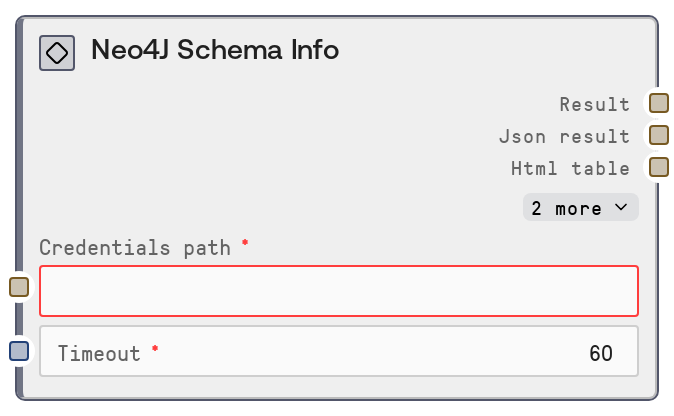
Neo4J Schema Info
This node queries a Neo4J database and returns schema-level information, including indexes and constraints. It uses the configured Neo4J service credentials and a shared database utility to call the "/schema-info" endpoint. The results are provided as both human-readable text and structured JSON suitable for analysis or downstream automation.
Usage
Use this node when you need to inspect or audit the structure of a Neo4J database, especially before building queries, migrations, or analytics pipelines. It typically appears early in a workflow after a credentials/configuration step that supplies the neo4j credentials, and before query-construction or data-exploration nodes. Common scenarios include: (1) documenting the current graph schema for data governance, (2) checking which indexes and constraints exist before creating or dropping them with write/query nodes, and (3) feeding schema metadata into downstream tools that generate Cypher or perform schema-aware analysis. Upstream, it works with nodes that configure Neo4J credentials or environment (using the neo4j credential template). Downstream, it pairs well with nodes like SaltNeo4JQuery, SaltNeo4JWrite, SaltNeo4JGraphExplorer, and reporting/export nodes that turn JSON schema metadata into documentation or dashboards. For best results, run this in a staging environment first to understand schema evolution, and re-run after migrations to validate that expected indexes and constraints are present.
| Field | Required | Type | Description | Example |
|---|
| timeout | True | INT | Maximum time in seconds to wait for the schema-info request to complete. Large schemas or heavily loaded databases may need a higher timeout. Must be a positive integer; values that are too low can cause request timeouts, while excessively high values may hold resources for longer than needed. | 60 |
Outputs
| Field | Type | Description | Example |
|---|
| text | STRING | Human-readable summary of the Neo4J schema information, typically including a label or title and formatted details about indexes and constraints. Useful for quick inspection in the UI or for logging. | Neo4J Schema Info Indexes: - INDEX ON :Person(name) [online] - INDEX ON :Order(orderId) [online] Constraints: - CONSTRAINT ON (p:Person) ASSERT p.id IS UNIQUE [online] - CONSTRAINT ON (o:Order) ASSERT exists(o.createdAt) [online] |
| json | STRING | JSON-encoded representation of the schema-info result as returned by the Neo4J service. Typically includes structured lists of indexes, constraints, and related metadata such as names, state, labels, and property keys. This is the primary output to feed into downstream automation. | {"indexes": [{"name": "person_name_index", "type": "BTREE", "state": "ONLINE", "labelsOrTypes": ["Person"], "properties": ["name"]}], "constraints": [{"name": "person_id_unique", "type": "UNIQUENESS", "state": "ONLINE", "labelsOrTypes": ["Person"], "properties": ["id"]}]} |
| html | STRING | HTML-formatted version of the schema information (if provided by the underlying formatter). Suitable for embedding in rich reports, dashboards, or HTML views. | Neo4J Schema InfoIndexes| Name | Type | Label | Properties |
|---|
| person_name_index | BTREE | Person | name |
Constraints| Name | Type | Label | Properties |
|---|
| person_id_unique | UNIQUENESS | Person | id |
|
| file | STRING | Optional file or export handle (for example, a path or identifier) produced by the shared formatter if export functionality is enabled. This may reference a generated report file containing the schema details. | salt-file://exports/neo4j/schema-info/person-db-schema-2024-03-01.html |
Important Notes
- Performance: On large graphs with many indexes and constraints, the schema-info call can be relatively heavy; if you experience slow responses, increase the
timeout input and avoid calling this node repeatedly in tight loops.
- Limitations: The node only returns metadata exposed by the
/schema-info service endpoint (primarily indexes and constraints); it does not list actual node data, relationship instances, or full query plans.
- Behavior: The node relies on shared credential loading via
credentials_path and a common request helper; misconfigured credentials or service URLs will manifest as connection or authorization errors from the underlying service.
- Behavior: Output formatting is standardized across database nodes, so the JSON field is the most reliable for programmatic use, while the text and HTML outputs are optimized for human consumption and may change layout over time.
Troubleshooting
- Connection or auth failures: If you see errors indicating connection refused, authentication failure, or inability to reach Neo4J, verify that
credentials_path points to a valid neo4j credential configuration and that the database is reachable from the Salt runtime environment.
- Timeout exceeded: When the node errors or returns a timeout-related message, increase the
timeout input value and re-run. Also check database load; heavily loaded clusters or large schemas may need substantially higher timeouts.
- Empty or partial schema output: If the JSON output contains empty
indexes or constraints arrays while you expect existing objects, confirm you are connecting to the correct database or cluster (check credentials and database selection in your Neo4J configuration). Also confirm that the Neo4J user has sufficient privileges to view schema metadata.
- Malformed JSON downstream: If downstream nodes or tools fail to parse the
json output, ensure you are passing the raw JSON string field without additional escaping or concatenation, and let the consumer parse it once using a JSON parser.