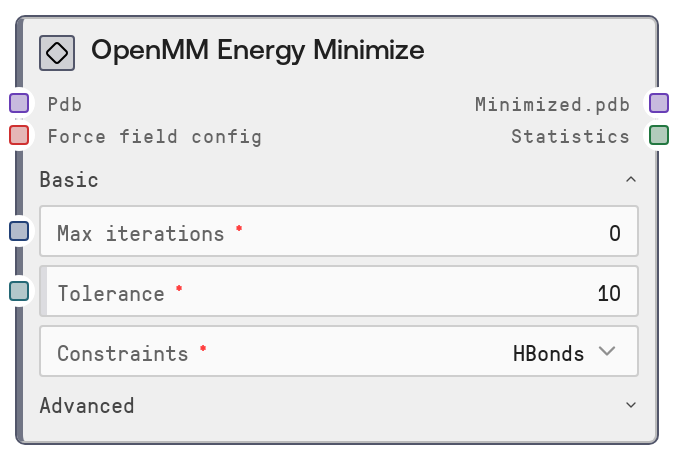
OpenMM Energy Minimize
This node sends PDB structure(s) to the salt-openmm-service to perform potential energy minimization using OpenMM. It uses a reusable force-field and water-model configuration plus minimization parameters, and returns minimized PDBs together with per-structure energy statistics. It supports batch operation over multiple PDBs in one run while keeping force-field settings consistent across the workflow.
Usage
Use this node after you have prepared protein or molecular structures and, typically, after adding an explicit solvent box. A common workflow is: generate or load a PDB (for example from an AlphaFold prediction or PDB import node) → configure a force field with "OpenMM ForceField Config" → solvate the structure with "OpenMM Solvate" → minimize energy with "OpenMM Energy Minimize" → optionally run MD with "OpenMM Simulate". This node is ideal for relaxing steric clashes, stabilizing solvated systems before dynamics, and comparing potential energies across a batch of candidate designs. Place it mid-pipeline, once the solvent box and ions are set but before production dynamics. Connect "pdb" from a node that outputs a PDB dictionary (often "OpenMM Solvate") and "force_field_config" from "OpenMM ForceField Config" to ensure consistent parameters. Tune "tolerance" and "max_iterations" depending on how tightly you need to minimize, and keep "constraints" and "nonbonded_cutoff_nm" aligned with the settings you plan to use in subsequent simulations. For batch jobs, pass a dictionary of PDBs keyed by unique IDs so the returned minimized structures and statistics can be mapped cleanly to each input.
| Field | Required | Type | Description | Example |
|---|
| pdb | True | PDB | Dictionary of PDB structure(s) to minimize. Keys are PDB identifiers (any unique string), values are PDB contents as text. Must not be empty; an empty dictionary raises an error. Structures may be raw or solvated, but for periodic PME workflows a solvated, boxed structure from a preparation node is recommended. | {'1abc_solvated': 'ATOM 1 N MET A 1 12.417 14.399 10.223 1.00 0.00 N \\nATOM 2 CA MET A 1 13.812 14.823 10.512 1.00 0.00 C \\n...', 'design_candidate_07': 'ATOM 1 N GLY A 1 1.234 2.345 3.456 1.00 0.00 N \\nATOM 2 CA GLY A 1 2.111 3.222 4.333 1.00 0.00 C \\n...'} |
| force_field_config | True | OPENMM_FORCE_FIELD_CONFIG | Force-field and water-model configuration produced by the "OpenMM ForceField Config" node. It is a small dictionary that includes at least "force_field" (for example "amber19-all.xml" or "charmm36.xml") and "water_model" (for example "amber19/tip3pfb.xml"). Values must be from the supported compatibility list enforced by that node. | {'force_field': 'amber19-all.xml', 'water_model': 'amber19/tip3pfb.xml'} |
| max_iterations | True | INT | Maximum number of minimization steps OpenMM may take. A value of 0 means run until convergence defined by the tolerance (recommended default). Valid range is 0–10000; larger values allow deeper minimization but increase runtime. | 0 |
| tolerance | True | FLOAT | Convergence threshold in kJ/mol/nm. Smaller values give more thoroughly minimized structures but require more iterations; larger values stop minimization earlier. Valid range is 0.1–1000.0. Typical use is 1–10 kJ/mol/nm. | 5.0 |
| constraints | True | CHOICE[HBonds\|AllBonds\|HAngles\|None] | Which bonds to constrain during minimization. "HBonds" (default) constrains bonds involving hydrogens and is standard for biomolecular systems. "AllBonds" constrains all bonds (useful when planning hydrogen mass repartitioning and larger MD timesteps). "HAngles" constrains angles involving hydrogens. "None" leaves all bonds unconstrained, giving full flexibility at higher computational cost. | HBonds |
| nonbonded_cutoff_nm | False | FLOAT | Distance cutoff for non-bonded interactions in nanometers. Must be less than half the shortest box dimension. Valid range is 0.5–1.4. Common choices: 1.0 nm for AMBER and 1.2 nm for CHARMM force fields. Defaults to 0.9 nm if not specified. | 1.0 |
| rigid_water | False | BOOLEAN | Whether to keep water molecules rigid during minimization. When true, water geometry is constrained, which can speed up minimization when solvent relaxation is not critical; disabling it allows water geometry to relax more fully but increases cost. Default UI setting is typically true. | True |
Outputs
| Field | Type | Description | Example |
|---|
| minimized.pdb | PDB | Dictionary of minimized PDB structures keyed by the same identifiers as the input. Each value is a PDB-formatted text representing the minimized configuration for that system. This output is typically fed into simulation, scoring, or visualization nodes. | {'1abc_solvated': 'ATOM 1 N MET A 1 12.398 14.415 10.201 1.00 0.00 N \\nATOM 2 CA MET A 1 13.796 14.829 10.502 1.00 0.00 C \\n...', 'design_candidate_07': 'ATOM 1 N GLY A 1 1.220 2.330 3.440 1.00 0.00 N \\nATOM 2 CA GLY A 1 2.095 3.210 4.315 1.00 0.00 C \\n...'} |
| statistics | DATAFRAME | Data table with one row per minimized structure, containing summary statistics from the minimization. At minimum it includes columns "pdb_id" (matching the input keys) and "potential_energy_kj_mol" with the final potential energy after minimization. Downstream table-processing or ranking nodes can use this to compare candidates. | [{'pdb_id': '1abc_solvated', 'potential_energy_kj_mol': -56723.4}, {'pdb_id': 'design_candidate_07', 'potential_energy_kj_mol': -43210.8}] |
Important Notes
- Performance: Each PDB is minimized via a remote call to the salt-openmm-service with a timeout of up to 600 seconds per structure; very large systems or extremely strict tolerances can approach this window.
- Performance: Tight tolerances, high max_iterations, no constraints, or small nonbonded cutoffs substantially increase runtime; for routine pre-MD relaxation, moderate tolerance and HBonds constraints are usually sufficient.
- Limitations: The input "pdb" dictionary must contain at least one entry; if it is empty the node raises an error and no service calls are made.
- Limitations: This node expects "force_field_config" created by "OpenMM ForceField Config". Hand-crafted or malformed configs (wrong keys or unsupported values) can cause downstream OpenMM job failures.
- Behavior: PDB IDs (dictionary keys) are preserved across inputs and outputs, allowing straightforward alignment of minimized structures and statistics with their original inputs.
- Behavior: If "salt_user_id" remains the placeholder "SALTAI_USER_ID", it is not forwarded as an explicit user ID to the OpenMM service; in normal deployments the platform overrides this automatically.
Troubleshooting
- Common Error 1: "Input pdb dictionary is empty. At least one PDB structure is required." – The upstream node produced an empty PDB dict or the connection is miswired. Ensure the source node outputs at least one structure and that you connect the correct output port.
- Common Error 2: Long-running jobs or timeouts from the OpenMM backend – Often caused by very large systems or overly strict settings. Reduce system size, loosen "tolerance", or lower "max_iterations" and, if appropriate, use constraints to improve stability and performance.
- Common Error 3: Backend failures related to force-field or water model – If the OpenMM service rejects the job, recreate the configuration using "OpenMM ForceField Config" and choose only combinations listed as compatible there instead of editing the config dictionary manually.
- Common Error 4: Unexpected behavior in follow-up simulations – If trajectories diverge or are unstable, verify that "constraints" and "nonbonded_cutoff_nm" used here match those in "OpenMM Simulate", and confirm the system was properly solvated (box size and ionic strength) before minimization.