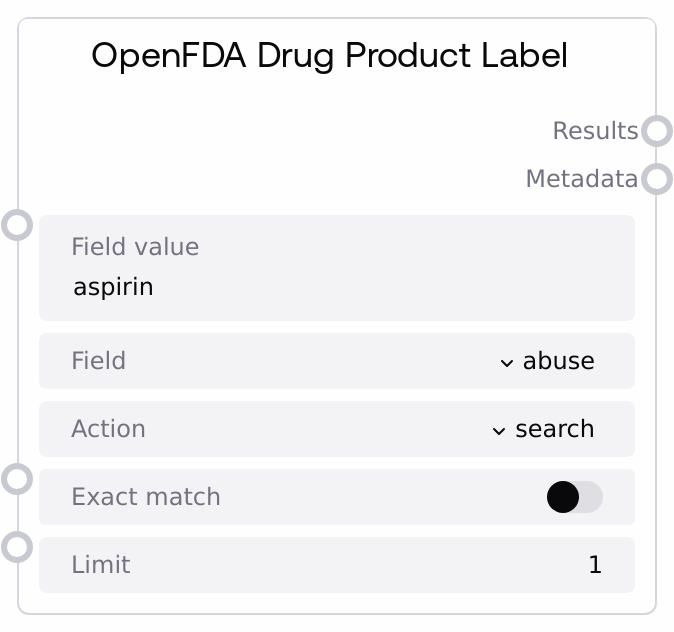
OpenFDA Drug Product Label
This node calls the OpenFDA /drug/label.json endpoint to retrieve information from FDA-approved drug product labels. You can search or count results across specific label sections such as warnings, adverse reactions, or precautions, with optional exact matching and a configurable result limit. The node returns the API results and metadata as JSON-formatted strings that downstream nodes can parse, analyze, or display.
Usage
Use this node when you need structured regulatory information directly from FDA drug product labels, such as safety warnings, adverse reaction profiles, or instructions for use. A common workflow is: (1) obtain or infer a drug keyword (for example from user input or another data source), (2) pass that term as field_value, (3) choose the appropriate label section via field (for example "warnings" or "adverse reactions"), (4) set action to either "search" to retrieve label documents or "count" to retrieve counts, (5) decide if you want exact_match for strict term matching, and (6) tune limit to control how many records you retrieve. This node often sits downstream of text or entity-extraction nodes that determine the drug name, and upstream of JSON parsing and summarization nodes that convert the JSON string into structured objects and human-readable summaries. It pairs well with OpenFDANDCNode: first use OpenFDANDCNode to identify relevant drug products in the NDC directory, then feed a selected name or identifier as field_value into OpenFDADProductLabelNode to fetch detailed labeling content. For robust workflows, start with narrow queries and small limits, inspect metadata to understand result volumes, and then expand if necessary.
| Field | Required | Type | Description | Example |
|---|
| field_value | True | STRING | Term to search for within the selected label section. This string is inserted into the OpenFDA query as the value in field_name:"field_value". Use specific drug names, active ingredient names, or well-defined clinical terms. Very generic terms can lead to large or noisy results and slower responses. | ibuprofen |
| field | True | CHOICE | Logical label section to query, mapped internally to an OpenFDA field name. Supported values are: "abuse", "adverse reactions", "components", "drug interactions", "effective time", "general_precautions", "instructions for use", "nursing_mothers", "overdosage", "precautions", and "warnings". Picking the most relevant section ensures more focused and interpretable results. | warnings |
| action | True | CHOICE | Determines how the OpenFDA API is queried. Use "search" to retrieve matching label documents in the results array. Use "count" to retrieve aggregated counts grouped by the selected field instead of full documents. Choose "count" when you only need high-level statistics or want to gauge how many documents match before running a full search. | search |
| exact_match | True | BOOLEAN | If true, the query uses the .exact variant of the selected field (for example, warnings.exact), enforcing exact string matches on field_value. This is useful for precise terms like a specific brand or generic name. If false, OpenFDA applies tokenized search, which can return broader, partial, or fuzzy matches. | true |
| limit | True | INT | Maximum number of records to return. Must be at least 1. Larger limits return more labels but increase response size and latency. Adjust this based on how much data you intend to analyze downstream and any performance constraints in your workflow. | 10 |
Outputs
| Field | Type | Description | Example |
|---|
| results | STRING | JSON-formatted string containing the results array from the OpenFDA Drug Label API. Each array element represents a single drug label document and may contain fields like id, effective_time, and multiple text sections (for example, warnings, adverse_reactions, drug_interactions). Downstream nodes typically parse this string into structured data for filtering, transformation, or summarization. | [{"id": "1234567","effective_time": "20240115","warnings": ["Do not use in patients with known hypersensitivity to ibuprofen."],"adverse_reactions": ["Nausea, dizziness, and headache were the most common adverse reactions observed in clinical trials."]}] |
| metadata | STRING | JSON-formatted string containing the meta object from the OpenFDA response. This includes disclaimer, terms, license, last_updated, and a results sub-object with skip, limit, and total counts. Use this to understand the size of the matching set, verify paging parameters, and track data currency. | {"disclaimer": "Do not rely on openFDA to make decisions regarding medical care.","terms": "https://open.fda.gov/terms/","license": "https://open.fda.gov/license/","last_updated": "2024-01-20","results": {"skip": 0,"limit": 10,"total": 275}} |
Important Notes
- Performance: Broad queries (common terms, no exact_match) combined with high limit values can be slow and may stress rate limits on the OpenFDA API; start with small limits and refine your query before scaling up.
- Limitations: The node only exposes a fixed set of label sections via its field_map; querying arbitrary or newly added OpenFDA fields is not possible without changes to the underlying node configuration.
- Behavior: When exact_match is enabled, the query uses the .exact version of the field, which often returns fewer but more precisely matched documents compared to non-exact searches.
- Behavior: Both outputs are raw JSON strings; they are not automatically deserialized. Any downstream processing that needs structured access to label fields must include an explicit JSON parsing step.
Troubleshooting
- Empty or unexpectedly small results set: Check whether exact_match is set to true. If so, try disabling it or simplifying field_value. Also confirm that field is the most appropriate section; relevant information may be in warnings rather than precautions, or vice versa.
- Errors about invalid field or query: Ensure that field is chosen from the provided options and that action is either "search" or "count". If errors persist, simplify field_value to remove problematic characters and retry.
- Slow responses or timeouts: Reduce limit, make field_value more specific, or temporarily switch to action = "count" to inspect how many documents match before running a full search. Very high totals with broad queries can significantly slow down your workflow.
- Downstream node cannot parse outputs: Verify that the downstream node expects a string and that it is configured to parse JSON. If not, insert a JSON parsing node between OpenFDADProductLabelNode and the consumer to convert results and metadata into structured objects.