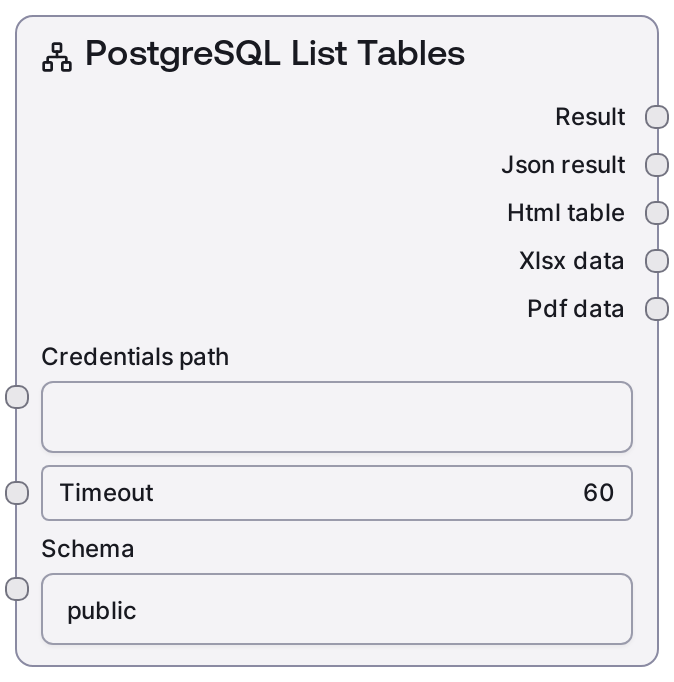
PostgreSQL List Tables
This node connects to a PostgreSQL database using your configured credentials and lists all tables in a specified schema. It calls the Salt data service endpoint for listing tables and formats the response as both human-readable text and structured JSON. Use it to quickly discover available tables before building queries or other database logic.
Usage
Use SaltPostgresListTables when you need to explore or validate the structure of a PostgreSQL database, especially before writing queries or configuring downstream processing. It typically appears early in a workflow: upstream you provide database credentials via a credentials/connection node, and downstream you might use nodes like SaltPostgresTableInfo to inspect specific tables, SaltPostgresQueryBuilder to design queries, or SaltPostgresQuery/SaltPostgresVisualQuery to run data retrieval. A common pattern is: (1) configure credentials in your Salt workspace, (2) run SaltPostgresListTables with the target schema (e.g., "analytics"), (3) choose a table from the output, then (4) pass that table name to nodes that fetch columns, build queries, or visualize results. Best practice is to explicitly set the schema instead of relying on defaults, and to keep timeouts reasonable when working with very large databases or slower connections. This node is read-only and safe for exploration; it performs no data modifications.
| Field | Required | Type | Description | Example |
|---|
| credentials_path | True | STRING | Path or identifier for the stored PostgreSQL credentials template. The credentials must include host, port, database, user, and password compatible with the configured "postgres" credential template. This is used by the node to authenticate against the data service and the underlying PostgreSQL instance. | connections/prod/postgres_warehouse |
| timeout | False | INT | Maximum time in seconds to wait for the list-tables request to complete before failing. Must be a positive integer; very low values may cause timeouts on slower networks or very large catalogs. | 30 |
| schema | True | STRING | Name of the PostgreSQL schema to list tables from. Must be a valid existing schema in the connected database. Case sensitivity follows the database rules (commonly lowercase if not quoted). | public |
Outputs
| Field | Type | Description | Example |
|---|
| text | STRING | Human-readable summary of the tables in the specified schema, suitable for inspection or routing to LLM/assistant nodes. Typically includes the schema name and a bullet or comma-separated list of table names. | Tables in Schema: public - users - orders - order_items - products - inventory_snapshots |
| json | JSON | Structured JSON payload returned from the PostgreSQL list-tables endpoint. Commonly includes a list/array of table records along with any metadata provided by the Salt data service (e.g., table name, schema, possibly type). Ideal for programmatic downstream use such as dynamic UI building, automated query generation, or filtering. | {'schema': 'public', 'tables': [{'table_name': 'users'}, {'table_name': 'orders'}, {'table_name': 'order_items'}, {'table_name': 'products'}]} |
Important Notes
- Performance: Listing tables is generally fast, but on databases with many schemas and thousands of tables, responses may be slower; increase the timeout accordingly in those environments.
- Limitations: This node only lists tables within a single specified schema; it does not cross schemas, list views, or provide column-level details—use dedicated nodes such as SaltPostgresTableInfo or query-building nodes for deeper inspection.
- Behavior: The node relies on a configured PostgreSQL credential template named "postgres" via the shared DatabaseBaseNode logic; if credentials are missing or invalid, the node will fail before any database call is made.
- Behavior: The output format (both text and JSON) is standardized by the shared database base node, so it will be consistent with other Salt PostgreSQL nodes, making it easier to chain in workflows and to parse programmatically.
Troubleshooting
- Common Error 1: "Authentication failed" or similar errors usually mean the credentials_path points to missing or invalid PostgreSQL credentials; verify the connection details (host, port, database, user, password) in your Salt workspace and ensure the credential template is set to "postgres".
- Common Error 2: "Schema not found" or an empty result when you expect tables often indicates a typo in the schema name or a mismatch in case; double-check the schema string (e.g., "public" vs "Public") and confirm the schema exists in the target database.
- Common Error 3: Request timeout or "operation exceeded timeout" suggests the timeout value is too low for your network or server performance; increase the timeout input and confirm that the database host is reachable from the Salt environment.