Loop Open
Usage
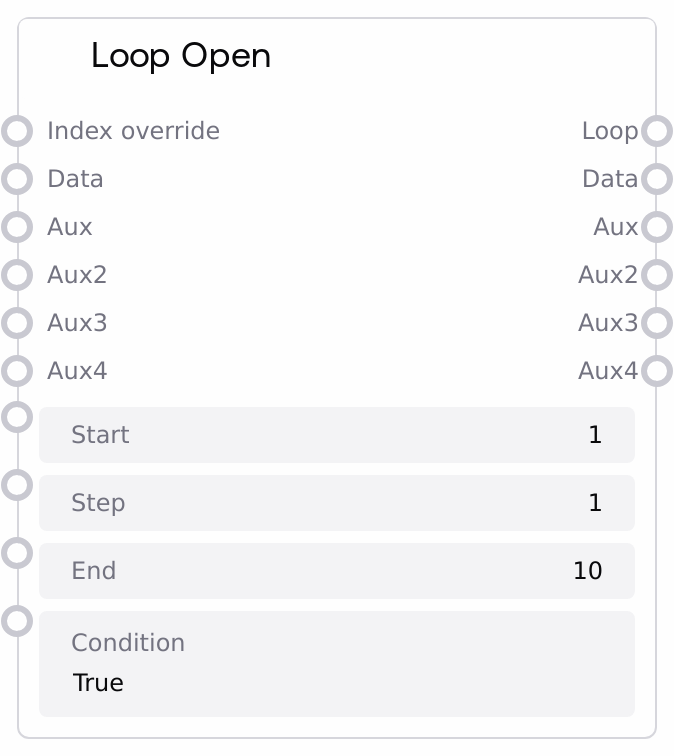
Use Loop Open when you need to repeat a section of your workflow multiple times while preserving evolving state. Place Loop Open before the nodes that should form the loop body, and connect its LOOP output to the LOOP input of a Loop Close node; everything between them will be executed on each iteration. Configure start, step, and end for fixed-count loops (for example, indices 1 through 10), or set a condition expression to control execution like a while-loop based on loop variables and data. The data and aux / aux2 / aux3 / aux4 inputs allow you to pass arbitrary objects (lists of prompts, configuration dicts, accumulators, etc.) into the loop; these values should be wired through Loop Close so that any changes made in the body persist to the next iteration.
Upstream nodes typically generate or load the initial data and auxiliary state, such as a list of prompts to iterate, initial counters, or configuration parameters. Downstream, Loop Close is required to complete the loop, deciding whether to continue or stop based on LOOP status and possibly its own condition, and returning updated data back into the iteration chain. Monitoring or inspection nodes can read the LOOP dictionary to access index, bounds, and flags for logging, branching, or adaptive behavior. This node is a good fit for batched processing of collections, iterative refinement pipelines, or algorithmic loops like stepping through time steps or parameter sweeps.
Inputs
| Field | Required | Type | Description | Example |
|---|---|---|---|---|
| start | True | INT | Initial value of the loop counter. Sets the first `index` value for the loop. Any integer is allowed; 0 or 1 are common for simple counters. | 1 |
| step | True | INT | Amount added to the index each iteration. Positive values count up, negative values count down. If 0, the index does not change and the loop behaves like a pure while-loop governed only by the condition expression. | 1 |
| end | True | INT | End bound for the loop. With a non-negative step, the loop is considered finished when `index >= end`. With a negative step, it is finished when `index <= end`. | 10 |
| condition | True | STRING | Boolean expression evaluated each iteration using an environment that includes loop status (such as `id`, `start`, `end`, `step`, `index`, `finished`) as well as stored logic data and current input values. If the expression evaluates to True, the loop proceeds; if False, the loop is blocked and marked finished. An empty string is treated as True. | index < end and finished == False |
| index_override | False | * | Optional manual override for the current index. When provided and not None, this value is used as the loop `index` for the iteration, letting you perform custom stepping or jumps. If omitted, the index defaults to `start` for the first iteration and is normally managed by the loop. | 5 |
| data | False | * | Primary data payload carried through the loop. This can be any type, such as strings, lists, dicts, or references to larger artifacts. If connected to Loop Close and back, modifications made in the loop body are preserved across iterations. | ['prompt 1: sunset over mountains', 'prompt 2: cyberpunk city at night', 'prompt 3: underwater coral reef'] |
| aux | False | * | First auxiliary data slot for any additional state you want to retain across iterations, such as configuration flags, per-iteration metrics, or intermediate results. | {'sampler': 'ddim', 'steps': 30} |
| aux2 | False | * | Second auxiliary slot used when your loop requires multiple separate state channels (for example, counters and error statistics). | {'processed_count': 7} |
| aux3 | False | * | Third auxiliary slot for additional loop-related state used in complex or deeply stateful loops. | {'current_temperature': 0.85} |
| aux4 | False | * | Fourth auxiliary slot, giving you up to four independent auxiliary channels to structure your loop state. | {'last_generated_image_id': 'img_2024_06_15_0012'} |
Outputs
| Field | Type | Description | Example |
|---|---|---|---|
| LOOP | * | Dictionary containing the current loop status. Typical keys include `id` (stable loop id), `start`, `end`, `step`, `index`, `finished` (True when loop is considered done), `last_id` (identifier of the last node in the iteration chain), and `condition_open` when the open-side condition evaluated to True. Must be connected to the LOOP input of a Loop Close node, and can also be inspected by diagnostic nodes. | {'id': 173, 'start': 1, 'end': 10, 'step': 1, 'index': 4, 'finished': False, 'last_id': 'node-3f9c2d10-7b8a-4ad6-9b61-2fef93a1b9cd', 'condition_open': True} |
| data | * | Current value of the primary data payload for this iteration. It matches the `data` input on the first iteration and then reflects updates passed through Loop Close on later iterations. | prompt 2: cyberpunk city at night, rain, neon reflections |
| aux | * | Current value of the first auxiliary data slot, forwarded between Loop Open and Loop Close each iteration. | {'sampler': 'euler_a', 'steps': 25} |
| aux2 | * | Current value of the second auxiliary slot, typically used for counters, summaries, or secondary state. | {'processed_count': 3, 'failed_count': 0} |
| aux3 | * | Current value of the third auxiliary slot for this iteration, useful for metrics or control variables. | {'running_loss': 0.3421} |
| aux4 | * | Current value of the fourth auxiliary slot, carried through iterations in the same way as the other aux channels. | {'last_generated_image_id': 'img_2024_06_15_0015'} |
Important Notes
- Performance: Each iteration clones and executes the subgraph between Loop Open and Loop Close; large loop bodies or high iteration counts can increase memory usage and runtime significantly.
- Limitations: Misconfigured loops that never satisfy the termination condition or never reach the end bound may be forcibly stopped by global loop guards after a maximum number of iterations.
- Behavior: If the condition at Loop Open evaluates to False, all outputs become blocking markers that prevent downstream execution for that path, and the loop is treated as finished from the open side.
- Behavior: Aggressive use of
index_override(especially jumping backwards without a separate termination condition) can cause effective infinite loops or skipped iterations; use it sparingly and with clear logic.
Troubleshooting
- Loop appears to run forever or hits a guard limit: Check that
stepmoves the index towardendand that yourconditionexpression becomes False under some realistic state; otherwise, adjust step direction or condition logic. - Nodes after Loop Open never execute: Your condition may be evaluating to False on the first evaluation. Temporarily set
conditiontoTrueor a minimal expression and use monitoring nodes to inspect which variables are available. - State does not persist between iterations: Ensure
dataandaux*outputs from Loop Open are wired to the corresponding inputs of Loop Close, and that Loop Close passes its outputs back into the loop. Missing or misconnected links will cause values to reset or not update as expected. - Condition evaluation failures: If you encounter errors about condition evaluation, check that your expression only references variables that exist in the evaluation context and uses operations valid for their types (for example, avoid arithmetic on non-numeric types).